📋 Table of Contents

BugHerd Review — a visual bug tracking and website feedback platform that lets users pin feedback and bug reports directly onto live web pages. No more email threads explaining which element on which page is broken. Just click the element and leave the note.
Here is the problem with traditional bug reporting: a developer sees a layout issue on the website, takes a screenshot, opens their email, tries to describe which element is misaligned and on which page and at what screen size, sends it to a developer, and waits for a reply asking for clarification. The same cycle repeats for every issue across every project. It is slow, imprecise, and frustrating for everyone involved.
BugHerd solves this by turning the website itself into the feedback form. You install a small JavaScript snippet on the site, and anyone with access can click directly on the element that has a problem (a misaligned button, a broken image, a copy error) and leave a note pinned to that exact element.
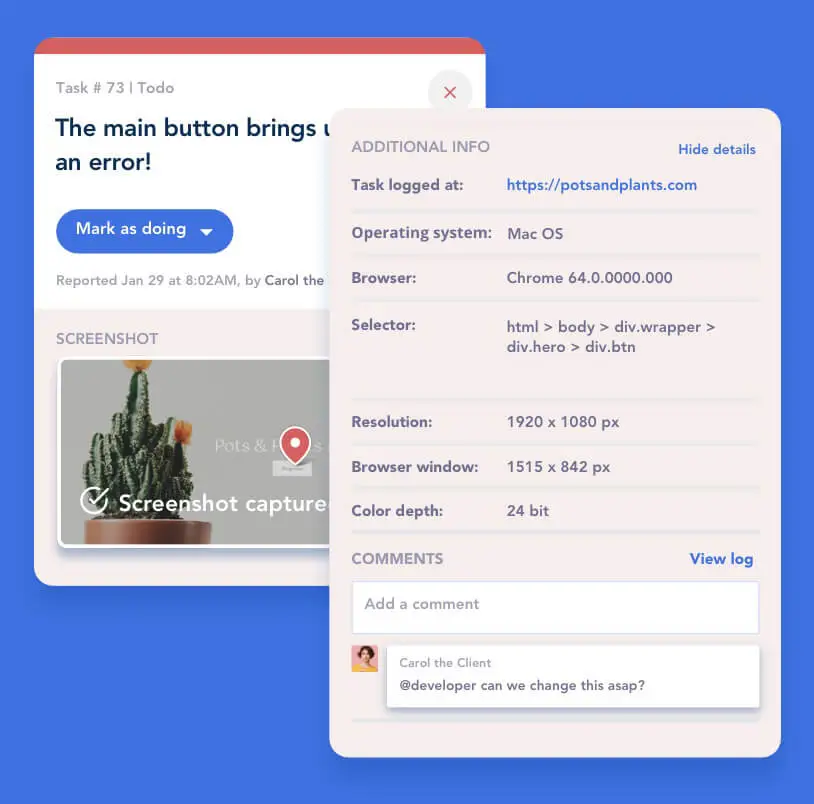
The feedback includes automatic metadata: browser version, operating system, screen resolution, and the exact URL. The developer has everything they need to reproduce and fix the issue without a single clarifying email.
What Is BugHerd?

BugHerd's visual interface — feedback and bug reports are pinned directly onto the live website, with automatic metadata capture providing developers with everything needed to reproduce each issue.
BugHerd (bugherd.com) is a visual bug tracking and website feedback platform. It works by embedding a lightweight sidebar onto your website that authorised users can activate to pin comments, feedback, and bug reports directly onto specific page elements.
Think of it as a layer of digital sticky notes that are attached not to a document but to the actual live elements of a web page — and that carry rich technical context automatically.
Once feedback is submitted, it flows directly into BugHerd's project management dashboard — a Kanban-style task board where team members can review, prioritise, assign, and track every issue from reported to resolved.
All feedback, client comments, developer notes, and status updates are centralised in one place, eliminating the fragmented communication across email, Slack, screenshots, and spreadsheets that typically characterises web development feedback cycles.
Quick Verdict at a Glance
Who Uses BugHerd?
Developers
Get precise bug reports with browser and OS context instead of vague email descriptions
Designers
Receive pinned visual feedback on specific design elements — no interpretation required
QA Testers
Log issues directly on the page during testing — with automatic technical metadata attached
Project Managers
Track all feedback and issues in one Kanban dashboard instead of chasing updates across tools
Clients
Leave feedback visually on any page element — no technical knowledge or account required
Agencies
Manage client feedback across unlimited projects with unlimited guest access on all plans
BugHerd Pros and Cons
✓ What BugHerd Does Well
- Visual feedback pinned directly on page elements — eliminates ambiguous bug descriptions
- Automatic metadata capture — browser version, OS, screen resolution, and URL attached to every report
- Unlimited projects and unlimited guests on all plans — exceptional value for agencies
- Clean Kanban board for task management — all feedback tracked in one dashboard
- Easy client onboarding — clients can leave feedback without technical knowledge or their own account
- 8+ native integrations including Slack, Jira, Trello, GitHub, and Zapier
- Easy installation — JavaScript snippet, WordPress plugin, or third-party tool integrations
- 14-day free trial with no credit card required
✗ Limitations Worth Knowing
- Screenshot capture can have occasional issues — some users report inconsistencies in screenshot quality
- Email notification delays — notifications are not always real-time, which can affect responsiveness
- Email-only customer support — no live chat or phone support available across plans
- No free permanent plan — a 14-day trial is available but not a free tier for ongoing use
- Pricing scales primarily by team member count rather than feature access — smaller teams may feel limited at the Standard tier
How BugHerd Works — Step by Step
Installation and Setup
Install a small JavaScript snippet on your website — the entire setup takes under 10 minutes. For WordPress sites, a dedicated BugHerd plugin makes installation even simpler.
Alternatively, BugHerd can be installed through third-party integrations like Google Tag Manager, making it compatible with virtually any web platform without direct code access.
Once the script is active, BugHerd deploys a toolbar on your website that is visible only to authorised users. Non-authorised visitors see the website exactly as normal — the BugHerd layer is invisible to the general public.
Collecting Feedback and Reporting Bugs
Authorised users activate the BugHerd sidebar and click directly on any element of the webpage they want to comment on — a button, a paragraph, an image, a navigation item, a layout section. Clicking opens a feedback form attached to that specific element.
The user describes the issue or provides their feedback in the form, optionally adds a screenshot or attachment, and submits. The report is then pinned visually to the exact page element it refers to — giving anyone who reads the report immediate visual context without needing to re-navigate the page.
BugHerd automatically captures and attaches the following metadata to every submission:
- Browser name and version
- Operating system and version
- Screen resolution
- Exact URL where the feedback was submitted
- Timestamp of submission
This metadata package provides developers with everything they need to reproduce the issue — dramatically reducing the back-and-forth that typically follows vague bug reports.
Managing Feedback and Bugs in the Dashboard
All submitted feedback and bug reports flow into BugHerd's central dashboard — a Kanban-style project management board. Each issue appears as a card that can be reviewed, prioritised, assigned to a specific team member, and tracked through a defined workflow from "Reported" to "In Progress" to "Resolved".
Project managers get a clear visual overview of all open issues across a project — their status, who they are assigned to, and their priority level. The Kanban format makes it easy to see at a glance whether a project is on track or accumulating a backlog of unaddressed issues.
Collaboration and Communication
Team members, developers, and clients can comment directly on individual feedback cards within BugHerd; keeping all discussion about a specific issue in one place rather than scattered across email threads.
Clients and stakeholders can be invited as guests to leave feedback on the live site; they do not need their own BugHerd account and are not presented with any technical complexity. Guest feedback flows into the same dashboard as internal team feedback, keeping everything centralised.
BugHerd sends notifications when new feedback is submitted, when a task is assigned, or when a comment is added — keeping team members informed without requiring them to check the dashboard continuously.
BugHerd Features — Full Breakdown

BugHerd's project management dashboard — all bug reports and feedback organised in a Kanban board view, with task assignment, status tracking, and priority management accessible from one interface.
📌 Visual Feedback Tool
The core capability that defines BugHerd — the ability to pin feedback directly onto website elements rather than describing them in a separate document. A tester who sees a misaligned button does not need to write "the button in the third section of the homepage near the top of the right column appears to be misaligned on desktop" — they click the button, type "misaligned", and submit. The pin is placed exactly on that element, and anyone reading the report sees immediately what it refers to without any interpretation required.
📊 Task Management and Kanban Board
Every piece of submitted feedback automatically becomes a task in BugHerd's project dashboard. The Kanban board displays all tasks across configurable columns (Backlog, To Do, In Progress, Done, etc.), allowing teams to manage their workflow visually. Tasks can be assigned to team members, given priority levels, tagged by type, and filtered by status. For project managers overseeing multiple team members, the board provides a real-time view of who is working on what and what remains unaddressed.
🔍 Automatic Metadata Capture
Every bug report submitted through BugHerd includes automatic capture of technical context — browser and version, operating system, screen resolution, and the exact URL. This is particularly valuable in a development context because many bugs are environment-specific: an issue that appears in Chrome on Windows may not appear in Safari on Mac, or at 1366px screen width but not at 1920px. Without this metadata, developers spend time attempting to reproduce issues that the metadata would have explained in seconds.
👥 Unlimited Projects and Unlimited Guests
Every BugHerd plan — from Standard to Deluxe — includes unlimited projects and unlimited guests. This is one of the most important value differentiators for agencies and development studios: you can add as many client projects as needed and invite any number of clients, stakeholders, or external reviewers to leave feedback on each project without hitting a guest limit or needing to upgrade to accommodate additional clients.
⏱️ Time Tracking
BugHerd includes built-in time tracking for tasks and projects — allowing team members to log hours spent on individual issues. For agencies billing clients by the hour or tracking project budgets against time estimates, this capability eliminates the need for a separate time tracking tool for the bug-fixing phase of development. Time logs are associated directly with individual tasks, providing a clear record of effort per issue.
BugHerd Integrations
BugHerd integrates with the project management, development, and communication tools that web development teams already use — ensuring feedback flows into existing workflows rather than creating a new silo.
BugHerd integrations ecosystem — connect with Slack, Jira, Trello, Asana, ClickUp, Monday.com, GitHub, and 1,500+ apps via Zapier to route feedback directly into your existing workflows.
Slack
Bug reports sent directly to your Slack channels in real time
Jira
Sync BugHerd tasks with Jira issues for unified bug tracking
Trello
Manage BugHerd feedback as Trello cards in your existing boards
Asana
Track feedback within Asana — seamlessly alongside existing project tasks
ClickUp
Push BugHerd feedback to ClickUp tasks for enhanced task management
Monday.com
Sync issues with Monday.com boards for project-wide visibility
GitHub
Create GitHub issues directly from BugHerd reports — dev and tracking in sync
Zapier
Connect to 1,500+ other apps for custom automation workflows
Use Cases — How Teams Use BugHerd
UAT (User Acceptance Testing)
User Acceptance Testing is one of BugHerd's primary use cases. UAT testers evaluate whether a website meets requirements before going live — and their feedback needs to be specific, actionable, and connected to the exact elements being tested. BugHerd allows testers to click on any element and leave detailed comments with the visual precision that UAT feedback requires, while the automatic metadata gives developers immediate context for each reported issue.
Bug Tracking
Identifying and reproducing bugs is the central technical use case. BugHerd's automatic capture of browser version, OS, and screen resolution data means developers receive reproducible bug reports rather than descriptions they have to decode and verify. The Kanban dashboard keeps the full backlog of bugs visible, prioritised, and tracked — from first report through verification and resolution.
Client Website Feedback
Gathering feedback from non-technical clients is one of the most common pain points in web development. BugHerd makes this work by requiring no technical knowledge from the client — they access the website, activate the BugHerd toolbar (often with a simple link or browser bookmark), and click on elements to leave their feedback. The result is specific, pinned, actionable input rather than the "the website looks weird" email that developers typically receive from non-technical clients.
Online Proofing and Design Review
Reviewing design elements, copy, and content in the context of the actual live webpage (rather than in a static mockup) catches issues that mockup review misses — layout shifts at specific screen sizes, interaction states, font rendering on different operating systems. BugHerd enables designers and clients to collaborate on live site review with pinned comments on specific elements, reducing the approval-to-implementation cycle that typically extends design projects.
BugHerd Pricing Plans
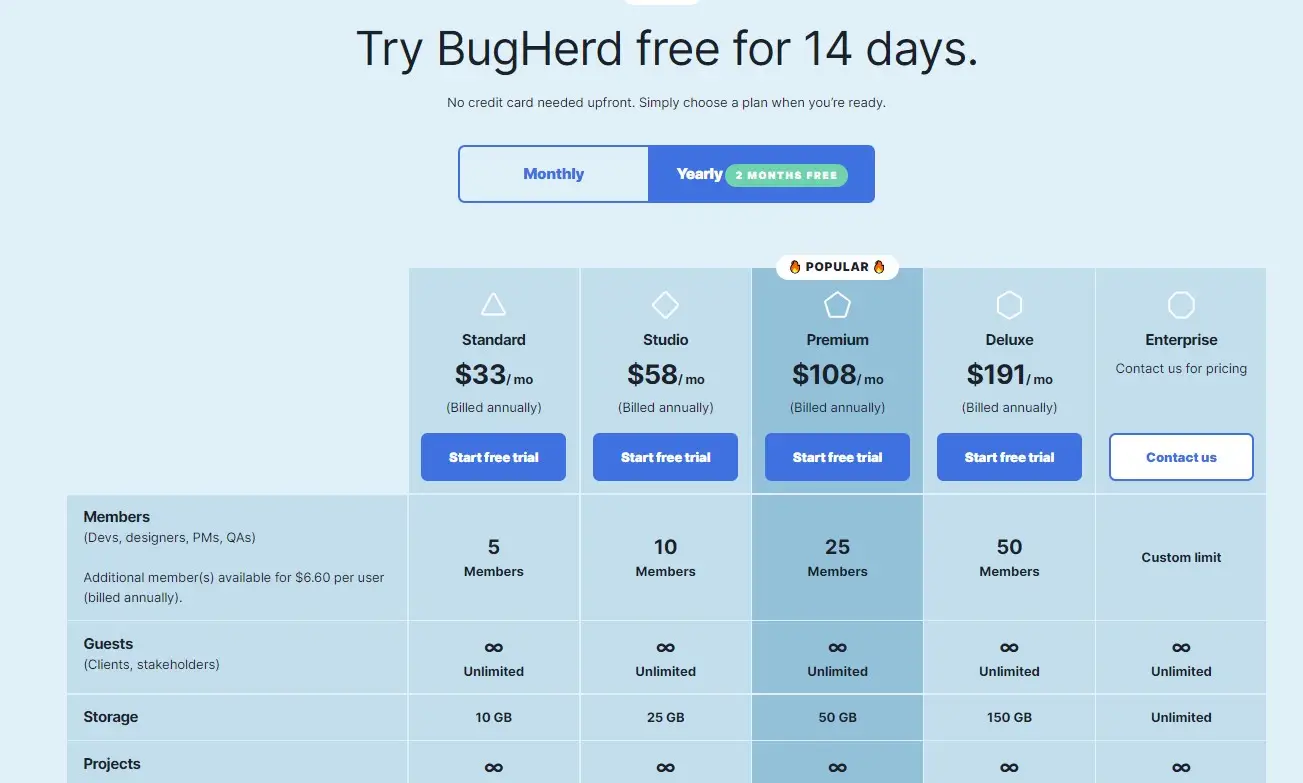
BugHerd pricing scales by team member count and storage — all plans include unlimited projects and unlimited guests, making it particularly strong value for agencies managing multiple client projects simultaneously.
- 5 team members
- 10 GB storage
- Unlimited projects
- Unlimited guests
- All core features
- 10 team members
- 25 GB storage
- Unlimited projects
- Unlimited guests
- All core features
- 25 team members
- 50 GB storage
- Unlimited projects
- Unlimited guests
- All core features
- 50 team members
- 150 GB storage
- Unlimited projects
- Unlimited guests
- All core features
- Custom team size
- Custom storage
- Dedicated support
- Custom integrations
- Tailored onboarding
BugHerd offers a 14-day free trial — no credit card required — giving you full access to test the platform on a real project before committing to a paid plan. Start your trial at bugherd.com. All plans include unlimited projects and unlimited guests regardless of tier.
What Users Say About BugHerd

User reviews from G2, Capterra, and TrustRadius consistently highlight BugHerd's visual simplicity, metadata capture quality, and the time savings from centralised feedback management.
Users consistently highlight BugHerd's intuitive setup and accessible interface across reviews. Non-technical clients can use the visual feedback system without training, and developers can be fully operational within the same day as installation. The visual approach is specifically noted for reducing the time required to log and understand each issue.
The ability to pin feedback directly onto specific page elements is the most frequently praised feature across platforms. Reviewers describe it as eliminating the interpretive work that traditional bug reporting creates — the element being referenced is visible at a glance, removing the "which button do you mean?" back-and-forth from development cycles.
The connections with Slack, Jira, and Trello are consistently mentioned as fitting smoothly into existing workflows. Teams using these tools report that BugHerd enhances their process without disrupting established systems — bug reports appear in the right channels and tools automatically without requiring a workflow change.
Agencies and development teams handling multiple simultaneous projects report significant time savings from centralised feedback and faster issue resolution. The combination of visual pinning, automatic metadata, and task management eliminates the coordination overhead that previously consumed meaningful amounts of developer and project manager time.
Try BugHerd Free for 14 Days
No credit card required. Install the snippet on your website and see exactly how BugHerd changes your feedback workflow on a real project before making any commitment.
Frequently Asked Questions About BugHerd
Minimal coding knowledge is needed for the most straightforward installation. Embedding BugHerd on your website requires pasting a single line of JavaScript code into your site's header — a task that most people who manage a WordPress site or have basic HTML familiarity can complete in under 10 minutes. For WordPress sites specifically, BugHerd offers a dedicated plugin that installs without any code editing. BugHerd can also be installed via Google Tag Manager, which means it can be deployed without touching the website's code at all if your site uses GTM. Once installed, all the features — feedback submission, dashboard management, integrations — require no coding knowledge to use.
Yes — and this is one of BugHerd's most practically valuable features. Clients, stakeholders, and external reviewers can be invited to leave feedback as guests, without needing to create a BugHerd account. They access the website through a shared link, activate the BugHerd sidebar, and leave their feedback visually on page elements — the same way internal team members do. The guest experience is designed to be non-technical and frictionless, so even clients who are not comfortable with software tools can participate effectively. All guest feedback flows into the same dashboard as internal team feedback. Unlimited guest access is included on all plans at no extra cost.
Yes — BugHerd can be installed on staging environments, development servers, and local development setups, not just live production websites. This is actually one of the most common use cases: installing BugHerd on a staging site so the client or QA team can review and provide feedback on the development version before it goes live. The JavaScript snippet works wherever it can be loaded in a browser, regardless of whether the URL is publicly accessible or restricted to specific IP addresses. For sites hosted on local development environments, BugHerd requires the site to be accessible via a browser — it cannot operate on a server that is completely offline.
Every bug report submitted through BugHerd automatically includes: the browser name and version (e.g. Chrome 124, Safari 17), the operating system and version (e.g. Windows 11, macOS Sonoma), the screen resolution at the time of the report, the exact URL of the page where the feedback was submitted, and a timestamp. This metadata package is automatically attached to every report without any action required from the person submitting the feedback. For developers, this information is the difference between immediately understanding how to reproduce an issue and spending 30 minutes attempting to recreate it across different environments.
BugHerd and tools like Jira or Asana serve different purposes in the web development workflow, and they work best together rather than as alternatives. Jira and Asana are general-purpose task management platforms — they can track any type of task across any type of project. BugHerd is specifically designed for capturing and managing website feedback and bug reports — it provides the visual pinning interface, automatic metadata capture, and website-context feedback collection that general project management tools do not offer. The integration between BugHerd and these platforms is the best-practice approach: use BugHerd to collect and visualise website feedback, then sync it to Jira, Asana, or your preferred task management tool for the wider project management workflow. Both tools have their place; BugHerd fills the specific gap between "someone noticed a problem" and "it's a task in our project management system."
Yes — BugHerd's unlimited projects and unlimited guests feature set makes it particularly well-suited for agency use. An agency can manage as many client websites as needed within a single BugHerd account, with each client project completely separate from others. Each client can be invited as a guest to their specific project without accessing any other client's work. All plans include unlimited projects and unlimited guests, so there is no per-project or per-client cost that scales with agency growth. The Kanban board and task assignment features allow project managers to oversee all active client projects from a single dashboard, and the Slack, Jira, and Asana integrations ensure BugHerd feedback flows into whatever project management system the agency already uses.
Final Verdict — Is BugHerd Worth It?
BugHerd solves a genuine and specific problem that every web development team and design agency experiences: the inefficiency and imprecision of communicating website feedback through email, screenshots, and vague descriptions.
Its visual pinning approach, combined with automatic metadata capture and centralized Kanban task management, compresses the feedback-to-fix cycle dramatically compared to any email-based alternative.
The unlimited projects and unlimited guests on all plans make the value proposition particularly strong for agencies — a team managing 10 client projects simultaneously gets the same access as a team managing 2, without paying per project.
The 8+ integrations with the tools that web teams already use (Slack, Jira, GitHub, Asana) mean BugHerd fits into existing workflows rather than creating a new one.
The limitations are real but narrow: email-only support, occasional screenshot inconsistencies, and no permanent free plan. For any team spending meaningful time in the feedback-and-revision cycle of web development (agencies, internal dev teams, QA operations) BugHerd's 14-day trial is worth taking to experience the workflow improvement firsthand before evaluating the cost.
Start Your BugHerd Free Trial Today
14 days free · No credit card required · Install on your real website · Test on a live project before committing