Loading...
Amplemarket Integrations 2026 (CRM, Dialer & Calendar Sync Made Easy)
Disclosure: This post contains affiliate links. If you click through and make a purchase, I may earn a small commission at no extra cost to you. I only recommend tools I have personally researched and believe offer genuine value. Read my full disclosure →
📋 Table of Contents
- Why Integrations Are Central to How Amplemarket Works
- Integration Overview at a Glance
- CRM Integrations — Salesforce, HubSpot, Pipedrive
- Email Integrations — Gmail and Outlook
- Built-in Dialer — Click-to-Call from Any Workflow
- Calendar Sync — Google and Microsoft
- Slack Notifications and Sales Alerts
- REST API and Custom Integrations
- How the AI Sales Copilot Works Across Integrations
- How Amplemarket Compares on Integrations
- Integration Setup — What to Expect
- Frequently Asked Questions
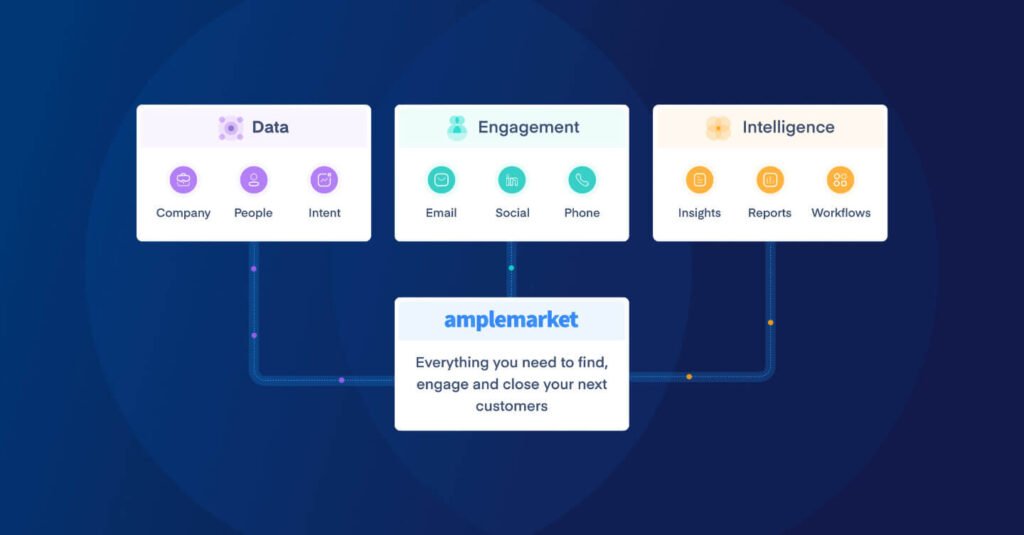
Amplemarket connects your CRM, email, dialer, calendar, and Slack into a single sales workflow — no manual data entry required.
If your sales team is manually copying contact data from your sequencer into your CRM at the end of each day, you are not running a sales operation; you are running a data entry operation that occasionally closes deals on the side. This is the problem that Amplemarket was specifically built to eliminate.
Unlike tools that treat integrations as an afterthought (a list of logos on a marketing page) Amplemarket was designed from the ground up as a revenue orchestration platform.
Every core function such as, outreach sequencing, contact data, phone calling, calendar booking, and pipeline management, is built to work as a single connected system, not a stack of tools that barely talk to each other.
This Amplemarket integration guide covers every major integration Amplemarket offers in 2026, what each one actually does, and how they work together to remove friction from your sales workflow. For a broader comparison of Amplemarket against its competitors, see our Amplemarket vs Apollo vs Lusha vs Seamless AI comparison.
Why Integrations Are Central to How Amplemarket Works
Most B2B sales platforms offer integrations as a convenience (a way to avoid manually exporting CSV files). Amplemarket treats them differently.
The platform is built around the idea that the most valuable sales data already exists in your tech stack (in your CRM, your email threads, your calendar, your call recordings) and that the job of a modern sales platform is to connect those sources and act on them intelligently, not just store them separately.
The practical result is that when a prospect in your Salesforce pipeline replies to an Amplemarket email sequence, that reply updates the deal stage in Salesforce automatically, triggers a Slack alert to the account owner, removes the contact from further automated follow-up, and schedules a follow-up task, all without anyone touching a button. That is what Amplemarket means by revenue orchestration, and it is only possible because of how deeply the integrations are built.
📌 What Amplemarket Is
Amplemarket is a B2B sales intelligence and engagement platform that combines a contact database, email and phone sequencing, a built-in dialer, and an AI sales assistant in one platform. If you are comparing it to Apollo.io, the key differentiation is Amplemarket's deeper integration architecture and its AI Copilot (called Duo) that works across your entire connected sales stack. Our full Apollo.io review covers how the two compare in detail.
Amplemarket Integration Overview at a Glance
Here is a summary of every integration category Amplemarket supports:
CRM
Salesforce, HubSpot, Pipedrive, and others via API
Gmail (Google Workspace) and Outlook / Microsoft 365
Dialer
Built-in click-to-call with call recording and CRM logging
Calendar
Google Calendar and Microsoft Outlook Calendar
Slack
Real-time sales alerts, meeting notifications, and reply routing
REST API
Open API for custom workflows, BI tools, and data lakes
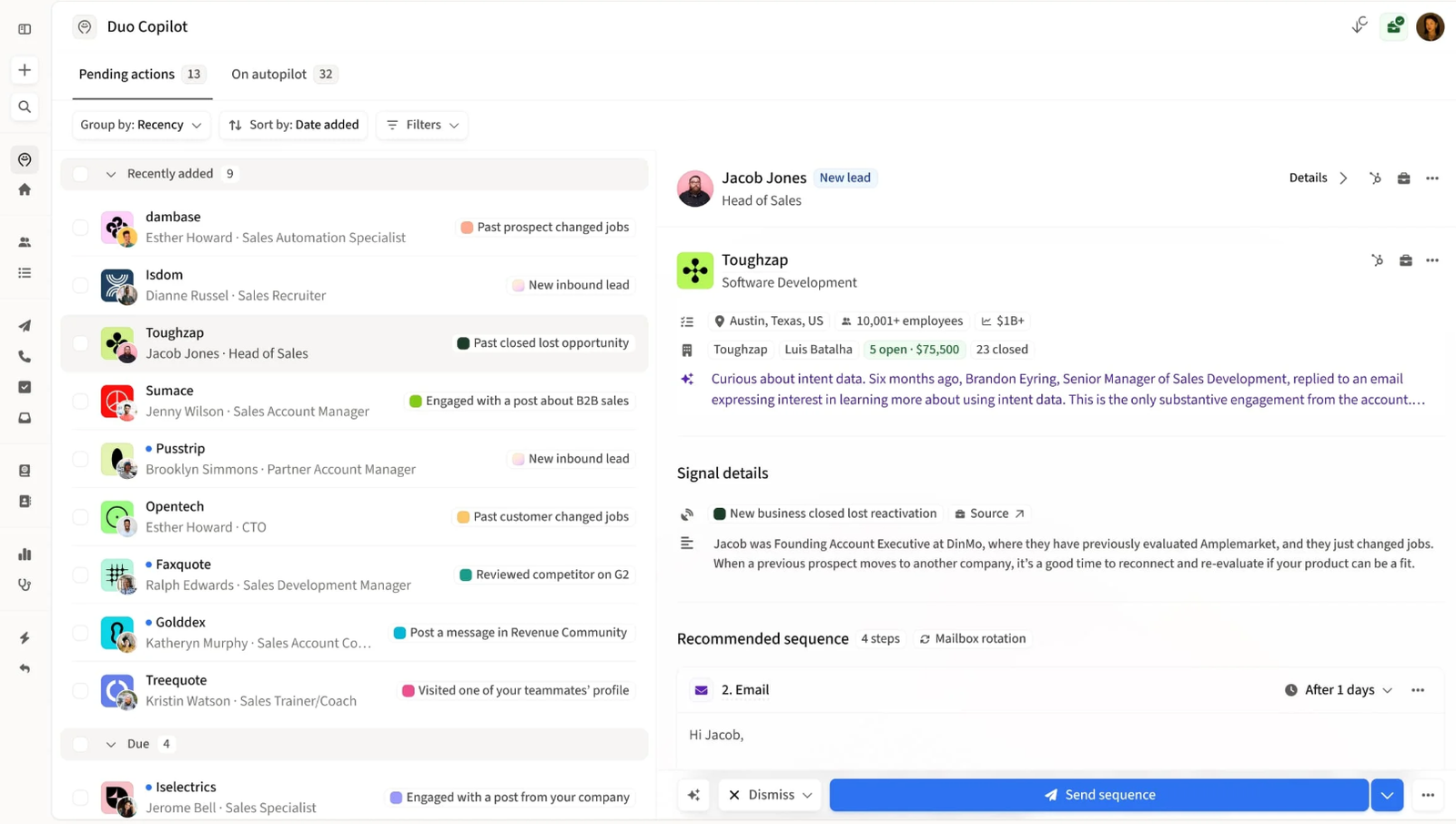
Amplemarket's admin panel — most integrations are set up in minutes via OAuth or direct connection, with no technical configuration required.
CRM Integrations — Salesforce, HubSpot, Pipedrive
CRM sync is where Amplemarket's integration architecture has the most day-to-day impact for sales teams. Stale CRM data is one of the most common reasons deals get mishandled; reps forget to update stages, activity logs fall behind, and managers make decisions based on information that is weeks out of date.
Amplemarket's CRM integrations fix this by making every interaction in your outreach sequences automatically visible in your CRM in real time.
Salesforce
Amplemarket's Salesforce integration is bidirectional (data flows both ways between the platforms). This means contacts you import from Salesforce into an Amplemarket sequence carry their full CRM context, and every interaction that happens in Amplemarket is pushed back into the corresponding Salesforce record automatically.
- Bidirectional sync of contacts, leads, and accounts
- Outreach activity, email opens, and reply events logged to Salesforce timelines
- Automated deal stage updates based on sequence outcomes (replied, interested, not interested)
- Contact and lead deduplication on import
- Automated task creation in Salesforce triggered by sequence events
- Custom field mapping — push specific Amplemarket data points to your own Salesforce fields
- Sync conditions — define rules for which records and which events get pushed to Salesforce
Practical example: A prospect replies positively to an Amplemarket email sequence. Salesforce automatically updates the lead stage to "Interested," creates a follow-up task for the rep, and logs the reply thread — all without the rep switching tabs.
HubSpot
The HubSpot integration follows the same bidirectional architecture as Salesforce and is particularly well-suited for teams that use HubSpot for both marketing and sales; because Amplemarket activity data enriches not just the sales pipeline but also the contact-level behaviour history that HubSpot's marketing automation uses to trigger campaigns.
- Contact and deal sync between HubSpot and Amplemarket
- Sequence reply events and outcomes pushed to HubSpot contact timelines
- Meeting booked events trigger deal stage updates in HubSpot pipelines
- Activity logs, email open and click data synced to HubSpot
- Works alongside HubSpot's marketing automation — Amplemarket sales activity enriches the full contact record
Practical example: A prospect who has been nurtured through a HubSpot marketing workflow reaches a scoring threshold. Amplemarket pulls the contact automatically, adds them to a cold outreach sequence, and pushes outcomes back to HubSpot — creating a closed loop between marketing qualification and sales outreach.
Pipedrive and Other CRMs
For teams using Pipedrive, Zoho, Freshsales, or other CRM platforms not yet natively supported, Amplemarket provides integration options through its REST API and Zapier compatibility.
This allows sequence-triggered record creation, note and task syncing, and pipeline updates to flow into most modern CRMs; though the depth of two-way sync will be shallower than the native Salesforce and HubSpot connections.
- Zapier-based integration for Pipedrive, Zoho, Freshsales, and others
- Sequence outcomes trigger record creation or field updates in connected CRMs
- Custom API payloads for teams with specific sync requirements
Email Integrations — Gmail and Outlook
Amplemarket's email integration is meaningfully different from how most sequencing tools handle email. Rather than sending from a shared IP address or a platform email server, which damages your domain reputation and reduces deliverability; Amplemarket sends directly from your actual Gmail or Outlook address.
Gmail (Google Workspace)
Gmail integration via Google OAuth takes under two minutes to set up and gives Amplemarket access to send, receive, and track emails on your behalf; without your password ever touching Amplemarket's servers.
Every email your sequence sends lands in the recipient's inbox as a genuine email from you, appearing in your Sent folder exactly as if you had sent it manually.
- Sends from your actual Gmail address — no shared IP or platform domain
- Real-time thread tracking — replies detected and sequences paused automatically
- Send-time optimisation — emails sent when the recipient's time zone suggests highest open rates
- Out-of-office detection — sequences paused when OOO replies are received
- Native threading — follow-ups appear in the same email thread as the original message
- Deliverability tools built into the platform — warmup features and sending limits managed automatically
Microsoft Outlook and Microsoft 365
The Outlook integration works identically to Gmail in terms of deliverability and threading (emails send from your real Outlook address). Teams using Microsoft 365 on a corporate Exchange server are also supported.
The integration is particularly important for enterprise and B2B teams whose prospects predominantly use Microsoft environments, where Gmail-sent cold emails can trigger additional spam filters.
- Supports both Microsoft 365 and on-premise Exchange configurations
- OAuth-based connection — no password stored on Amplemarket's servers
- Thread tracking and reply detection for Microsoft email clients
- Send-time optimisation and out-of-office detection
- Deliverability monitoring across Outlook-sent sequences
Built-in Dialer — Click-to-Call from Any Workflow
Unlike many outreach platforms that bolt on a third-party calling tool as an afterthought, Amplemarket's dialer is native to the platform.
It is embedded directly in the sequencing workflow, which means you can move from an email step to a phone call step without switching applications, and every call outcome is automatically logged in both Amplemarket and your connected CRM.
What the Dialer Does
- Click-to-call from any contact, sequence step, or pipeline view inside Amplemarket
- Call recording stored against the contact record — accessible for coaching and review
- Automatic outcome logging — connected, voicemail left, no answer, wrong number — logged without manual input
- Voicemail drop — pre-recorded voicemail messages dropped instantly when calls go to voicemail, saving 30–45 seconds per call
- Local presence dialling — calls display a local area code for the prospect's location, improving answer rates
- International calling supported across Amplemarket's 150+ country coverage
- All call outcomes sync to Salesforce, HubSpot, or your connected CRM automatically
Performance: Teams using Amplemarket's dialer alongside its contact validation engine have reported substantially higher phone connect rates than industry averages. The combination of validated phone numbers and local presence dialling removes two of the most common reasons calls fail to connect.
💡 Best Practice
For maximum call efficiency, configure your sequences so that the dialer step triggers after at least two unanswered emails. Contacts who have already seen your name twice in their inbox are significantly more likely to answer an unrecognised number from the same area code.
Calendar Sync — Google and Microsoft
Calendar integration solves one of the most friction-heavy parts of outbound sales: moving from a positive reply to a booked meeting without an awkward back-and-forth email exchange about availability.
Amplemarket's calendar sync embeds booking links directly into your outreach sequences so that when a prospect is ready to book, they can do it immediately, from the same email where they decided to say yes.
Google Calendar Integration
- Connects via Google OAuth — no separate setup required beyond your existing Google Workspace account
- Personalised booking links embedded in sequence emails — prospects book directly from the email
- Real-time availability checking — only shows slots when you are genuinely free
- Automatic meeting creation in Google Calendar when a prospect books
- Round-robin routing — distribute meeting bookings across multiple reps automatically
- Buffer times configurable — prevent back-to-back bookings without gaps
Microsoft Outlook Calendar Integration
- Connects via Microsoft OAuth — supports Outlook and Microsoft 365 calendar accounts
- Same booking link and availability features as the Google Calendar integration
- Meeting confirmation emails sent automatically to both parties on booking
- Calendar events include video conferencing links (Zoom, Google Meet, or Teams) automatically
- Round-robin and team routing supported for enterprise sales teams
Practical example: A cold email sequence step reads: "Would a 20-minute call this week make sense? Here is my calendar: [booking link]." The prospect clicks, picks a slot, and the meeting appears in both calendars with a Zoom link — the rep receives a Slack alert and does not need to do anything.
Slack Notifications and Sales Alerts
Slack integration transforms Amplemarket from a tool individual reps use in isolation to something the whole team can stay informed about in real time.
When configured properly, Slack becomes the live pulse of your outbound sales operation, surfacing what matters immediately rather than requiring anyone to log into another platform to check.
What You Can Push to Slack
- New replies from prospects — route them to the relevant rep's channel or DM instantly
- "Interested" signal alerts — when a reply is categorised as positive intent, an immediate alert surfaces in Slack
- Meeting booked confirmations — the rep's Slack receives a notification the moment a prospect books
- Sequence performance summaries — daily or weekly digests of open rates, reply rates, and booking rates
- Bounce and unsubscribe alerts — track deliverability issues before they become serious
- Manager-level team dashboards — route sequence summary data to a shared team channel for visibility
Revenue impact: The most valuable use of Slack alerts is the "interested reply" notification. In most sales teams, a positive reply that sits unactioned for more than 60 minutes loses its urgency sharply. Real-time Slack alerts push these moments to the rep the second they happen — which means the follow-up call comes in while the prospect is still thinking about it.
REST API and Custom Integrations
For teams with custom tech stacks (internal CRMs, bespoke RevOps dashboards, data lakes, or workflow tools not covered by native integrations) Amplemarket offers a full REST API with flexible authentication and well-documented endpoints.
What You Can Build with the API
- Pull sequence performance metrics into BI tools such as Looker, Tableau, or Power BI
- Push leads into Amplemarket sequences programmatically — triggered by product usage events, CRM score changes, or external data sources
- Sync Amplemarket activity data to internal data warehouses (Snowflake, BigQuery, Redshift)
- Create custom Slack or Teams notifications beyond the native integration's defaults
- Trigger sequences from external events — a prospect visiting your pricing page, upgrading a trial, or submitting a form
- Build no-code automation via Zapier using Amplemarket as a trigger or action source
Advanced use case: A SaaS company's product usage data shows that a free trial user has hit the usage threshold that historically predicts conversion intent. The API connection pushes that user into an Amplemarket sequence automatically, triggering a personalised email from their account manager within minutes of hitting the threshold — without any manual intervention from the sales team.
How the AI Sales Copilot Works Across Integrations
Amplemarket's AI Copilot (also known as Duo) is not a standalone feature. It is a layer of intelligence that sits across every integration Amplemarket has, using the combined data from your CRM, your email threads, your call recordings, and your calendar activity to make better recommendations than any individual data source could produce alone.
Here is what Duo does with your integration data:
- Lead prioritisation from CRM data — Duo analyses your Salesforce or HubSpot pipeline and surfaces which contacts to prioritise in outreach based on engagement signals, deal velocity, and historical patterns from your closed-won data
- AI reply drafting in Gmail and Outlook — when a positive reply lands, Duo drafts a suggested follow-up response using the context from the email thread and the contact's CRM history — the rep reviews and sends rather than writing from scratch
- Call coaching from dialer recordings — Duo analyses call recordings and provides post-call summaries, identifying what was discussed, what objections were raised, and what follow-up was agreed
- Calendar optimisation — Duo suggests optimal follow-up timing based on when contacts in similar roles historically respond and book
- Sequence optimisation — Duo analyses open rates, reply rates, and sequence conversion data across your connected email accounts to recommend changes to subject lines, send times, and step intervals
The effect is that Amplemarket gets progressively smarter the more your team uses it. The integrations are not just convenience features; they are the data inputs that make Duo increasingly useful over time.
This is what distinguishes Amplemarket from a sequencer that simply has CRM sync bolted on.
How Amplemarket Compares on Integrations
| Integration Feature | Amplemarket | Apollo.io | Outreach | Salesloft |
|---|---|---|---|---|
| Salesforce CRM sync | ✓ Bidirectional, native | ✓ Native | ✓ Native | ✓ Native |
| HubSpot CRM sync | ✓ Bidirectional, native | ✓ Native | ⚡ Partial | ⚡ Partial |
| Built-in dialer | ✓ Native, no add-on | ⚡ Add-on (Professional+) | ✓ Native | ✓ Native |
| Calendar booking links | ✓ Google & Microsoft | ✓ Basic | ✓ Yes | ✓ Yes |
| Round-robin calendar routing | ✓ Yes | ✗ No | ✓ Yes | ✓ Yes |
| Slack alerts (real-time) | ✓ Full (replies, meetings, performance) | ✗ No | ⚡ Partial | ✓ Yes |
| REST API access | ✓ Open, flexible | ⚡ Limited (paid tiers) | ✓ Enterprise tier | ✓ Enterprise tier |
| AI Copilot across integrations | ✓ Deeply embedded (Duo) | ✗ Template-based only | ⚡ Moderate | ⚡ Moderate |
| Voicemail drop | ✓ Yes | ✗ No | ✓ Yes | ✓ Yes |
The clearest differentiation in this comparison is the combination of Slack alerts, round-robin calendar routing, and the Duo AI Copilot working across all integrations; none of Amplemarket's direct competitors offers all three at the same depth on a single platform.
Integration Setup — What to Expect
Amplemarket's integration setup is designed for non-technical users. You do not need a RevOps engineer or a developer to connect most integrations. Here is what the setup process looks like for each category:
- Gmail and Outlook — OAuth login from the Amplemarket settings panel. Takes under two minutes. The connection uses read-only permissions by default until you authorise sending.
- Salesforce — OAuth connection via the CRM settings tab. Field mapping is configured in a drag-and-drop interface. Most standard configurations take 20–30 minutes to set up correctly.
- HubSpot — Same OAuth process as Salesforce. HubSpot's native API makes the connection more straightforward to configure than Salesforce in most cases.
- Google Calendar and Outlook Calendar — Connected through the same OAuth login as the corresponding email integration. No separate setup required if email is already connected.
- Slack — Slack app installation from the Amplemarket admin panel. Alert types, channels, and routing rules are configured from within Amplemarket's settings.
- REST API — API keys generated from the Amplemarket admin panel. Full documentation available in Amplemarket's developer portal. Technical setup typically managed by a developer or RevOps team member.
💡 Setup Priority
If you are setting up Amplemarket for the first time, connect your CRM first, then your email, then calendar. This order ensures that when your first sequences start running, every interaction is being captured in your CRM from day one — rather than having to backfill data later.
Ready to Connect Your Sales Stack?
Amplemarket's integrations remove the manual work that slows your team down. See it in action with a free demo.
🚀 Get Started with Amplemarket →Frequently Asked Questions
Does Amplemarket integrate with Zoho CRM or Freshsales?
Not natively at this time. Zoho CRM and Freshsales are not part of Amplemarket's native integration set. However, you can connect them through the REST API or via Zapier, which supports sequence-triggered record creation, note syncing, and task creation in both platforms. The depth of integration will be lighter than the native Salesforce or HubSpot connections — custom field mapping and bidirectional sync require API-level configuration.
Can I use my own VoIP or telephony provider with Amplemarket's dialer?
No. Amplemarket's dialer uses its own internal telephony infrastructure rather than connecting to an external VoIP provider. The advantage is that the calling experience is fully integrated — call outcomes, recordings, and notes sync to your CRM without any configuration. The limitation is that teams with existing contracts with providers like RingCentral, Twilio, or Aircall cannot redirect those calling minutes through Amplemarket's interface. International calling is supported through Amplemarket's own system.
Can I control which data fields sync to my CRM?
Yes. Amplemarket's CRM integrations include a custom field mapping interface that lets you define exactly which Amplemarket data fields map to which fields in your Salesforce or HubSpot records. You can also configure sync conditions — rules that determine which contact records and which event types trigger a sync — so that your CRM only receives the data that is relevant to your workflow. This prevents your CRM from being flooded with low-signal activity data from prospects who are early in an automated sequence.
Are the Gmail and Outlook integrations secure?
Yes. Both email integrations use OAuth 2.0, which means you authorise Amplemarket to access your email account through a secure handshake rather than sharing your password. Amplemarket's password never touches its servers. The platform is SOC 2 Type II certified and GDPR compliant, meaning its data handling practices have been independently audited. For teams in regulated industries, Amplemarket's security documentation is available on request from their sales team.
How does Amplemarket compare to Apollo.io for integrations?
The two platforms are fairly comparable on CRM and email integrations. The meaningful differences are: Amplemarket includes Slack alerts natively where Apollo.io does not; Amplemarket's dialer is fully integrated without an add-on upgrade; and Amplemarket's AI Copilot (Duo) works across all integrations rather than being limited to template-based email suggestions. For teams where the dialer and Slack workflow are important, Amplemarket has a clear advantage. For teams primarily focused on database access and cost, Apollo.io's free tier is hard to beat as a starting point. Our full Amplemarket vs Apollo comparison covers this in more detail.
Does Amplemarket support round-robin meeting routing for sales teams?
Yes. Calendar round-robin routing is available as part of Amplemarket's calendar integration. When a prospect clicks a booking link embedded in a sequence email, Amplemarket distributes the meeting booking evenly across the connected reps' calendars based on real-time availability. This is particularly useful for teams where multiple SDRs are working the same segment and you want meeting bookings spread fairly across the team rather than all flowing to one rep's calendar.