📋 Table of Contents
- Why Schema Markup Matters More Than Ever in 2026
- What Is Alliai and How Does It Handle Schema?
- 8 Types of Schema You Can Implement with Alliai
- Which Schema Types Work Best for Your Site Type
- How to Add Schema with Alliai — Step by Step
- Bulk Schema Application for Large Sites
- Alliai vs Manual Coding vs Schema Plugins
- Alliai Schema — Pros and Cons
- Common Schema Mistakes Alliai Helps You Avoid
- Frequently Asked Questions
- Final Verdict

Alliai's schema automation — add Google-validated structured data to any page on any CMS in minutes, without touching your site's code.
Two pages can rank identically in Google's search index and produce wildly different click-through rates. The page with star ratings, FAQ dropdowns, and price information visible directly in the search results gets clicked significantly more than the plain blue link next to it, even when the plain link ranks slightly higher.
The difference is schema markup, and it is one of the highest-leverage SEO improvements most bloggers, affiliate marketers, and content creators are not doing because they assume it requires coding.
It does not have to. Alliai automates the entire schema markup process through a Chrome extensionm no developer, no plugin conflicts, no JSON-LD errors.
You navigate to your live page, select the schema type, let the AI fill in the structured data, validate it, and publish. The whole process takes a few minutes per page, or a few hours for your entire site using Alliai's bulk application feature.
Why Schema Markup Matters More Than Ever in 2026
Schema markup is structured data (code added to your web pages that tells search engines exactly what type of content is on the page and what each element means). Without schema, Google has to infer the context of your content from text alone.
With schema, you are providing a precise, machine-readable description of your content that Google can use to generate rich results in the search engine results pages (SERPs).
Rich results are the enhanced search listings you see when you search for a product and immediately see star ratings, prices, and stock availability or when you search for a how-to question and see a step-by-step expandable list directly in Google's search results.
According to Google's structured data documentation, pages with valid schema markup that qualify for rich results consistently outperform equivalent pages without structured data on click-through rate.
Three specific changes in Google's 2024–2026 algorithm evolution make schema more valuable than ever:
- AI Overviews pull from structured data — Google's AI-generated answer boxes frequently cite pages with well-structured schema as their sources, giving those pages prominent placement above standard organic results
- Rich results are expanding to more schema types — Google added job listings, courses, recipes, software applications, and educational Q&A to the rich results programme, opening new visibility opportunities for content publishers
- Featured snippets prioritise structured content — FAQ schema in particular continues to generate featured snippet appearances at a higher rate than unstructured content
For bloggers and affiliate marketers (the core of David's audience) FAQ schema and Review schema are the two types with the highest immediate impact on organic click-through rates.
If you have a review post with affiliate links that currently shows as a plain blue link, adding Review schema can surface star ratings directly in the SERP, which dramatically increases the visual prominence of your listing and drives more clicks to your affiliate content.
For the broader context on how Alliai fits into your complete AI-powered SEO workflow, see our Alliai vs SEMrush vs Surfer SEO comparison.
What Is Alliai and How Does It Handle Schema?
Alliai (also written AllI AI) is an AI-powered on-page SEO platform that operates through a Chrome browser extension. It lets you edit and optimise any live page on your website (including title tags, meta descriptions, heading structure, internal links, image alt tags, and schema markup) directly from your browser without accessing your CMS backend or editing code files.
Alliai's schema automation feature sits within the same live editor interface as all its other on-page tools. When you navigate to a page on your site with the Alliai extension active and click into the schema tab, the system reads the page content and suggests schema types based on what it detects.
You can then let the AI populate the structured data fields automatically, or override any field manually before validating and publishing.
Alliai's schema automation works on any website the Chrome extension can access — WordPress, Shopify, Wix, Webflow, Squarespace, and custom-built sites. This is a meaningful advantage over WordPress-only schema plugins. If your site runs on Shopify or Webflow, Alliai is one of the few tools that can add schema without requiring custom code development.
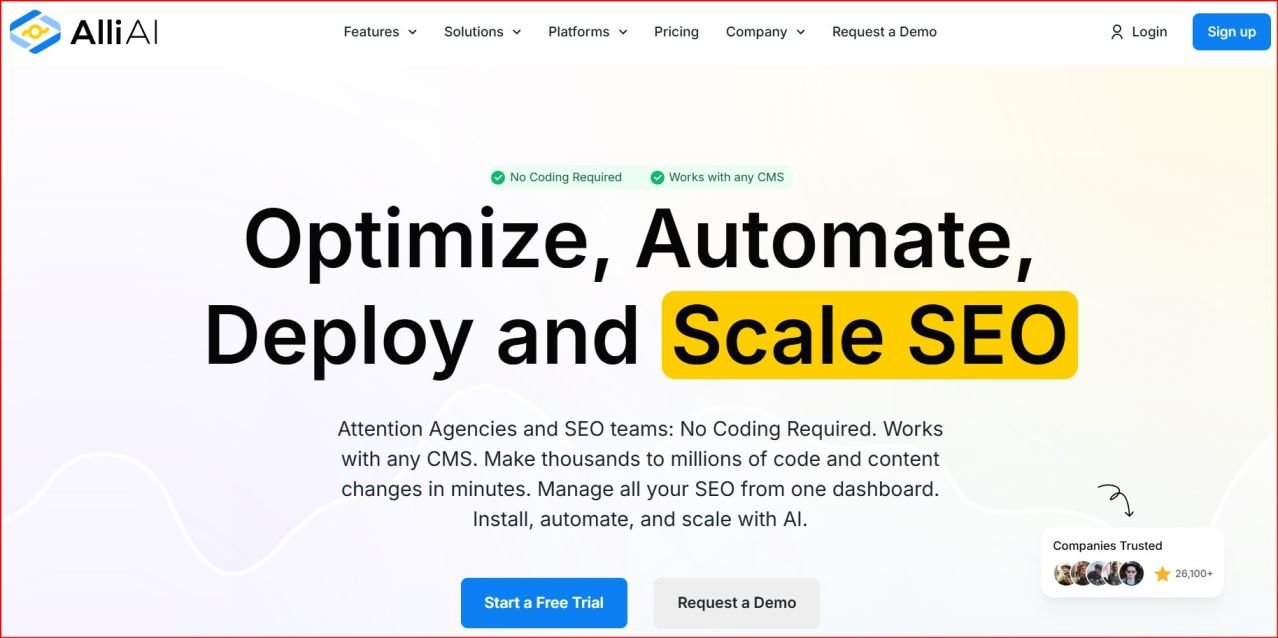
Alliai's live editor — schema markup is applied directly on the live page with AI-generated suggestions, validation, and one-click publishing.
8 Types of Schema You Can Implement with Alliai
Alliai supports all the major schema types that Google recognises for rich results. Here is a complete breakdown of what each type does and when to use it:
FAQ Schema
Adds expandable question-and-answer sections directly in Google search results below your listing. Ideal for blog posts, product pages, and service pages. Each FAQ item you add creates a clickable expansion in the SERP that can occupy significantly more SERP real estate than a standard result.
Review / Rating Schema
Displays star ratings, review counts, and score data directly in search results. Essential for affiliate review posts and product comparisons. A listing showing "★★★★☆ 4.2 (387 reviews)" in the SERP gets a significantly higher click-through rate than a plain listing for the same query.
Product Schema
Shows product price, availability, condition, and aggregate rating in Google Shopping results and organic SERPs. Critical for any page selling a physical or digital product. Without product schema, your Shopify or WooCommerce listings miss out on rich product snippets entirely.
Article / Blog Post Schema
Marks up blog posts and news articles with author, publish date, headline, and image metadata. Helps Google understand your content as journalistic or editorial content — improving eligibility for Google News, Google Discover, and Top Stories carousels.
How-To Schema
Structures step-by-step content so Google can display individual steps in an expandable rich result. Ideal for tutorial posts, recipe-style guides, and process explanations. When eligible, Google surfaces the step list directly in the SERP without requiring a click to your page.
Breadcrumb Schema
Displays your site's navigation path in search results (e.g., Home › Blog › SEO Tools › Alliai Review). Helps users understand where a page sits within your site before clicking, and gives Google a clearer signal about your site's category structure and content hierarchy.
Event Schema
Marks up live events, webinars, courses, and conferences with date, location, price, and organiser data. Google surfaces event schema in a dedicated Events rich result that appears above standard organic results for relevant searches.
Organisation / Local Business Schema
Provides Google with structured information about your business — name, address, phone, hours, service area, and social profiles. Helps confirm your entity to Google's Knowledge Graph and improves local search visibility for business-focused sites.
Which Schema Types Work Best for Your Site Type
Not every schema type applies to every site. Here is a practical recommendation by content type for bloggers and digital entrepreneurs:
✍️ Affiliate Blog
- Review/Rating — on every product review
- FAQ — on comparison and review posts
- Article — on all blog posts
- Breadcrumb — site-wide
🛒 eCommerce / Shopify
- Product — on every product page
- Review — aggregate ratings on products
- Breadcrumb — category and product pages
- Organisation — homepage/about
📚 Course Creator
- Course schema — on all course pages
- Event — on webinars and live sessions
- FAQ — on sales and landing pages
- Article — on blog content supporting courses
🏠 Service Business
- Local Business — homepage and contact
- FAQ — on service pages
- Review — on testimonial pages
- Breadcrumb — site-wide
"For affiliate bloggers, Review schema and FAQ schema are the two highest-ROI schema implementations. Both visually expand your search listing at no ranking cost — you are winning more clicks from the same position."
How to Add Schema with Alliai — Step by Step
Here is the exact workflow for adding schema to any page using the Alliai Chrome extension:
- Install the Alliai Chrome Extension Download and install the Alliai Chrome extension from the Chrome Web Store and log into your Alliai account. The extension connects to your Alliai subscription and becomes available on every page you visit in Chrome.
- Navigate to the Page You Want to Optimise Go to the live URL of the page on your website where you want to add schema. This needs to be a published, live page — not a draft preview. Alliai reads the published content to generate schema suggestions.
- Open the Alliai Extension and Click "Schema" Click the Alliai extension icon in your Chrome toolbar to open the live editor panel. Navigate to the Schema tab. Alliai will analyse the page content and show you which schema types are appropriate for the content it detects.
- Select the Schema Type Choose the schema type you want to implement from the dropdown — FAQ, Review, Product, Article, How-To, Event, Breadcrumb, or Organisation. If the page warrants multiple schema types (for example, a review post that also has FAQs), you can add them sequentially.
- Let the AI Auto-Fill or Enter Manually Click "Auto-Fill with AI" and Alliai reads the page content to populate the schema fields automatically. For FAQ schema, it extracts the questions and answers from your page content. For Review schema, it uses the review score and product information it detects. You can override any auto-filled field manually if the AI gets something wrong or if you want to add additional data.
- Run the Validation Check Before publishing, Alliai runs your schema through a validation check against Google's structured data requirements. Any errors — missing required fields, incorrect data types, or formatting issues — are flagged with specific guidance on how to fix them. This prevents you from publishing invalid schema that Google would ignore or penalise.
- Publish the Schema Once validation passes, click Publish. Alliai injects the validated JSON-LD schema code directly into your page's HTML without requiring you to access your CMS, edit template files, or install any additional plugins. The structured data is live immediately.
- Verify in Google Search Console After publishing, open Google Search Console and use the Rich Results Test to verify that Google is reading your schema correctly. Rich results typically begin appearing in SERPs within a few days to a few weeks of valid schema being indexed.
If you are adding schema to an existing site for the first time, start with your highest-traffic pages. Pull your top 20 pages by organic sessions from Google Search Console and add FAQ schema and Article/Review schema to those first. The impact on click-through rate will be visible in your GSC data within 2 to 4 weeks.
Bulk Schema Application for Large Sites
For blogs or eCommerce sites with hundreds or thousands of pages, adding schema one page at a time is not practical. Alliai's bulk schema feature addresses this through template-based rules that apply schema across multiple pages automatically.
Here is how the bulk workflow operates:
- Define schema rules by URL pattern — for example, apply Article schema to all URLs matching /blog/, or Product schema to all URLs matching /products/
- Set field mapping rules — tell Alliai which content elements on each page map to which schema fields (the H1 becomes the headline, the first paragraph becomes the description, etc.)
- Run the bulk application — Alliai processes all pages matching your rules and injects validated schema across the entire set simultaneously
- Review the validation report — a report shows which pages succeeded, which had validation errors, and what corrections are needed
For a site with 500 blog posts, adding Article schema across all pages manually would take hours or days. Alliai's bulk application completes it in a single session. This is the feature that primarily justifies the Growth and Scale plan pricing for content publishers with large existing archives.
Schema markup automation (individual page and bulk) is available on Alliai's Growth and Scale plans. It is not available on the Starter plan. If schema automation is your primary reason for evaluating Alliai, confirm the plan tier before subscribing.
Alliai vs Manual Coding vs Schema Plugins
| Feature | Alliai | Manual JSON-LD Coding | WordPress Schema Plugins |
|---|---|---|---|
| AI-powered schema generation | ✓ Yes — reads page content | ✗ Manual only | ✗ Manual only |
| No code required | ✓ Zero code | ✗ Developer required | ⚡ GUI, but still complex |
| Works on any CMS | ✓ WordPress, Shopify, Wix, Webflow, custom | ⚡ Yes, but developer needed | ✗ WordPress only |
| Built-in validation | ✓ Pre-publish validation | ✗ Manual Google testing required | ⚡ Some plugins validate, some don't |
| Bulk application | ✓ Template-based rules | ✗ Script-based — needs developer | ⚡ Limited — category-level only |
| Multiple schema types per page | ✓ Yes | ✓ Yes | ⚡ Varies by plugin |
| Live preview in SERP | ✓ Yes | ✗ Use separate Google tool | ✗ Limited |
| Plugin conflict risk | None — no plugin installed | None | ⚡ High — common with Rank Math/Yoast |
| Maintenance on Google updates | Alliai updates schema templates | ✗ Manual developer updates | ⚡ Plugin-dependent |
Alliai Schema Automation — Pros and Cons
✓ What Works Well
- Works on any CMS — no WordPress dependency
- AI auto-fills schema from page content — significantly faster than manual entry
- Pre-publish validation catches errors before they go live
- Bulk application across hundreds of pages in one session
- No plugin conflicts — schema injected directly via extension
- Supports multiple schema types on a single page
- Part of a broader on-page SEO toolkit — schema sits alongside title, meta, and link optimisation
✗ Limitations Worth Knowing
- Schema features require Growth or Scale plan — not available on Starter
- Chrome-only — no Firefox, Safari, or Edge extension
- AI auto-fill is not always accurate for complex or unusual content formats — manual review still needed
- Bulk application requires careful rule setup to avoid misapplied schema
- No standalone tool — schema is part of the broader Alliai platform subscription
Common Schema Mistakes Alliai Helps You Avoid
Most schema implementation errors fall into a small number of categories. Here is what Alliai's validation system catches before your structured data goes live:
- Missing required fields — Google's rich results require specific fields for each schema type. Product schema without a name field, or FAQ schema without at least one question-answer pair, will be rejected. Alliai's validator flags every missing required field before publishing.
- Wrong data types — schema fields expect specific data formats. A price field expects a number, not a string like "$29.99". Alliai validates that each field receives the correct data type.
- Misleading schema — applying Review schema to a page that does not actually contain a review, or FAQ schema to a page where the Q&A is not genuinely user-relevant, can result in Google penalising your rich results eligibility. Alliai's AI reads the page content and only suggests schema types that are genuinely supported by the page's content.
- Duplicate schema conflicts — if you have a WordPress schema plugin already installed (Rank Math, Yoast SEO, Schema Pro) and add Alliai schema on top, you may end up with conflicting structured data from multiple sources. Alliai detects existing schema on the page and flags potential conflicts before you publish.
- Outdated schema format — Google periodically updates its structured data requirements. Manually maintained JSON-LD can become out of compliance as requirements evolve. Alliai maintains its schema templates against current Google guidelines, reducing the maintenance burden on site owners.

Alliai's built-in schema validator checks your structured data against Google's requirements before you publish — catching errors that would otherwise prevent rich results from appearing.
Start Adding Schema to Your Site Today
Alliai's schema automation works on any website — no code, no plugins, no developer. Start your free trial and add your first FAQ or Review schema in the next 15 minutes.
FAQs About Alliai Schema Markup Automation
Schema markup does not directly improve your keyword ranking position — Google has confirmed that structured data is not a ranking factor in the traditional sense. What it does is improve your click-through rate by making your listing visually richer and more informative in the SERP. A higher CTR on an existing ranking position signals user satisfaction to Google, which can indirectly influence rankings over time. For affiliate blogs, the direct commercial value of schema is the CTR improvement itself — more clicks to the same content means more affiliate revenue from the same organic traffic.
Yes. Alliai's Chrome extension works on any website you can access in Chrome — including Shopify, Wix, Webflow, Squarespace, and custom-built sites. This is one of Alliai's most significant advantages over WordPress-only schema plugins. For Shopify stores, Alliai can add Product, Review, Breadcrumb, and Organisation schema without requiring access to theme code or a developer.
Potentially, if both are generating schema for the same page and outputting different or conflicting structured data. Alliai detects existing schema on any page before you publish new schema, and flags potential conflicts. The safest approach is to disable the schema-generation feature within your WordPress SEO plugin (Rank Math and Yoast both allow this) and use Alliai as your sole schema tool — this prevents Google from seeing contradictory structured data from two sources on the same page.
There is no fixed timeframe. Once valid schema is published and Google crawls and indexes the updated page, the structured data is processed. Rich results typically begin appearing within a few days to a few weeks of the page being re-indexed. You can speed up indexing by requesting a crawl via Google Search Console's URL Inspection tool. Use Google's Rich Results Test to verify that your schema is valid and eligible for rich result treatment before waiting for organic indexing.
Yes, and for many pages this is the right approach. A product review post, for example, can legitimately have Article schema, Review schema, and FAQ schema all on the same page — because it is an article that contains a review and has FAQs. Google accepts multiple non-conflicting schema types on a single page. Alliai lets you add them sequentially through the same editor interface. Just ensure each schema type is genuinely supported by the actual content on the page — Google penalises misleading schema application.
No. Schema markup automation is available on the Growth and Scale plans only — it is not included in the Starter plan. If schema is your primary reason for evaluating Alliai, make sure you are looking at the correct plan tier when comparing prices. The Growth plan also includes bulk schema application, which is the feature that delivers the most value for established sites with large page archives.
Final Verdict: Is Alliai Schema Automation Worth It?
If you run a blog, an affiliate site, an eCommerce store, or any content-heavy website and you are not using schema markup, you are leaving click-through rate on the table for every page that ranks.
FAQ schema and Review schema in particular offer some of the highest-ROI SEO improvements available; they cost nothing to implement beyond the time it takes to add the structured data, and the return in terms of expanded SERP visibility is immediate and measurable.
Alliai makes the implementation process accessible to non-technical site owners across any CMS.
The AI auto-fill significantly reduces the manual effort involved, the built-in validation prevents the errors that make schema ineffective, and the bulk application capability makes schema implementation at scale practical for the first time without a developer.
For bloggers and affiliate marketers who are already using Alliai for on-page SEO optimisation, the schema automation feature is an extension of the same workflow you are already in, and it is one of the most impactful additions to your existing traffic without requiring any new content creation.
If you want to understand how schema fits into your broader SEO tool stack, our comparison of Alliai vs SEMrush vs Surfer SEO covers where Alliai sits relative to the major alternatives.
Add Your First Schema in 15 Minutes — Try Alliai Free
Works on WordPress, Shopify, Wix, and any other CMS. No code. No plugins. Start your free trial and add FAQ or Review schema to your highest-traffic pages today.