📋 Table of Contents
- Why Creative Quality Is the #1 Variable in Facebook Ad Performance
- What Is AdCreative.ai?
- What You Need Before You Start
- Step 1 — Create Your Account and Start a Free Trial
- Step 2 — Set Up Your Brand Profile
- Step 3 — Connect Your Facebook / Meta Account
- Step 4 — Create a New Ad Creative Project
- Step 5 — Enter Your Ad Content
- Step 6 — Select Your Visual Style and Format
- Step 7 — Generate Your Ad Creatives
- Step 8 — Understand and Use the Creative Score
- Step 9 — Export or Publish Directly to Meta
- Advanced Features Worth Using
- Facebook Ad Best Practices with AdCreative.ai
- Frequently Asked Questions
- Final Thoughts

AdCreative.ai — generate, score, and publish conversion-optimised Facebook ad creatives in minutes using AI trained on billions of ad performance data points.
Why Creative Quality Is the #1 Variable in Facebook Ad Performance
You are here because you want to understand how to use Adcreative AI. There is a commonly repeated idea in paid advertising circles that targeting is everything. It is not.
In 2026, with Meta's machine learning and broad targeting doing most of the heavy lifting on audience selection, the creative is the targeting. The right image or video attracts the right person from a broad audience more effectively than any manually constructed demographic filter.
According to Meta's own advertising research, creative quality accounts for approximately 56% of a campaign's performance outcome. A mediocre creative served to a perfectly targeted audience will underperform a strong creative served to a broad audience, because the creative itself is what stops the scroll and converts the impression.
The bottleneck for most advertisers is not strategy or targeting. It is volume and velocity of creative production. Testing enough creative variants to find the 1 or 2 that perform strongly requires producing 10 to 20 creatives per ad set. Designing those manually takes days. AdCreative.ai was built to remove that bottleneck.
What Is AdCreative.ai?
AdCreative.ai is an AI-powered advertising creative platform that generates high-converting ad visuals, headlines, and copy at scale.
The platform is trained on billions of real advertising data points — meaning it does not just generate visually random designs, but designs scored against historical performance patterns from actual ad campaigns across Facebook, Instagram, Google, LinkedIn, and other platforms.
The key capabilities for Facebook advertisers:
- Generate 10 to 100+ unique ad creative variations from a single input brief
- Each creative is scored 0–100 for predicted conversion performance
- Brand-consistent design using your uploaded logo, colours, and fonts
- AI-generated headline and body copy variants alongside the visuals
- Direct publishing to Meta Ads Manager via API integration
- Creative Insights analytics showing which of your existing ads are performing and why
- Video and animated ad generation alongside static image formats
For a complete breakdown of AdCreative.ai's plan tiers and costs, see our AdCreative.ai pricing guide. For a comparison against alternative AI creative tools, see our AdCreative.ai alternatives guide.
What You Need Before You Start
✅ Prerequisites Checklist
- An AdCreative.ai account — start a free trial at adcreative.ai. No credit card required for the trial.
- A Facebook Business Manager account with admin access to the ad account you want to publish to
- Your brand logo in PNG format (transparent background preferred) — optional but strongly recommended for brand-consistent outputs
- Your primary brand colours in hex codes (e.g., #FF5733) — available in your existing brand guidelines or from your website's CSS
- A clear understanding of your offer — what you are selling, who it is for, and what the core benefit is. AdCreative.ai generates better outputs with specific inputs than vague ones.
- At least one product or lifestyle image if you want to incorporate a specific visual. Alternatively, AdCreative.ai can generate or pull stock images automatically.
AdCreative.ai's workspace — brand profiles, projects, and creative generation all managed from a clean, intuitive dashboard.
Step 1 — Create Your Account and Start a Free Trial
Sign Up and Begin Your Trial
Go to adcreative.ai and click Get Started or Try Free. You will be prompted to enter your email, create a password, and specify your primary use case (agency, brand, freelancer, or eCommerce). Choose accurately — AdCreative.ai tailors the dashboard and default settings based on this selection.
The free trial gives you a credit allowance of AI-generated creatives to evaluate the platform. The number of credits and trial duration vary — check the current offer on the site when you sign up. You do not need a credit card to start in most regions.
Step 2 — Set Up Your Brand Profile
Configure Your Brand Identity
Brand setup is the most important configuration step in AdCreative.ai. Every creative you generate will pull from your brand profile (logo, colours, and preferred typography) to produce outputs that look like they came from your design team rather than a generic AI tool.
- Navigate to Settings → Brands → Add Brand
- Upload your logo: Use a high-resolution PNG with transparent background. AdCreative.ai uses this across all generated creatives. A low-quality logo produces noticeably lower-quality outputs.
- Enter your brand colours: Add your primary, secondary, and accent colours using hex codes. You can add multiple colours — AdCreative.ai will use these as the palette for generated designs.
- Select your preferred font style: Choose from AdCreative.ai's font library or select one that most closely matches your brand's existing typography. Exact custom font uploads may require a higher plan tier.
- Enter your brand name and website: The AI uses your website to understand your product category and visual aesthetic when making generation decisions.
- Set your industry: Selecting the correct industry calibrates the AI's scoring model to compare your creatives against performance benchmarks from similar categories.
Save your brand profile. You can create multiple brand profiles if you manage ads for multiple clients or brands — each project you create will be associated with one brand profile.
Step 3 — Connect Your Facebook / Meta Account
Integrate with Meta Ads Manager
Connecting AdCreative.ai to your Meta account enables direct publishing of creatives from AdCreative.ai to your Facebook campaigns without downloading and re-uploading files manually.
It also enables the Creative Insights feature, which pulls your existing ad performance data into AdCreative.ai for analysis.
- Navigate to Integrations → Facebook Ads in the AdCreative.ai dashboard
- Click Connect Facebook Account — you will be redirected to Meta's OAuth authentication page
- Log in with the Facebook account that has admin access to your Business Manager
- Select the specific Business Manager and Ad Account you want to connect
- Authorise the permissions AdCreative.ai requests — these include access to read your ad account data and publish creatives
- Return to AdCreative.ai — the integration status should show as Connected
You must be an admin on the Facebook Business Manager account to complete this integration. Editor-level access is not sufficient for the full Meta API integration. If you manage client ad accounts, ensure the correct Business Manager is selected during the authorisation step.
Step 4 — Create a New Ad Creative Project
Set Up Your Project Parameters
From the AdCreative.ai dashboard, click + New Project. A project organises all the creative variants for a single campaign or offer. Configure the following:
- Platform: Select Facebook. You can also simultaneously generate for Instagram, which shares the same Meta ad system. If you run the same ad on both, select both.
- Ad format: Choose from Single Image (Feed), Square (1:1 for Feed), Story (9:16 vertical), or Carousel. Facebook Feed single image (1200×628 or 1:1) is the most versatile starting point — it runs across desktop and mobile Feed, Marketplace, and right-column placements.
- Campaign objective: Select the objective that matches your Meta campaign — Conversions, Traffic, Lead Generation, App Installs, Brand Awareness, or Engagement. This calibrates the AI's creative scoring model toward the performance patterns of campaigns with your chosen objective.
- Brand: Select the brand profile you created in Step 2
- Project name: Use a descriptive name that identifies the campaign and date (e.g., "Spring Sale — Fitness Products — May 2026") for easy reference later
Step 5 — Enter Your Ad Content
Input Your Brief — This Is the Quality Driver
The quality of your creative outputs is directly proportional to the quality of your inputs. AdCreative.ai generates better work from specific, benefit-led briefs than from vague or generic descriptions. Here is exactly what to provide:
- Product or service name: Be specific. "Protein powder" is less useful than "Vegan whey-free protein powder for women"
- Headline: Enter your primary headline, or click "Generate with AI" to have AdCreative.ai produce multiple headline options. If generating, review and select the best one rather than using the first output.
- Body copy / description: Write 1–2 sentences describing the offer. Focus on the primary benefit and the call to action. Keep it under 125 characters for optimal Facebook display.
- Call-to-action: Select from standard CTAs (Shop Now, Learn More, Sign Up, Get Offer, Book Now) or write a custom CTA if your specific offer benefits from more specific language
- Images: Upload your own product or lifestyle images, or choose from AdCreative.ai's integrated stock library. AI-generated background images are also available. Using your own product photography typically produces more brand-authentic results than stock imagery.
- Target audience context (optional): Enter a brief description of your target audience — for example "fitness-conscious women aged 25–40." This helps the AI optimise visual and copy choices for your specific audience.
Step 6 — Select Your Visual Style and Format
Customise the Design Parameters
Before generating, you can configure the design approach AdCreative.ai uses:
- Design style: Choose from Clean/Minimal, Bold, Playful, Professional, or Luxury depending on your brand positioning. These presets adjust the AI's typography, whitespace, and colour intensity choices.
- Background type: Solid colour backgrounds (using your brand colours), gradient backgrounds, lifestyle imagery backgrounds, or AI-generated scene backgrounds. For direct-response Facebook ads, solid and gradient backgrounds typically outperform complex background imagery because they reduce visual competition with your product.
- Number of variations: Select how many creatives you want to generate per project. Higher plans allow more variations — generating 20–40 is worth doing because the difference in creative score between the top-ranked and bottom-ranked outputs is often substantial.
- Text emphasis: Choose whether the headline, offer, or visual should be the dominant element in the layout hierarchy.
Step 7 — Generate Your Ad Creatives
Run the Generation and Review Outputs
Click Generate Ad Creatives. Depending on your plan and the number of variations requested, generation typically takes 10 to 45 seconds. AdCreative.ai's AI applies your brand profile, content inputs, and visual style parameters to produce a set of unique creative variants.
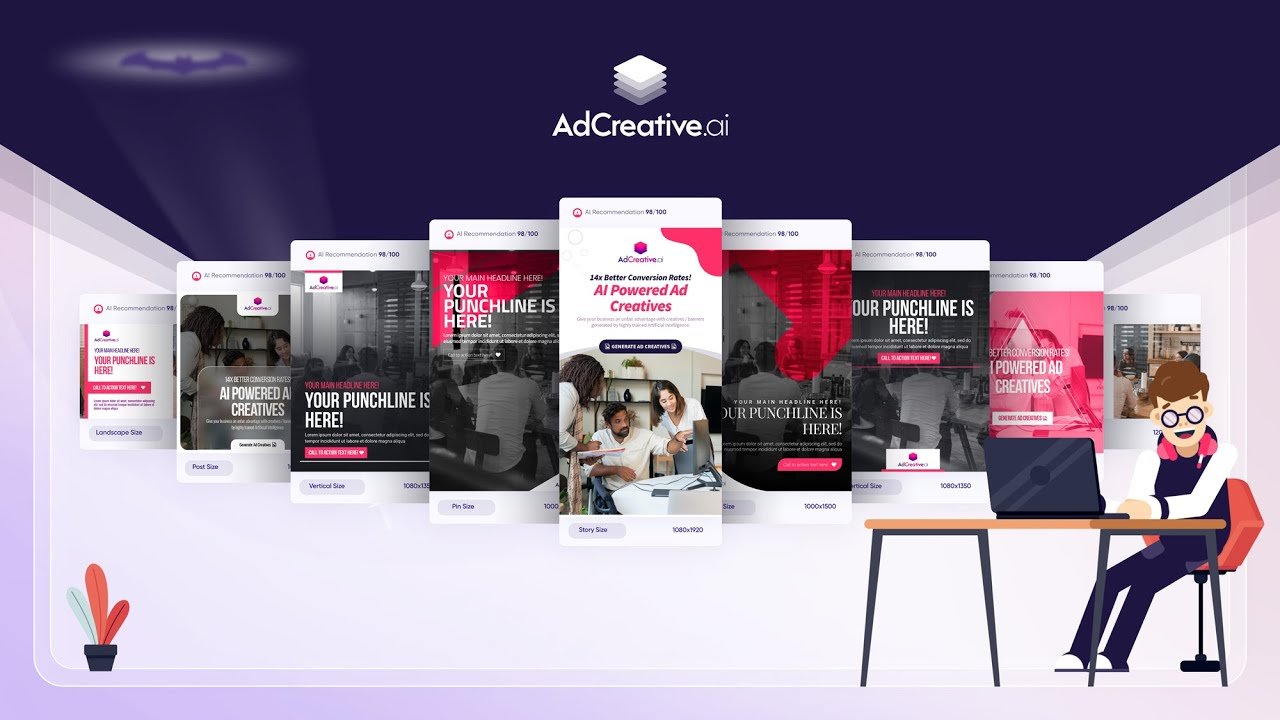
When the outputs load, you will see each creative displayed with its individual performance score prominently shown. Before downloading or publishing anything, review the full set:
- Sort by highest score first — the top 3–5 creatives should be your starting shortlist for testing
- Look for visual hierarchy clarity — the best Facebook ads have a single clear focal point. If a creative has too many competing elements, the AI score may be high but real-world performance can still underperform.
- Check text legibility on mobile — use AdCreative.ai's mobile preview toggle to see how each creative renders at phone screen size. Small text that is readable on desktop can be invisible on mobile.
- Edit individual creatives — if a specific creative is almost right but needs a minor adjustment (different background colour, repositioned logo, adjusted font size), use the in-platform editor to make changes before downloading.
For a standard Facebook campaign, select 3 to 5 of the highest-scoring creatives to test initially. Starting with more than 5 dilutes your budget across too many variants before the Meta algorithm has enough impressions to identify a winner. Once you have a clear top performer from the first test, use it as a benchmark and test new variants against it iteratively.
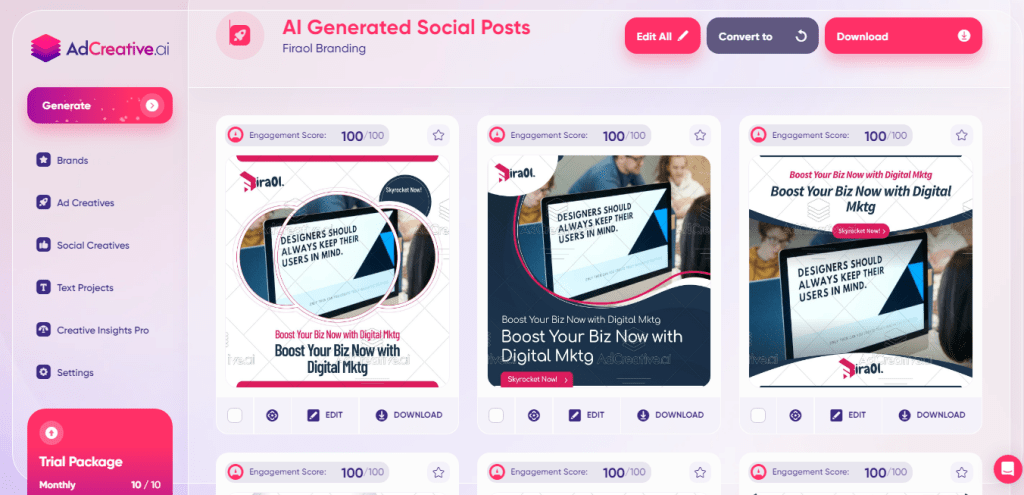
AdCreative.ai's generation output — each creative is scored 0–100 for predicted conversion performance, with the highest-scored variants sorted to the top.
Step 8 — Understand and Use the Creative Score
What the Score Means and How to Use It
AdCreative.ai's 0–100 Creative Score is a predictive performance indicator trained on performance data from real advertising campaigns. It does not guarantee results — it indicates which creatives are most likely to outperform based on historical patterns from similar campaigns.
Practical guidance on using the score:
- Use it as a tiebreaker between visually similar variants — when you cannot decide between two creatives, the higher-scored one is the safer launch choice
- Do not use it as an absolute filter — occasionally a lower-scored creative resonates strongly with a specific audience because of contextual factors the AI cannot fully account for. Run real tests to confirm.
- Regenerate if all scores are below 60 — a full set of low scores usually means the inputs need refinement. Re-evaluate your headline, image quality, or brand colour contrast before generating again.
- Track the relationship between score and actual CTR over time. If higher-scored AdCreative.ai outputs consistently produce better CTR in your campaigns, you can gradually trust the score more as a reliable predictor for your specific audience and offer.
Step 9 — Export or Publish Directly to Meta
Get Your Creatives Into Facebook Ads Manager
You have two options for moving creatives from AdCreative.ai into your Facebook campaign:
Option A: Export and Upload Manually
- Select the creatives you want to use (tick the checkboxes)
- Click Download Selected — files download as high-resolution JPG or PNG
- Go to Meta Ads Manager, create your ad set, and upload the downloaded creative files
- Set your headline, body copy, and CTA in Ads Manager — you can use the copy you generated in AdCreative.ai or test different text variants
Option B: Publish Directly via Integration
- Select your creatives and click Send to Facebook Ads
- Choose the connected ad account, campaign, and ad set you want to publish to
- AdCreative.ai pushes the creative assets to Meta and opens them in Ads Manager for final review
- In Ads Manager, set your targeting, budget, schedule, and placements before publishing
Direct publishing is faster if you are running multiple campaigns. Manual download and upload gives you more control to organise naming conventions in your Ads Manager library, which matters for keeping large-scale campaigns organised. Either approach works — choose based on your workflow preferences.
Advanced Features Worth Using
AI Text Generator
Generate multiple headline, body copy, and CTA variants simultaneously. Particularly useful for creating ad copy variations to test alongside your visual variants — matching the best headline to the best visual is a meaningful conversion lever.
Creative Insights
Pulls your existing ad performance data from connected Meta accounts and analyses which creatives are working. Shows performance patterns by visual element, colour, and copy style — helping you understand what to replicate in future generations.
Video and Animated Ads
Generate short animated or video creatives alongside static images. Video ads typically achieve higher engagement and lower CPM on Facebook than static images — integrating video creatives into your testing mix can improve overall campaign efficiency.
Batch Generation
Generate creatives for multiple products or campaigns simultaneously rather than creating projects one by one. Essential for agencies managing 10+ clients or eCommerce stores with large product catalogues that need regular creative refreshes.
Social Proof Overlay
Add star ratings, review counts, and social proof badges directly to creatives within the platform. Adding visible social proof to a Facebook ad creative is one of the consistently documented ways to improve cold audience conversion rates.
Creative Refresh Automation
Set automatic reminders or scheduled regeneration for campaigns that have been running for 14+ days. Ad fatigue on Facebook compounds quickly — the Creative Insights data shows you when your existing creatives' CTR is declining, signalling time to refresh.
Facebook Ad Best Practices with AdCreative.ai
The tool generates the creatives — how you use them determines the results. These practices produce the highest performance from AdCreative.ai outputs in Facebook campaigns:
- Always test at least 3 creative variants per ad set. Meta's algorithm needs multiple options to optimise delivery toward the best performer. A single creative in an ad set misses this optimisation advantage.
- Generate separate projects for mobile and desktop placements when your creative concept differs significantly between them. Feed ads on mobile have a square (1:1) aspect ratio advantage over landscape formats — generate square versions specifically for mobile.
- Keep primary text under 125 characters. Facebook truncates body copy in Feed placements after the first 125 characters. Everything after that requires the user to click "See More" — the majority do not. Write for the truncated version.
- Refresh creatives every 14–21 days on active campaigns. Facebook frequency caps mean your target audience has seen the same creative multiple times within two weeks. Use AdCreative.ai's batch generation to produce a fresh set quickly without starting the brief from scratch — iterate on what is already working.
- Combine AdCreative.ai with Meta's Advantage+ Audience. Broad targeting with high-quality AI-generated creatives is the current highest-performing setup on Facebook. Let the creative do the targeting by speaking specifically to your buyer persona, and let Meta's algorithm find them in a broad audience.
- Use Creative Insights to inform your next generation. After 7 days of campaign data, check which creative elements in your top performers are common — specific colour palettes, image types, headline patterns. Use these patterns as inputs for your next generation session.
"The biggest unlock with AdCreative.ai is not the first batch of creatives you generate. It is the learning loop — using the performance data from batch one to generate a better batch two. Each round gets more dialled in to what your specific audience responds to."
Start Generating High-Converting Facebook Creatives Today
AdCreative.ai's free trial gives you a full set of AI-generated creatives to test. No design skills required. No credit card needed to start.
FAQs on How to Use Adcreative AI
Yes. AdCreative.ai integrates directly with Meta via the Facebook Marketing API. Once you connect your Meta account through the Integrations tab, you can select finished creatives and push them directly to a specific ad account, campaign, and ad set in Meta Ads Manager. The creative assets are transferred automatically — you complete the final setup (targeting, budget, schedule) in Ads Manager. This saves the time of downloading, renaming, and uploading files manually.
They serve different purposes. Canva is a manual design tool — it gives you templates and editing controls to build creatives by hand. AdCreative.ai is an AI generation tool — it produces multiple creative variants automatically from a brief and scores each one for predicted performance. For marketers without design experience who need to produce and test many ad variants quickly, AdCreative.ai is significantly more efficient. For marketers who have specific, detailed design requirements and want precise pixel-level control, Canva provides more flexibility. Many advertisers use both: AdCreative.ai for generating high-volume test batches, Canva for refining the top-performing concepts into polished final assets.
The Creative Score (0–100) is a predictive indicator of how likely a creative is to outperform other creatives in its category based on historical ad performance patterns. It is trained on anonymised data from billions of ad impressions and click-through events across Meta, Google, and other platforms. The score does not guarantee results — it is a probability-based signal, not a certainty. A creative scored 85 is more likely to outperform a creative scored 45 in a comparable campaign, but real-world performance always depends on audience fit, offer relevance, and bid competition. Use it as one data point alongside actual CTR from your live campaigns.
The number of creative generations per month depends on your plan. Entry-level plans typically include 10–30 creatives per month. Mid-tier and professional plans scale to 100–300+ per month. Enterprise and agency plans can go to unlimited. Check the current plan details on the AdCreative.ai pricing page since these limits update periodically. During the free trial, you receive a credit allowance to test the generation quality before committing to a plan.
Yes. Uploading your own product or lifestyle photography consistently produces more authentic and brand-relevant outputs than relying on stock images. In the content input section of any project, click Upload Your Own Image and select your file. AdCreative.ai incorporates your image into the generated creative layouts while applying your brand colours, typography, and the overlay copy you specified. For eCommerce advertisers especially, using your actual product photography produces creatives that look substantially more professional than generic stock imagery alternatives.
Yes. AdCreative.ai includes video and animated ad generation features alongside static image formats. Video outputs are typically short animated sequences (5–15 seconds) that animate your product visuals, text, and brand elements into a motion format suitable for Facebook Feed and Stories placements. Video ad generation is available on mid-tier and higher plans — check your current plan's feature access. For more complex video production with full scene generation, AdCreative.ai's video capability is an entry-level solution; dedicated video production tools produce more sophisticated outputs at higher cost.
Final Thoughts: Start Testing, Start Learning
The most important thing to understand about AdCreative.ai is that its value compounds with use. The first batch of creatives you generate will be good.
The third batch (informed by performance data from the first two) will be better. The sixth batch will outperform what a freelance designer could produce in the same time at 10 times the cost.
The practical starting point is simple: sign up for the free trial, set up your brand profile properly, generate 20 variations of one core offer, pick the top 5 by score, and launch a small test campaign.
Within 7 days you will have real CTR data from real impressions that tells you which visual and copy direction is resonating with your audience. That data is the foundation for every subsequent iteration.
If you want to scale Facebook advertising without scaling your design spend proportionally, AdCreative.ai is one of the most directly useful tools in the current advertising stack.
Generate Your First Facebook Ad Creatives in Minutes
Free trial — no credit card required. Set up your brand profile, generate 20+ variants, and launch your first AI-powered test campaign today.