📋 Table of Contents
- Why Blog Post Templates Matter
- All 9 Templates at a Glance
- Template 1 — Query Post
- Template 2 — How-To Post
- Template 3 — Informational Listicle
- Template 4 — Visual Listicle
- Template 5 — Product / Affiliate Listicle
- Template 6 — Review Post
- Template 7 — Comparison Post
- Template 8 — Expert Roundup Post
- Template 9 — Case Study Post
- Frequently Asked Questions
The 9 blog post templates every blogger needs — each one covering a specific reader intent, with a proven structure that makes writing faster, publishing more consistent, and SEO results stronger.
Blogging consistently is harder than it looks — not because writers run out of things to say, but because every blank page presents the same question: where do I start? The right blog post template solves that problem before it begins. It gives you the structure before you write the first word, so you can focus entirely on the quality of your ideas rather than the architecture of the post.
Templates do something else too. When your content follows proven structures that match specific reader intents (someone asking a question, someone comparing two products, someone looking for a list of options) search engines can identify your content's purpose more easily and serve it to the right audience.
Good templates are not a shortcut to mediocre content; they are the framework that makes great content easier and faster to produce.
Here are the 9 blog post templates that cover every major content type you will need as a blogger; each with a clear structure, real examples, and tips to help you apply it effectively.
For more on growing your blog, see our 41+ blogging tips and our guide to starting a blog and making money online.
Why Blog Post Templates Matter for SEO and Consistency
There are three reasons experienced bloggers work from templates rather than starting from scratch every time:
- They match reader intent. Google's primary job is matching search queries to content that satisfies the reader's specific intent. A reader who types "how do I do X" wants a step-by-step guide. A reader who types "best X for Y" wants a ranked comparison list. A post that structurally matches the intent it targets ranks better than a post with great content in the wrong format.
- They compress writing time. A blogger who knows they are writing a how-to post can start immediately with Step 1. A blogger staring at a blank document deciding on structure first spends 30–60 minutes on architecture before a single word of content is written. Over the course of a year of publishing, this difference compounds significantly.
- They create a consistent reading experience. When readers visit your blog repeatedly, familiar structure builds trust. They know where to find the quick answer, where the detailed breakdown is, where the FAQ lives. That predictability is a feature, not a limitation.
All 9 Templates at a Glance
Query Post
A query post is designed to answer a specific question that your readers are actively searching for online. The reader is seeking quick, practical, authoritative advice — and their patience for meandering introductions is low. The structure is built around delivering the direct answer fast, then expanding on the detail for readers who want depth.
Query posts are concise by design — 800 to 1,300 words is the standard range. Their brevity is not a weakness; it is a feature. A reader who types "how do you store fresh herbs?" does not need 3,000 words. They need a clear answer, a few supporting details, and confidence that they now know what to do. Writing more than necessary actively hurts the user experience.
📋 Query Post Structure
- Short intro (3 sentences) — establish credibility and set up the question. Do not retell the question back to the reader at length. A sentence of context, a sentence of empathy, a sentence of what this post delivers.
- Direct answer (40–60 words) — answer the question clearly and concisely at the top. This improves your chances of being featured as a Google snippet and immediately satisfies readers who only need the short version.
- Transition phrase — "But there's more to it. Here's a step-by-step breakdown…" signals readers that the full guide follows.
- H2 subheadings for each supporting point — break down the process or answer into scannable sections. E.g. "Choosing the Right Location", "Preparing Your Soil", "Picking Beginner-Friendly Plants".
- H3 subheadings where needed — for deeper dives within a section. E.g. "Testing Soil Acidity" or "Sunlight Requirements for Leafy Greens".
- FAQ section — use Google's "People Also Ask" section to identify the 4–6 follow-up questions your readers are most likely to have. Answer each one concisely.
- Conclusion with internal links — wrap up briefly, link to related content on your blog, and invite engagement via comments.
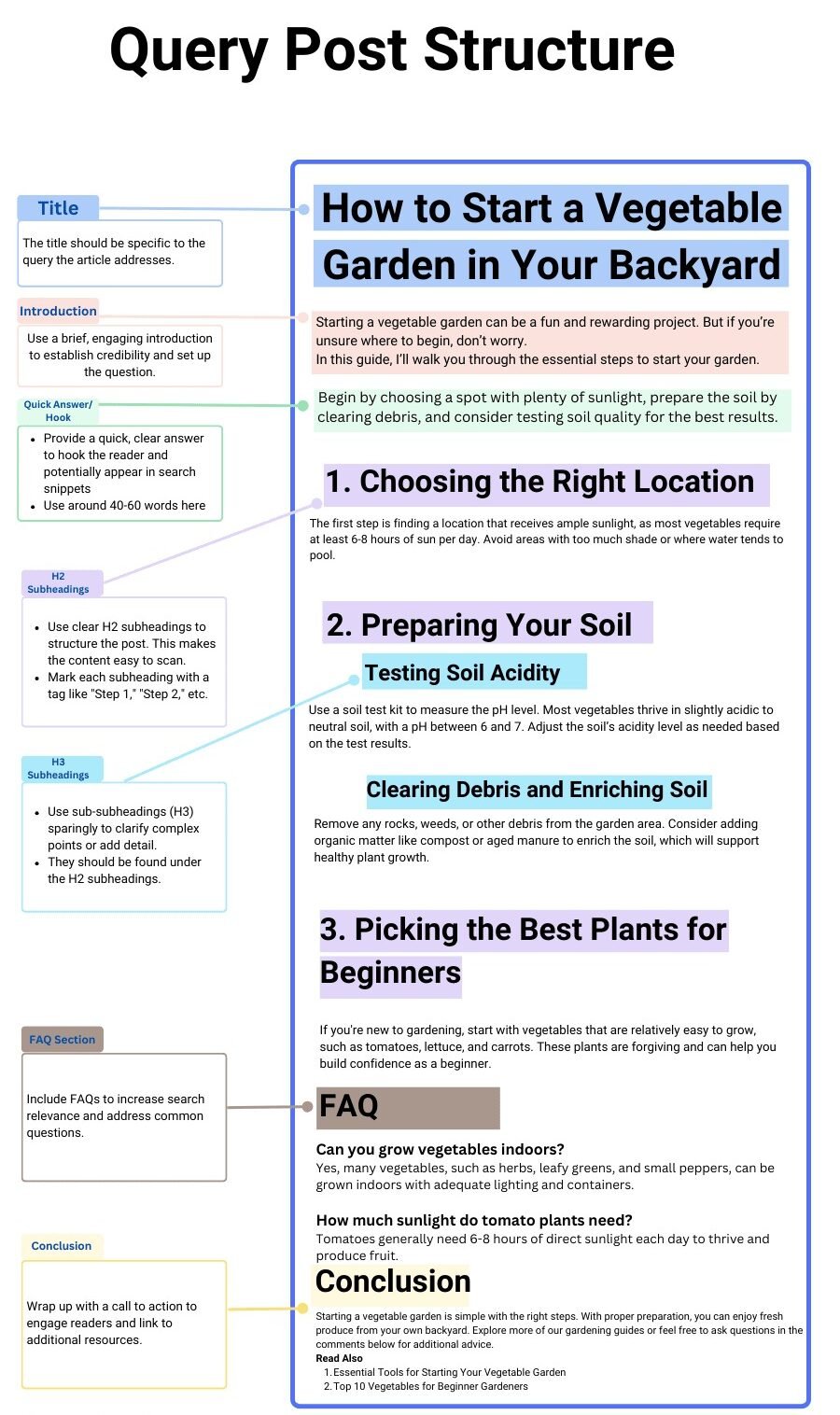
Query post structure — the direct answer comes immediately after the intro, before the detailed breakdown, to capture the featured snippet position and serve readers who only need the short answer.
How-To Post
A how-to post is a detailed step-by-step guide that helps readers accomplish a specific task or achieve a specific outcome. Unlike query posts (which answer a single question) how-to guides take the reader through a complete process from start to finish.
The reader arrives knowing what they want to do; they are relying on you to show them exactly how to do it, in the right order, with enough detail to succeed without getting stuck.
The quality benchmark for a how-to post is whether a reader who follows your instructions can complete the task without needing to look anything up elsewhere.
Every step should be detailed enough to stand alone, every tool or material mentioned should be defined, and any point where a reader might make a common mistake should be addressed explicitly.
📋 How-To Post Structure
- Introduction — briefly describe the task and the outcome. Confirm the reader is in the right place. Include a brief description of what they will have built, made, or achieved by the end.
- Tools and materials list — if the task requires specific items, list them upfront. Readers need to gather everything before they begin — sending them mid-step to find a missing tool breaks their flow.
- Steps with H2 headings — each step gets its own H2 heading (e.g. "Step 1: Cut the Wood to Size"). The heading should be action-oriented — it tells the reader what they are about to do, not just what the section covers.
- Detailed step descriptions — each step should have enough detail to complete it without guesswork. If a step has common failure points, address them explicitly.
- Images or video for each step — visual confirmation that the reader is on track significantly reduces errors and boosts time-on-page. For complex tasks, an embedded video is highly valuable.
- Conclusion and next steps — celebrate the completion, reinforce what the reader has achieved, and suggest what they can do or learn next.
- How-To Schema markup — use Rank Math or AIOSEO to add How-To Schema to your post. This signals to Google that your content is a step-by-step guide, improving your chances of appearing as a rich snippet.
- FAQ section — address the follow-up questions most readers will have after completing the task.
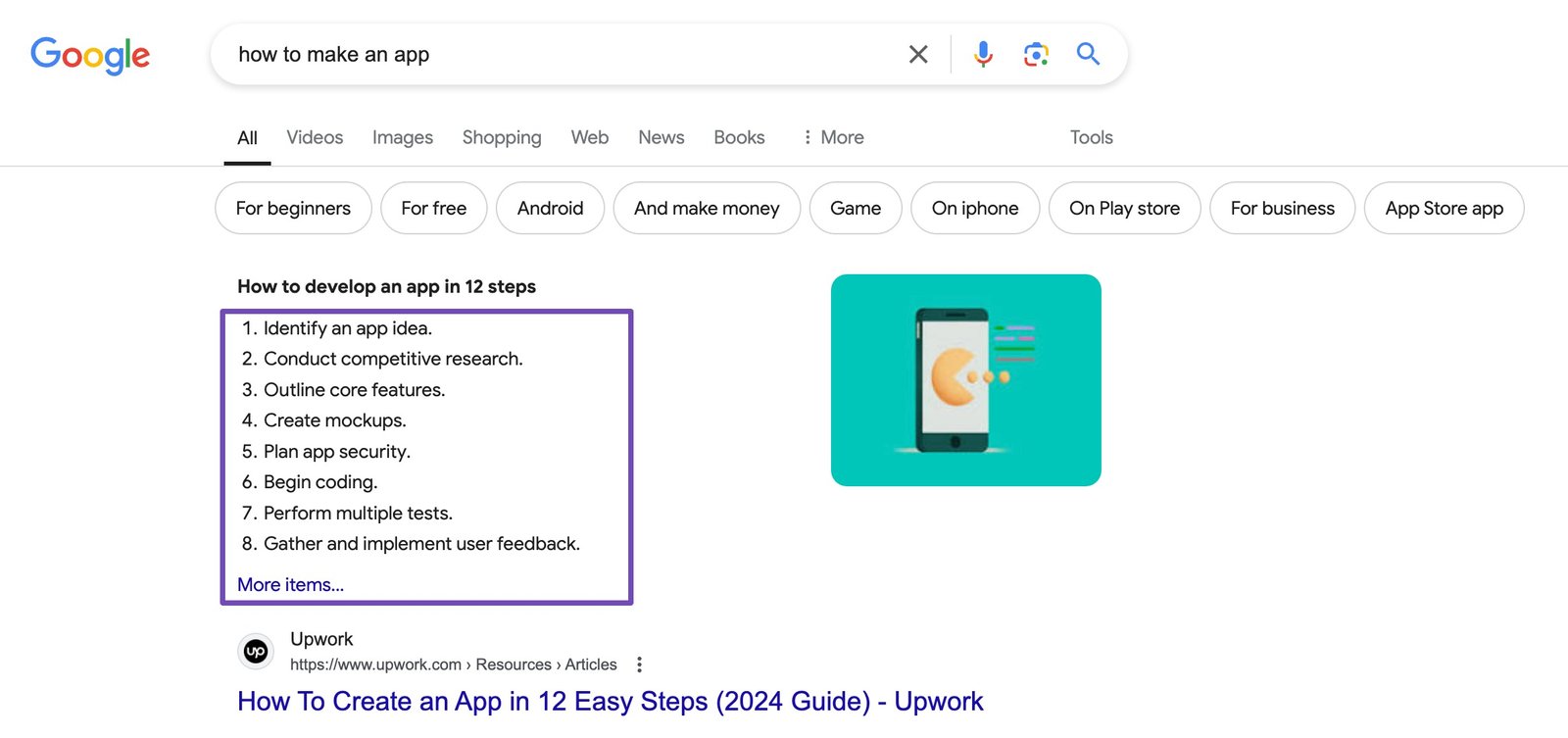
How-to posts work best with action-oriented step headings (Step 1: Do X, Step 2: Do Y) and visual evidence at each stage — images or embedded video dramatically reduce reader confusion and abandonment mid-process.
Informational Listicle
An informational listicle delivers educational or factual insights on a topic that readers want to understand in depth. The list format serves the reader by breaking a complex subject into discrete, scannable items — each one self-contained enough to read independently while contributing to a complete understanding of the topic.
Informational listicles are distinct from product listicles (Template 5) because the reader's intent is to learn, not to buy. They are also distinct from visual listicles (Template 4) because the depth of explanation matters more than the imagery.
Examples include "10 Reasons Why Learning a Second Language Is Beneficial", "7 Types of Business Structures Explained", or "12 Habits of Highly Productive Entrepreneurs".
📋 Informational Listicle Structure
- Introduction explaining the topic's relevance — why does this list matter? What will the reader understand or be able to do after reading it? Keep this to 2–3 short paragraphs.
- Table of contents — particularly valuable for longer lists (10+ items), allowing readers to jump directly to the items most relevant to them.
- Numbered H2 items — each list item gets its own H2 heading with a number for clarity. E.g. "1. Cognitive Benefits", "2. Enhanced Career Opportunities", "3. Improved Empathy".
- 2–3 paragraphs per item — explain what it is, why it matters, and ideally provide an example or supporting evidence. Bullet points within items are fine for supplementary detail, but prose should carry the explanation.
- Supplementary section after the list — additional context that did not fit within any individual item. E.g. "Challenges of Learning a New Language" or "Best Resources for Language Learners".
- FAQ section — cover the most common follow-up questions your readers will have on this topic.
- Conclusion with internal links — summarise the key takeaways and link to related posts that provide deeper coverage of specific items.
Visual Listicle
A visual listicle is built around imagery — the photos or visuals are the primary content, with text providing supporting context. Readers coming to this type of post are often in an inspiration or planning mode: looking for destination ideas, interior design inspiration, food options, seasonal activity suggestions, or visual examples of a concept.
The image sells the idea; the text provides the information needed to act on it.
This template performs strongly on platforms with visual discovery mechanics — Pinterest, Instagram, and Google Images all drive significant traffic to well-executed visual listicles.
The SEO value is also strong: posts titled "Best Cities to Visit for Cherry Blossoms" or "10 Minimalist Living Room Ideas Under $500" serve highly specific visual search intent.
📋 Visual Listicle Structure
- Brief introduction — 2–3 sentences of context. Why this list? Why now? What are you covering?
- Numbered H2 item headings — each list item (destination, room, dish, product) gets its own H2 heading. E.g. "1. Tokyo, Japan", "2. Washington D.C., USA".
- High-quality image immediately below the heading — the image should be striking, properly alt-tagged with descriptive text for both SEO and accessibility, and contextually representative of the item.
- Short supporting description — 3–5 sentences per item covering the key information the reader needs: why it is notable, what makes it unique, what they need to know before engaging with it (e.g. best season, approximate cost, how to access it).
- Supplementary tips section — add practical information at the end that applies to all items in the list. E.g. "Tips for Photographing Cherry Blossoms", "What to Pack for a Spring Trip", "How to Book in Advance".
- FAQ section — common questions about the topic. E.g. "When does cherry blossom season typically start?", "Which cities have the longest blossom periods?"
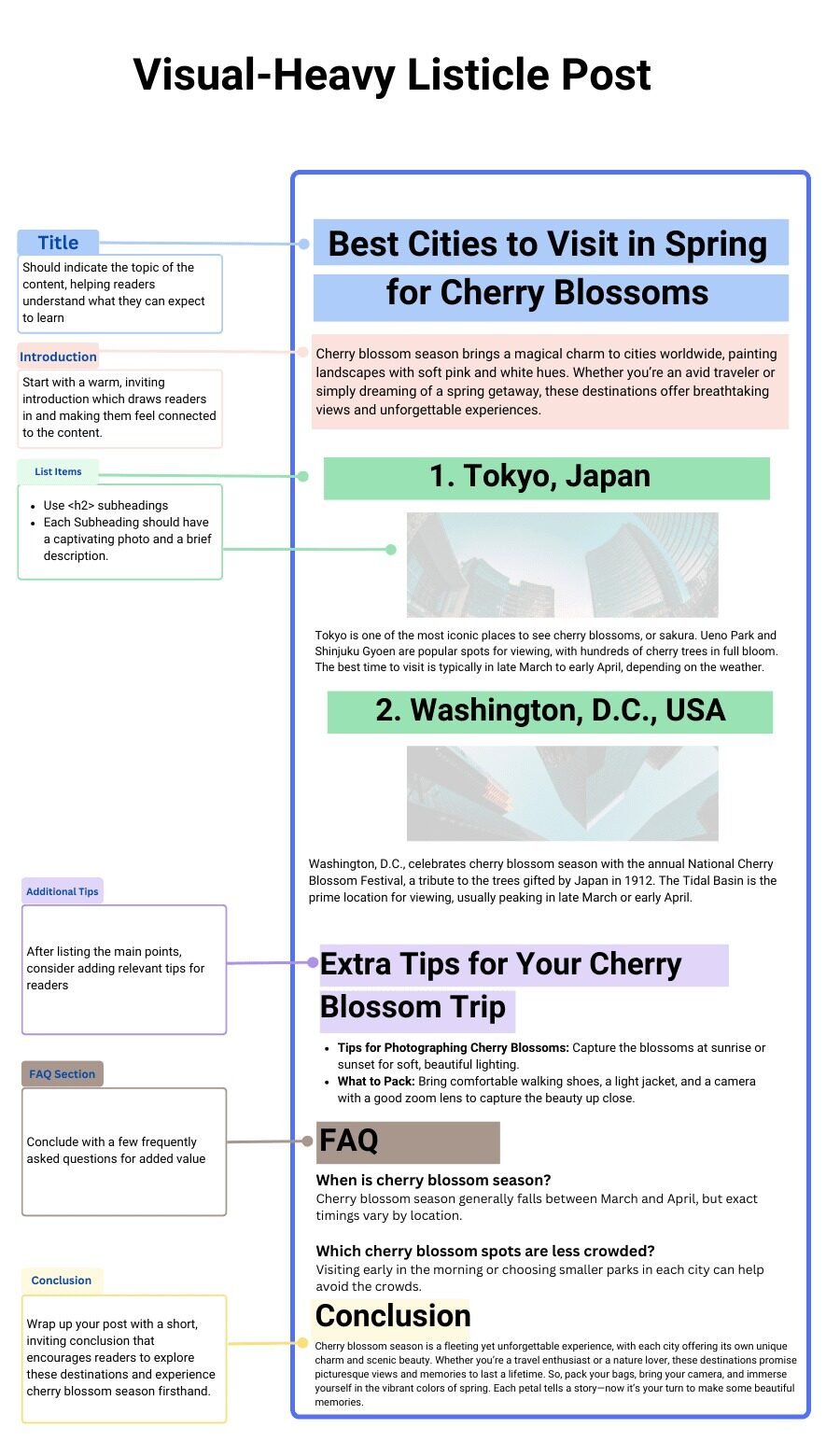
Visual listicle structure — the image appears immediately after each numbered H2 heading, making the post visually engaging on scroll and providing readers with instant visual confirmation of each item before they read the description.
Product / Affiliate Listicle
A product listicle serves readers who are ready to buy and want expert guidance on which option to choose. The reader has a specific use case in mind ("best laptops for graphic designers", "best email marketing tools for beginners", "top web hosts for WordPress sites") and they are trusting your list to help them make a confident decision without doing weeks of their own research.
This template carries the highest affiliate revenue potential of any blog format, because readers arrive with genuine purchasing intent and are actively looking for a recommendation.
The quality bar is also the highest, readers evaluating purchase decisions are sensitive to shallow, recycled content that was clearly written without using the products. Firsthand experience or credible depth of research is essential.
📋 Product Listicle Structure
- Introduction — explain what the reader should look for when buying in this category. This positions you as an expert before the list begins and helps readers self-qualify which products are right for their specific use case. 200–300 words.
- Comparison table at the top — a quick-scan table with key specs, pricing, and ratings for all products on the list. Readers with time pressure use this to shortlist without reading every entry.
- Numbered product entries with H2 headings — e.g. "1. Apple MacBook Pro 16 — Best Overall for Graphic Designers". The heading structure tells readers the product name and who it is best for in one line.
- Per-product content — product image, key specs, pros and cons, a 2–3 paragraph review covering performance, user experience, and who this product suits best, and an affiliate link / buy button.
- Buying guide section — a dedicated "What to Consider When Buying [X]" section at the end for readers who want to understand the decision framework before choosing.
- FAQ section — address common questions about the product category that were not fully covered in the individual entries.
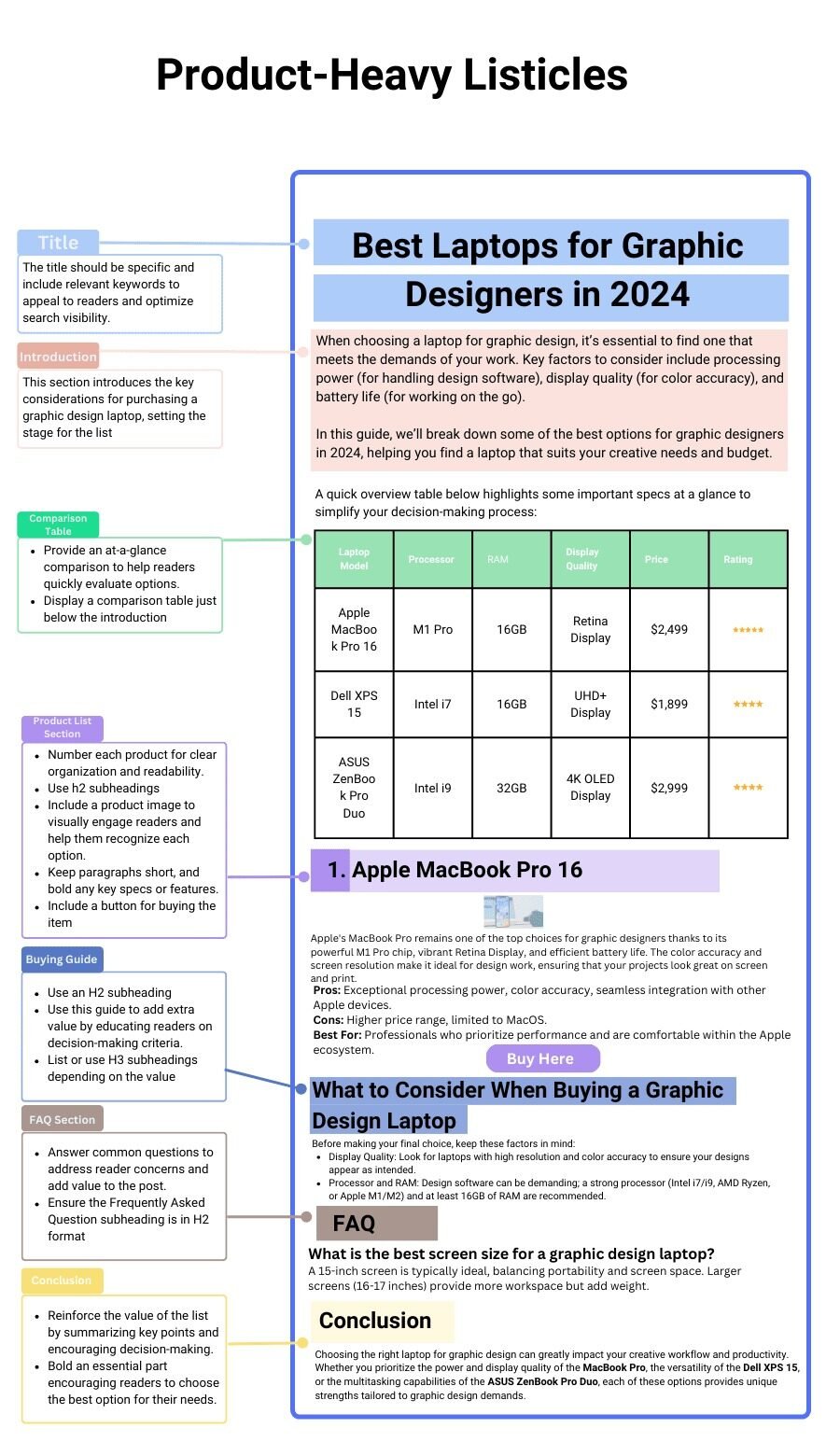
Product listicle structure — the comparison table at the top serves readers who are comparison-shopping at speed; the detailed individual entries serve readers who want depth on their shortlisted options before making a final decision.
Review Post
A review post provides an in-depth evaluation of a single product or service — sharing your honest experience, analysis, and verdict to help readers decide whether it is right for them.
Review posts are particularly valuable for digital products, software, courses, and services where there are limited authoritative independent reviews available.
For mass-market physical products with thousands of Amazon reviews, the bar for adding genuine value through a review post is significantly higher.
Authenticity is the entire foundation of a review post's value. A reader evaluating a significant purchase is relying on your honest perspective — a review that reads as a promotional piece for every product it covers erodes trust and reader loyalty faster than almost any other content error.
📋 Review Post Structure
- Introduction addressing a pain point — open with the problem or challenge the product is designed to solve. This immediately connects with readers who have the same problem.
- Table of contents — essential for review posts, which are typically long and reference-heavy.
- Quick verdict summary — a 60–100 word honest summary of your overall assessment, with pros and cons at the top. Readers who only want the verdict get it immediately; readers who want depth continue reading.
- Product overview — what it is, who makes it, the key features at a high level.
- Detailed feature breakdown — each major feature discussed in depth from a user experience perspective. Not just what the feature does, but how well it does it in practice.
- Comparison to alternatives — how does it stack up against the other main options readers would consider? Internal links to your comparison and alternatives articles are valuable here.
- Who this product is (and is not) for — specific guidance on which reader profiles this product suits well, and which would be better served elsewhere.
- Pricing breakdown — detailed, accurate, current pricing with what each tier includes.
- Alternatives section — a brief comparison table of the main alternatives for readers who decide this product is not right for them.
- Final verdict — a clear, unambiguous recommendation backed by the evidence presented in the review.
- FAQ section — address the most common questions readers will have after reading the review.
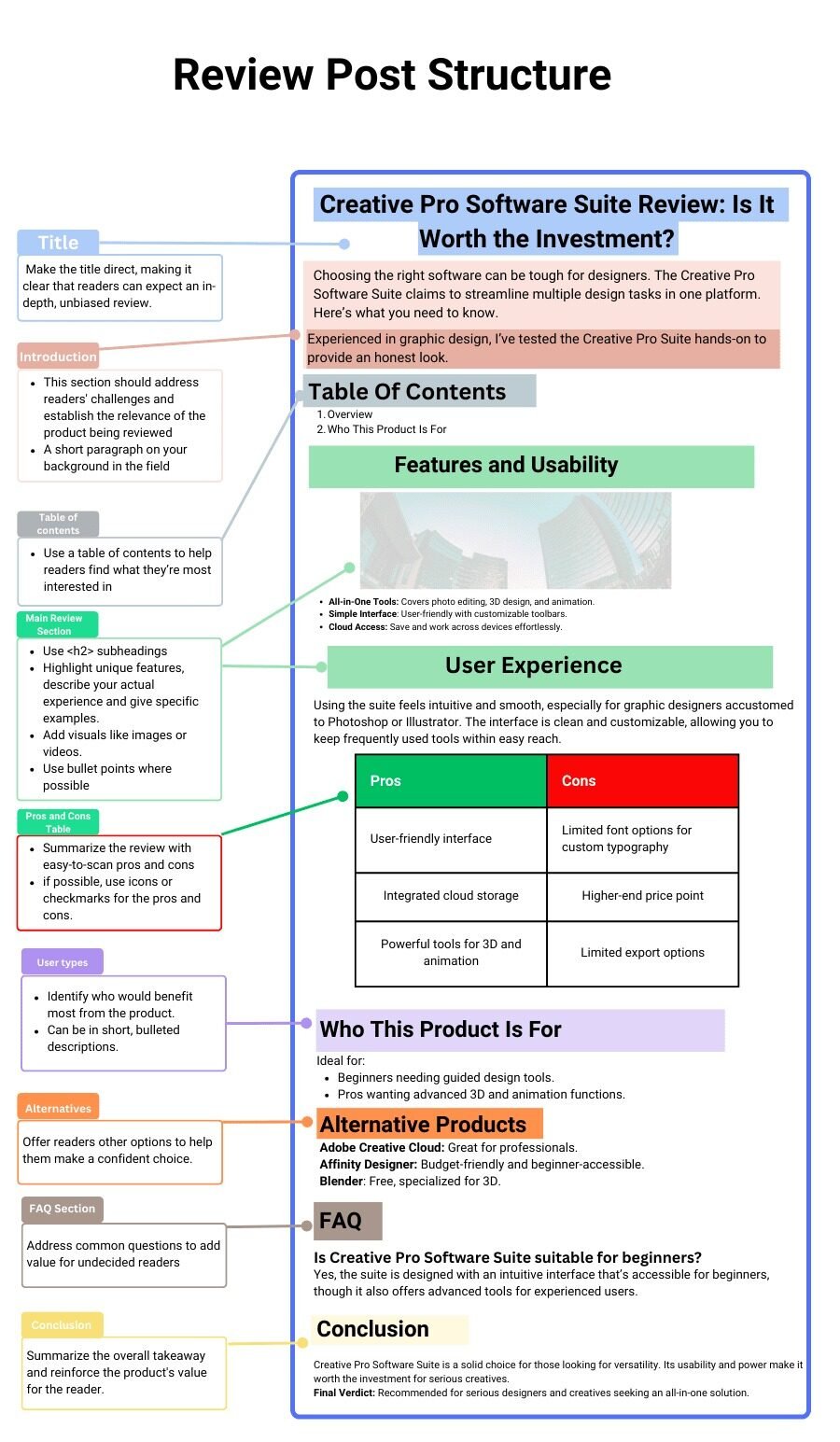
Review post structure — the quick verdict summary near the top serves readers who want the conclusion immediately; the full structure provides the depth and evidence that justifies the recommendation for readers who want the complete picture.
Comparison Post
A comparison post analyses two or more similar products or services against each other — helping readers who have already narrowed their options and need to make a final choice.
"Rank Math vs Yoast SEO", "Airwallex vs Wise for Business", "Apollo.io vs Amplemarket" — these are readers at the final stage of their buying decision. They are not asking what these products are; they already know. They are asking which one is better for their specific situation.
Comparison posts require firsthand experience with all products being compared — not just the one you prefer or the one that pays higher affiliate commissions.
Readers in the decision stage are conducting their own due diligence; they will quickly identify comparisons written without genuine product knowledge, and that identification destroys the post's credibility entirely.
📋 Comparison Post Structure
- Introduction (~200 words) — acknowledge the comparison these readers are making and what differentiates the two products at a high level. State upfront which product you recommend overall and for which specific use cases.
- 60-word quick verdict — a concise top-level summary for readers who want an immediate answer. Which is better? For whom?
- Comparison table — a side-by-side table covering key attributes: features, pricing, support, integrations, compliance. This is the most-referenced element of a comparison post — readers return to it repeatedly.
- "What is Product A?" and "What is Product B?" — brief but complete introductions to each product for readers less familiar with one or both options.
- Feature-by-feature comparison — each major feature category gets its own H2 section. "Ease of Use", "Pricing", "Integrations", "Customer Support", "Security and Compliance". Evaluate both products on each feature with specific evidence.
- Pros and cons per product — a dedicated pros/cons section for each product, summarising the detailed comparison above.
- Which should you choose? — specific, segmented recommendations. "Choose Product A if you…" "Choose Product B if you…" This is often the section readers jump to directly.
- FAQ section — address the questions that do not fit neatly into the feature-by-feature comparison.
Expert Roundup Post
An expert roundup post collects insights, opinions, or recommendations from multiple recognised experts on a specific topic. The core value is aggregation: instead of one person's perspective, the reader gets 10 or 20 perspectives from established voices in the field — providing breadth of insight that no single author can provide alone.
For the blogger, roundup posts serve a secondary purpose: the experts featured typically share the post with their own audiences, generating significant referral traffic and backlinks.
The quality of a roundup post depends entirely on two things: the calibre of the experts you feature, and the specificity of the question you ask them.
A vague question to mediocre contributors produces a forgettable post. A specific, provocative question to recognised experts produces a highly shareable, reference-worthy piece.
📋 Expert Roundup Structure
- Introduction — explain the topic, why you sought expert input, who you approached, and how to use the post. 2–3 paragraphs.
- Expert insights grouped by theme — if multiple experts gave similar answers, group them under a shared theme heading (e.g. "Focus on Content Quality", "Build an Email List First"). This grouping reveals which ideas are consensus wisdom vs which are contrarian or unique.
- Expert insights listed individually — if no clear patterns emerge, list each expert's contribution separately, ordered by name recognition or social following. Include a photo, name, title, and short bio for each contributor.
- Summary of key takeaways — synthesise the most actionable insights from all contributors into a practical summary. This is often the section beginners find most useful.
- Action step for the reader — what should the reader do with this information? A specific, singular recommended next step.
- FAQ section — address follow-up questions about the topic that the expert responses raised or implied.
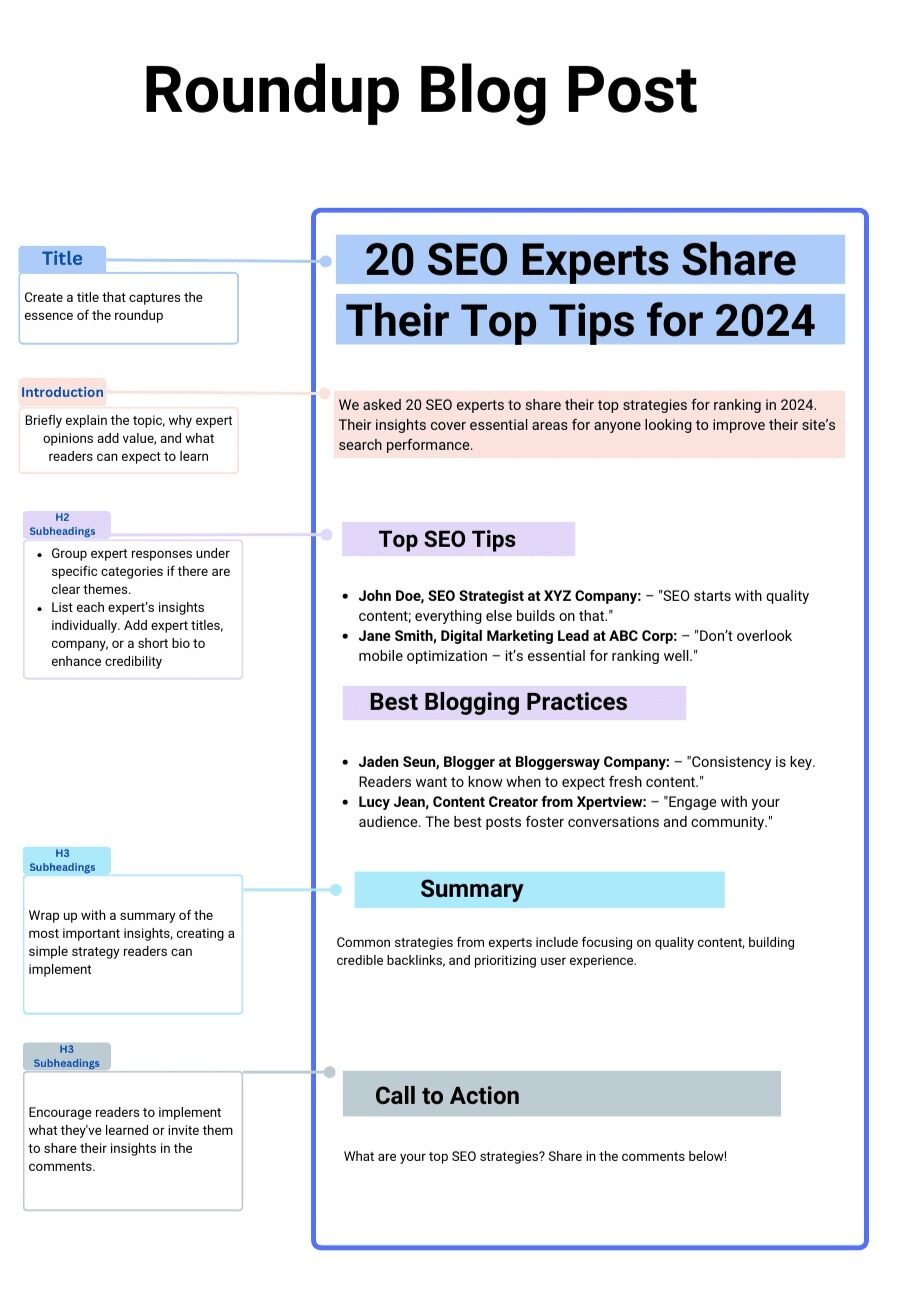
Expert roundup structure — group insights by theme where patterns emerge; this reveals consensus and disagreement within the field, which is more interesting and useful than a flat list of individual opinions.
Case Study Post
A case study post documents a real outcome — showing exactly how a specific approach, tool, strategy, or decision produced a measurable result.
"How I Grew My Blog from 0 to 50,000 Monthly Visitors in 18 Months", "How I Made My First $5,000 in Affiliate Income", "How I Cut My Blog's Load Time by 60% Using a VPS Host" — these posts succeed because they are grounded in specific, verifiable data rather than general advice.
Case study posts are among the most effective content for building trust and authority because they demonstrate expertise through results rather than claiming it through credentials. Readers who want to replicate your outcome will read every word.
They will also share it with others trying to achieve the same thing. And because case studies contain proprietary data and experience that cannot be copied from another source, they are naturally resistant to content duplication.
📋 Case Study Structure
- Hook headline with the result — the result should be in the headline. Not "How I Grew My Blog" but "How I Grew My Blog from 0 to 50,000 Monthly Visitors in 18 Months Using Only Free Traffic." The specificity of the result is what stops the scroll.
- Introduction: the starting point — where were you before? What was the problem, the baseline, the context? Be honest about the starting conditions — readers need to know whether the result is relevant to their situation.
- The goal — what were you trying to achieve, and why? This gives the narrative direction and allows readers to assess whether your goal aligns with theirs.
- The approach — what did you do, step by step? This is the main body of the case study. Be specific — "I published 3 long-form posts per week targeting low-competition keywords" is more useful than "I focused on content creation".
- The results — with data — the outcome, supported by screenshots, analytics, or other verifiable evidence. Month-by-month data is ideal for showing progression rather than just the endpoint.
- What worked / what did not — the mistakes and detours are as valuable to readers as the successes. Honest failure analysis builds trust and makes the success more credible.
- Key takeaways and replicable actions — what can the reader do starting today to replicate or improve on your approach? Convert your experience into a concrete action plan.
- FAQ section — address the follow-up questions readers will have after reading your results.
Build a Blog That Actually Makes Money
Templates give you the structure. AIpreneur Academy gives you the complete system — from your first post to your first $10,000 month. Join 12,000+ students building profitable blogs and YouTube channels.
FAQs About Blog Post Templates
All 9 templates can rank well in search when properly executed, but the best template for SEO is the one that matches the reader's search intent for your specific target keyword. Query posts and how-to posts tend to perform best for informational keywords with clear question intent. Product listicles and comparison posts perform best for commercial and transactional keywords where readers are close to a purchase decision. The most common SEO mistake is writing a query post for a keyword that search engines are matching to listicles — your content format needs to match what Google is already ranking for that query. Search your target keyword in incognito mode and check what format the top 5 results use before deciding on your template.
Blog post length should match the complexity of the topic and the format of the post, not a universal word count target. Query posts are most effective at 800–1,300 words because they answer a specific question — adding unnecessary content to hit a word count dilutes the directness that makes them effective. How-to posts and product listicles typically run 2,000–4,000 words because the detail required to do the job well naturally fills that length. The actionable principle: write until you have fully served the reader's intent and not one word more. A comprehensive 1,500-word post will outrank a padded 3,000-word post on the same topic every time, because Google measures content quality by how well it satisfies the reader's intent, not by its length.
No — and you should not. Different posts serve different reader intents, and the template should always be chosen based on the specific intent your post is targeting. A blog that only publishes one format — only how-to posts, or only product listicles — misses the natural diversity of questions and intents that their audience brings to the blog. A healthy content mix typically includes informational query and how-to posts (for audience building and organic traffic), product listicles and comparison posts (for affiliate revenue), review posts (for targeted buyer traffic on specific keywords), and case study posts (for authority building and trust). The templates are tools — use the right tool for each job.
Yes — templates and AI writing tools work extremely well together. The template provides the structure and the specific elements each section must contain; the AI fills in draft content for each section that you then refine with your own experience, voice, and specific knowledge. The most common mistake bloggers make with AI writing is asking it to produce a complete article from a single prompt without any structural guidance. Providing the AI with a specific template — "write a 60-word direct answer to the question [X] that could be featured as a Google snippet" — produces dramatically better output than "write a blog post about X". Templates make AI writing faster and more consistently useful.
Consistency matters more than frequency. A blogger who publishes one thoroughly researched, well-structured post per week consistently will outperform one who publishes five thin posts one week and nothing for three weeks. For bloggers who are building an audience from scratch, two to three posts per week targeting specific long-tail keywords is a strong starting cadence — enough volume to accumulate a content library quickly, manageable enough to maintain quality. As your domain authority grows, the frequency threshold for significant traffic increases also changes — older, more authoritative blogs need fewer posts to maintain and grow their traffic than new sites. The more important question than "how often" is "how good" — the internet does not need more mediocre content; it rewards unusually good content disproportionately.
A listicle (Templates 3, 4, 5) presents a curated list where the blogger is the author of all the content — you write every item on the list yourself, drawing on your own research, experience, or curation. A roundup post (Template 8) aggregates content from multiple external contributors — you ask other people a question and present their answers. The blogger's role in a roundup is curator and synthesiser rather than primary author. Listicles are faster to produce and offer full editorial control; roundup posts require contributor outreach but generate backlinks and referral traffic when featured experts share the post with their audiences.