Loading...
Kit Review 2026 | Pros, Cons, Pricing, Features
Disclosure: This post contains affiliate links. If you click through and make a purchase, I may earn a small commission at no extra cost to you. I only recommend tools I use and believe in. Read my full disclosure →
📋 Table of Contents

Kit — the email marketing and creator monetisation platform built specifically for bloggers, YouTubers, podcasters, and digital product sellers.
Most email marketing platforms were built for businesses. Kit (formerly ConvertKit) was built for creators. That distinction sounds like marketing language until you actually use it and notice how differently the two experiences feel.
A business-focused email platform gives you newsletter campaigns and contact lists. Kit gives you subscriber tagging, visual automation, paid newsletter infrastructure, digital product selling, a creator referral network, and a marketplace of integrations designed around the specific workflow of someone who builds an audience online for a living.
Kit was founded in 2013 by Nathan Barry, a blogger and author who could not find an email marketing tool that thought the way he thought about audience building.
He built one for himself, and the product he created now serves over half a million creators worldwide. This review covers everything you need to decide whether Kit is the right email platform for your specific situation in 2026.
What Is Kit (Formerly ConvertKit)?
Kit (formerly ConvertKit) is an email marketing and creator monetisation platform that helps content creators build their email list, automate their marketing, and earn revenue directly through the platform. The rebrand from ConvertKit to Kit in 2024 reflected a broader ambition: to be not just an email tool but a complete creator business platform.
The core difference between Kit and general-purpose email platforms like Mailchimp or Constant Contact is philosophy. Kit treats your subscribers as individual people with specific interests and behaviours, not as names in a database.
Every subscriber can carry multiple tags (labels you assign based on their behaviour or interests), belong to multiple segments, and move through visual automation workflows that respond to what they actually do (clicking links, purchasing products, joining forms) rather than just what campaign they signed up to.
David's Take
Kit is the email platform I use and recommend most consistently for creators who are serious about building an owned audience.
The subscriber-first, tag-based approach is more powerful than the list-based model that most other platforms use — and the built-in ability to sell digital products, paid newsletters, and subscriptions without a third-party integration is a genuine advantage for anyone monetising their audience directly.
The free plan up to 10,000 subscribers is one of the most generous in the market.
Quick Verdict at a Glance
⚡ Kit 2026 — Quick Summary
Free PlanYes — up to 10,000 subscribers
Paid From$25/month (Creator, up to 1,000 subscribers)
Free Trial14 days on paid plans
Best ForBloggers, YouTubers, podcasters, digital product creators
Creator MonetisationYes — sell products, paid newsletters, subscriptions natively
Integrations100+ via Kit App Store (Creator plan+)
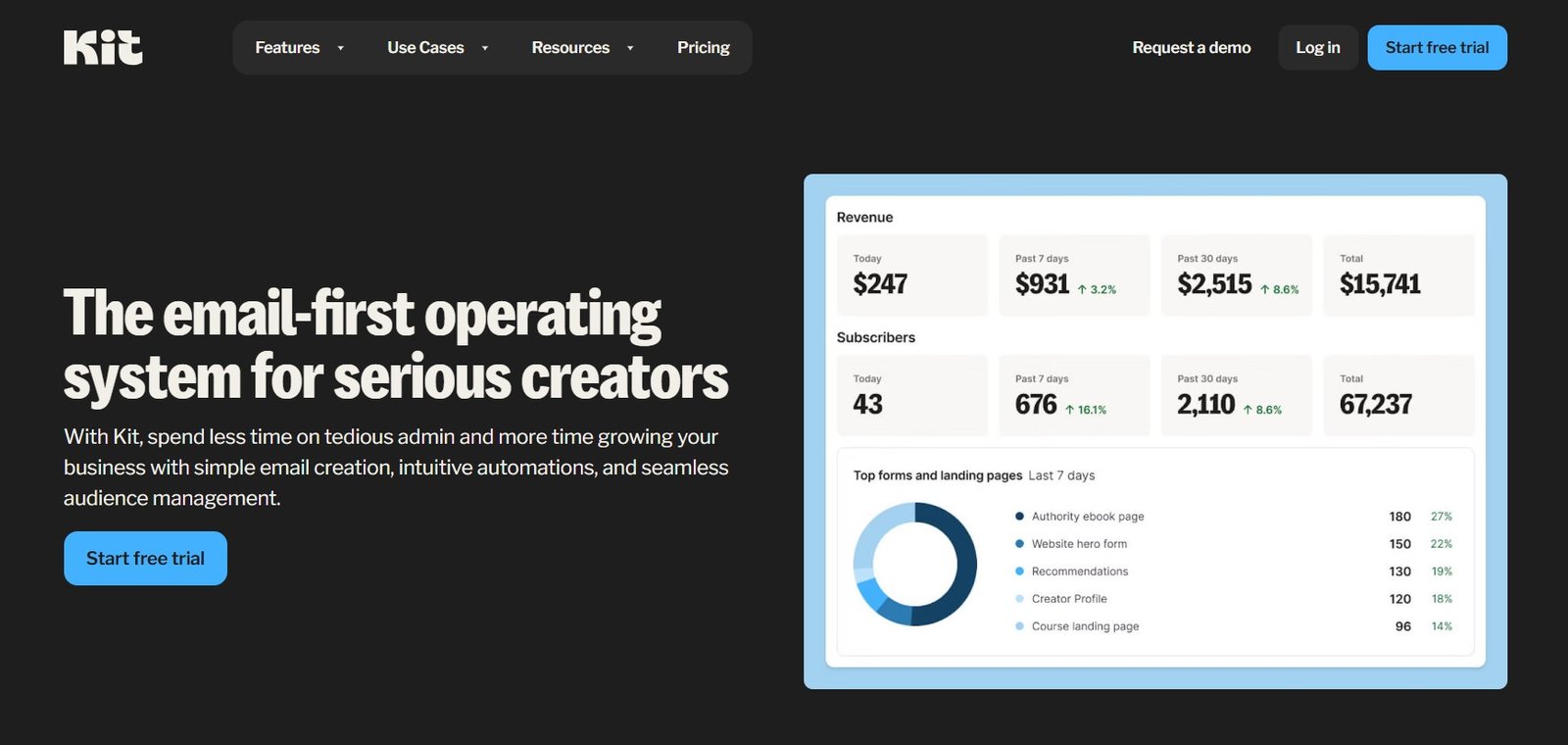
Kit's feature suite — visual automations, broadcasts, subscriber tagging, landing pages, and creator monetisation tools in one platform.
Who Is Kit Built For?
Kit's creator-first design philosophy shows up most clearly in the types of users it serves well. Unlike general email platforms that work for everyone and are therefore optimised for no one specifically, Kit is built around the creator workflow:
Bloggers
Build your list from content readers, nurture them with automated sequences, and convert them to paid products or affiliate offers.
YouTubers
Move video viewers onto your email list — the only audience you truly own. Segment by content topic and automate follow-ups.
Podcasters
Convert podcast listeners to email subscribers. Sell episode-specific offers, premium content, and memberships directly.
Course Creators
Automate your lead magnet → free content → course sales funnel. Segment based on where students are in the journey.
Newsletter Writers
Build and grow a paid newsletter directly on Kit. Charge subscribers monthly without needing Substack or a separate tool.
Digital Product Sellers
Sell ebooks, templates, memberships, and digital downloads with built-in commerce tools — no Gumroad or separate store required.
Coaches and Consultants
Build authority with free content, automate discovery calls booking, and sell coaching packages to a warm email audience.
African Digital Entrepreneurs
Accept USD payments for digital products without needing local payment infrastructure. Kit's commerce features work globally.
Kit Features — Full Breakdown
📧 Email Broadcasts and Sequences
Kit's two primary email types serve different purposes. Broadcasts are one-time emails sent to your subscribers — weekly newsletters, announcements, product launches, or any time-specific communication. They can be sent to your full list or to specific segments defined by tags, purchase history, or custom fields.
Sequences are automated series of emails triggered by a specific action — signing up for a form, purchasing a product, or joining a tag.
A welcome sequence, onboarding series, or evergreen sales funnel is built in Kit's sequence editor: a linear list of emails with configurable time delays between each. You write the emails once and Kit delivers them automatically to every new subscriber who enters the sequence.
⚡ Visual Automation Builder
Kit's visual automation builder is one of its strongest differentiators from entry-level email platforms.
You build automation workflows on a canvas — drag and drop events (form submissions, purchases, tag additions), conditions (has purchased, has opened X emails, custom field value), and actions (add to sequence, apply tag, send email, move to another automation) into a visual flowchart that shows exactly how subscribers move through your system.
A typical creator automation might look like: subscriber joins lead magnet form → send welcome email → wait 3 days → if clicked link: add "interested" tag → start purchase sequence → if purchased: add "customer" tag, remove from sales sequence → start onboarding sequence. This level of behaviour-based automation is not available in most free or entry-level email platforms.
🏷️ Tag-Based Subscriber Management
The fundamental architecture of Kit is tag-based rather than list-based. In a traditional email platform (Mailchimp's classic model), you manage separate lists — a subscriber on List A and List B is counted twice and may receive duplicate emails.
Kit's single-subscriber model means every person in your account exists once, regardless of how many tags, sequences, or automations they are in. Tags describe their interests and behaviours; segments filter by tags to create targeted audiences for broadcasts.
This approach produces cleaner data, prevents double-billing for the same subscriber, and allows significantly more sophisticated segmentation than the list model.
A subscriber who downloads your free guide gets tagged "freebie-downloaded", later purchases your course gets tagged "customer", and enrolls in your coaching programme gets tagged "coaching-client" — and you can target, exclude, or sequence each of these groups independently.
🖥️ Landing Pages and Forms
Kit includes a drag-and-drop landing page and opt-in form builder with professionally designed templates. Landing pages are fully hosted by Kit (no website required) and can be customised with your branding, colours, and copy.
Forms can be embedded on your website as inline, modal, slide-in, or sticky bar formats.
Both landing pages and forms connect directly to your Kit automations — when someone submits a form, they can be immediately tagged, added to a sequence, and entered into a visual automation workflow in the same platform without any external integration required.
💰 Creator Commerce — Sell Digital Products and Paid Newsletters
Kit's commerce features allow creators to sell digital products, subscriptions, and paid newsletters directly from the platform without integrating a separate payment processor (beyond the standard Stripe connection).
You can set up a digital product (ebook, template, course, coaching package) with a product page, checkout, and automated email delivery all managed inside Kit.
Paid newsletters allow you to charge subscribers a monthly or annual fee for premium email content, managed entirely through Kit's interface. The Subscriber Engagement Score (Creator Pro) shows which subscribers are most engaged, enabling targeted upsell campaigns to your most responsive audience.
🌐 Creator Network and Recommendations
One of Kit's most unique features is the Creator Network — a built-in recommendation system that allows Kit users to recommend each other's newsletters. When a new subscriber confirms their email, Kit can show them a curated list of other newsletters they might enjoy.
The newsletters shown are selected by you and appear after someone subscribes to your list. This creates an organic cross-promotion system that helps all participating creators grow their lists through warm recommendations rather than paid acquisition.
The Paid Recommendations feature (Creator plan and above) allows you to charge other creators to be recommended to your audience — turning your subscriber confirmation flow into a revenue stream.
💼 Sponsor Network
Kit's Sponsor Network connects creators with brands looking to sponsor newsletters. If your list is large enough to be attractive to sponsors, Kit can match you with relevant brands directly within the platform — eliminating the need to separately manage sponsor outreach through external tools. Available on the Creator Pro plan.
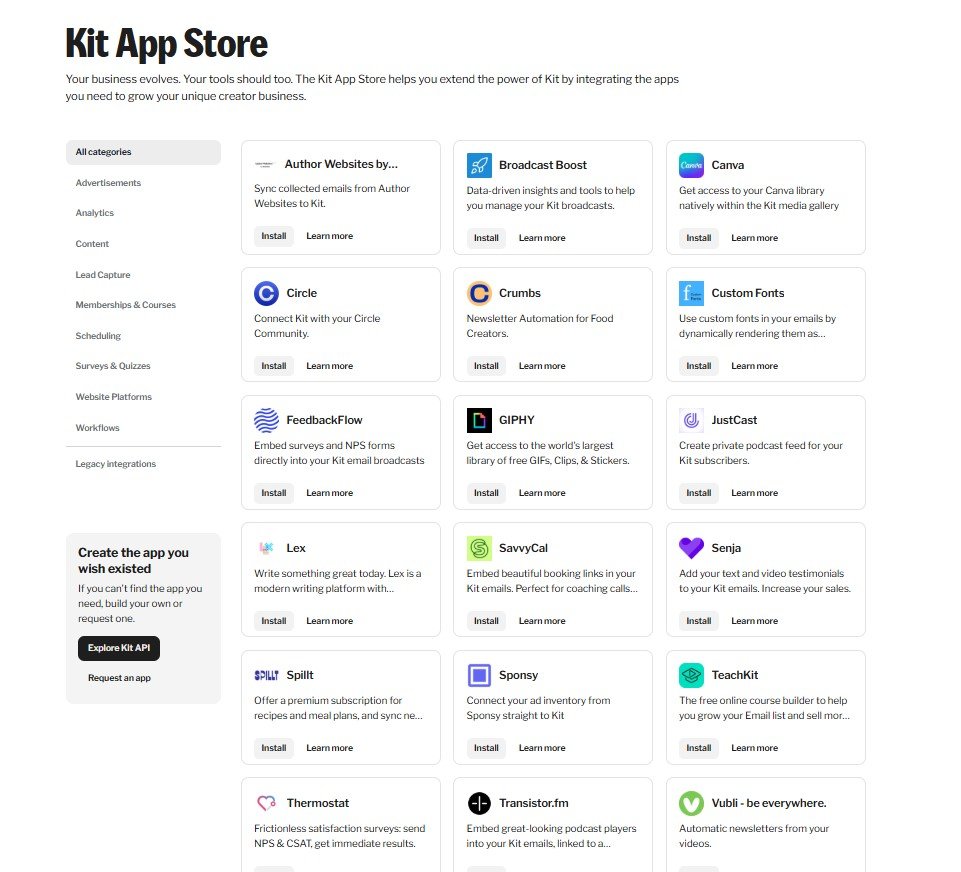
The Kit App Store — a curated library of integrations that connect your email marketing with the tools your creator business already uses.
The Kit App Store
The Kit App Store is a curated collection of application integrations available on the Creator plan and above. Unlike general third-party automation tools like Zapier, the Kit App Store integrations are purpose-built for creator workflows — they surface inside Kit's interface and are designed specifically for how creators use each connected tool.
Well-known apps available in the Kit App Store include Stripe, Shopify, WordPress, WooCommerce, and Canva. The Canva integration is particularly useful for email creators — it gives you access to your Canva library directly within Kit's media gallery when designing emails, eliminating the download-and-upload step.
The benefits of the App Store model over generic Zapier integrations are:
- Simpler setup — purpose-built integrations typically connect in 2 to 3 clicks rather than requiring Zapier trigger/action configuration
- Better data sync — integrations exchange relevant creator-specific data rather than generic field mapping
- In-dashboard access — connected apps surface their relevant data inside Kit rather than requiring tab-switching
📌 App Store Access
The Kit App Store requires the Creator plan ($25/month for up to 1,000 subscribers). The free Newsletter plan does not include App Store access. If connecting your email marketing with your eCommerce store, CRM, or other creator tools is important to your workflow, factor this into your plan decision.
Kit Pricing Plans
Kit offers three pricing tiers designed to scale with the size of your audience and the sophistication of your monetisation needs.
Free Forever
Newsletter
$0/month
Up to 10,000 subscribers · No credit card required
- Up to 10,000 subscribers
- Unlimited email broadcasts
- 1 visual automation
- 1 email sequence
- Unlimited landing pages and forms
- Sell digital products and subscriptions
- Creator Network recommendations
- 1 user account
⭐ Most Popular
Creator
$25/month
From $25/mo for 1,000 subscribers — scales with list size
- All Newsletter features
- Unlimited visual automations
- Unlimited email sequences
- 2 user accounts
- Kit App Store access (100+ integrations)
- Paid newsletter recommendations (earn revenue)
- Remove Kit branding from emails
- Live chat + email support
- Audience polls
Creator Pro
$50/month
From $50/mo for 1,000 subscribers — scales with list size
- All Creator features
- Unlimited user accounts
- Newsletter referral system
- Facebook Custom Audiences integration
- Subscriber engagement scoring
- Deliverability reporting
- Insight analytics dashboard
- Sponsor Network access
- Edit links in sent broadcasts
- 24/7 priority support
💡 Free Plan Note — 10,000 Subscribers
Kit's free Newsletter plan is one of the most generous in the email marketing market. Up to 10,000 subscribers at zero cost — with the ability to sell digital products, run landing pages, and use the Creator Network — gives new creators significant capability before any subscription is required. Compare this to Mailchimp's free plan (capped at 500 contacts) or ActiveCampaign (no free plan). For creators just starting to build their list, Kit's free plan is a compelling entry point.
Kit Pros and Cons
✓ Kit Strengths
- Free plan supports up to 10,000 subscribers — most generous in the market
- Tag-based subscriber model — no duplicate billing for subscribers on multiple lists
- Visual automation builder — powerful, visual, and beginner-accessible
- Sell digital products and paid newsletters without separate tools
- Creator Network for organic list growth through cross-promotion
- Kit App Store — purpose-built integrations for creator workflows
- Clean, focused interface — built for creators, not corporate marketing teams
- 14-day free trial on paid plans
- Excellent deliverability record compared to larger platforms
✗ Kit Limitations
- Limited email design flexibility — clean templates but fewer customisation options than Mailchimp
- Analytics and reporting are basic — no deep engagement heatmaps or advanced A/B testing
- Spam testing not included — requires external tools
- Price scales steeply with subscriber count — large lists get expensive
- Not designed for eCommerce or transactional email — better tools exist for those use cases
- Visual editor is less sophisticated than some competitors for HTML-heavy designs
Kit vs Alternatives
All-in-One Marketing
Kartra
Kartra is a full business platform that goes well beyond email — it includes pages, funnels, checkout, affiliate management, video hosting, and membership sites in one subscription. If you need a complete digital business infrastructure rather than just email marketing, Kartra handles it all.
The trade-off is complexity and cost. For creators specifically focused on email list building and newsletter monetisation, Kit is more focused and less expensive. For creators who want everything in one platform, Kartra is worth evaluating.
Try Kartra →Full Marketing Suite
GetResponse
GetResponse positions itself as an all-in-one marketing platform — email marketing, landing pages, webinar hosting, paid advertising integration, and website builder. It is more feature-broad than Kit and competitive on pricing.
The email editor is more visually flexible than Kit's, and the webinar feature is genuinely useful for coaches and course creators who host live sessions.
Where it falls behind Kit for creators is in the subscriber-first philosophy — GetResponse feels more like a business tool adapted for creators rather than one built from the ground up for them.
Try GetResponse →Advanced Automation
ActiveCampaign
ActiveCampaign is the strongest option for businesses that need the most sophisticated email automation available — complex conditional logic, CRM integration, site tracking, and predictive sending. Its automation capabilities significantly exceed Kit's in depth and complexity.
The trade-off: ActiveCampaign has no free plan, its interface is more complex than Kit's, and it is less focused on creator monetisation features.
For digital entrepreneurs running more sales-intensive operations — agencies, high-ticket consultants, complex funnel businesses — ActiveCampaign's depth may justify the higher learning curve and cost.
Try ActiveCampaign →Quick Comparison Table
| Feature | Kit ⭐ | Kartra | GetResponse | ActiveCampaign |
|---|---|---|---|---|
| Free Plan | ✓ 10,000 subscribers | ✗ No | ⚡ Limited trial | ✗ No |
| Creator Monetisation | ✓ Native (products, newsletters) | ✓ Full platform | ⚡ Limited | ✗ Not focused |
| Visual Automation | ✓ Strong | ✓ Strong | ✓ Good | ✓ Best-in-class |
| Email Design | ⚡ Clean, limited customisation | ✓ Flexible | ✓ Very flexible | ✓ Flexible |
| Subscriber Model | Tag-based (no duplicate billing) | Contact-based | Contact/List-based | Contact-based |
| Creator Network | ✓ Yes — unique feature | ✗ No | ✗ No | ✗ No |
| Starting Price | Free / $25/mo | ~$119/mo | ~$15/mo | ~$15/mo |
Who Should Not Use Kit
Kit is not the right tool for every situation. Be honest with yourself about the following scenarios:
- eCommerce businesses with large product catalogues needing transactional emails, abandoned cart sequences, and deep Shopify/WooCommerce integration — Klaviyo or Omnisend are significantly better for this use case
- Sales-intensive businesses running high-volume cold email outreach — Kit is not built for cold email. Apollo.io, Instantly, or Lemlist are the correct tools.
- Businesses needing the most advanced CRM-style automation with deal stages, lead scoring, and B2B pipeline management — ActiveCampaign or HubSpot serve this need better
- Price-sensitive creators with very large lists — Kit's pricing scales by subscriber count. A list of 100,000+ subscribers on Kit Creator Pro becomes expensive monthly. Compare the cost against Substack (free but takes a 10% revenue cut) or Beehiiv for large-list newsletter economics
Start Building Your Email List with Kit Today
Free plan for up to 10,000 subscribers. Sell digital products, automate your sequences, and build an audience you actually own — all in one creator-focused platform.
Frequently Asked Questions on this Kit Review
Is Kit (ConvertKit) free to use?
Yes. Kit's Newsletter plan is permanently free for up to 10,000 subscribers. It includes unlimited email broadcasts, landing pages and forms, one visual automation, one email sequence, and the ability to sell digital products and subscriptions. No credit card is required to start on the free plan. Paid plans start at $25/month for the Creator plan, which adds unlimited automations and sequences, the Kit App Store, and the ability to remove Kit branding from your emails.
What is the difference between Kit and ConvertKit?
They are the same product. ConvertKit rebranded to Kit in 2024 to reflect its broader ambition as a creator business platform rather than purely an email marketing tool. All accounts, features, billing, and integrations from ConvertKit transitioned directly to Kit with no changes required from users. The name on the platform, logo, and website changed; the product itself is a continuous evolution of the same software.
Can I sell digital products with Kit?
Yes. Kit has built-in commerce features that allow you to sell digital products, paid newsletter subscriptions, and one-time digital downloads without integrating a separate payment platform (beyond Stripe, which handles the payment processing). You can set up a product page, checkout, and automated email delivery for purchased products entirely within Kit. This makes it a practical alternative to tools like Gumroad for creators who want to keep their email marketing and product sales in the same platform.
How does Kit's Creator Network work?
The Creator Network is a mutual recommendation system for Kit users. After setting up your recommendations, Kit shows your opted-in subscribers a list of other newsletters you endorse when they complete their subscription confirmation. Other creators who have recommended you get similar exposure to their new subscribers. On the Creator plan, you can also offer paid recommendations — charging other creators to be featured in your confirmation flow as a revenue stream from your existing audience growth mechanism.
Is Kit good for beginners?
Yes — Kit is widely regarded as one of the most beginner-friendly professional email marketing platforms available. Its interface is clean and purposeful, the visual automation builder uses drag-and-drop logic that is intuitive even for new users, and the free plan removes any financial barrier to getting started. The learning curve is significantly gentler than ActiveCampaign or complex marketing platforms, while offering substantially more capability than basic tools like Mailchimp's entry tier.
Can creators in Nigeria or Africa use Kit?
Yes. Kit is available globally and Nigerian and other African creators can open accounts on any plan. The Kit commerce features require a Stripe account to accept payments — for Nigerian creators, this typically means setting up through a US LLC or UK entity that has Stripe access, following the same approach described in our guides on international payment infrastructure. The email marketing features (broadcasts, sequences, automations, landing pages) work without any payment integration requirement and are fully accessible worldwide from signup.
Final Verdict: Is Kit the Right Email Platform for You?
Kit earns its reputation as the email marketing platform of choice for content creators. The free plan up to 10,000 subscribers removes the barrier to entry that makes many creators hesitate.
The tag-based subscriber model, visual automation builder, and built-in creator monetisation features are genuinely well-designed for how creators think about their audience — not as a mass of contacts but as individual people with different interests at different stages of a relationship.
The honest limitations are worth acknowledging: the email design editor is less visually flexible than some competitors, the analytics reporting is basic compared to enterprise tools, and the pricing can become expensive as your list grows beyond 50,000 subscribers.
For creators focused on list building, automation, and direct monetisation (rather than heavily designed HTML email campaigns or advanced CRM pipelines) Kit's strengths consistently outweigh these limitations.
If you are a blogger, YouTuber, podcaster, course creator, or digital product seller who wants to own your audience and earn from it directly — start with Kit's free plan today. The free 10,000 subscriber tier is generous enough that most creators can validate the platform fully before spending a dollar.
Start Free with Kit — Up to 10,000 Subscribers at No Cost
No credit card required. Build your list, automate your sequences, and sell your first digital product — all on Kit's free plan.