📋 Table of Contents
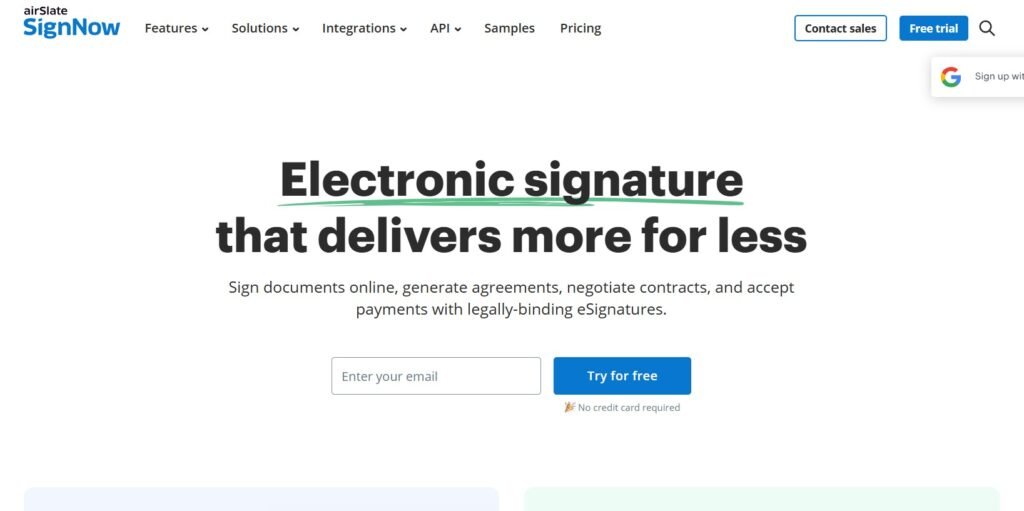
airSlate SignNow — an e-signature platform offering 270+ app integrations, multiple signing options, document tracking, workflow automation, and pricing from $8/user/month on annual plans, with a 7-day free trial.
Every business that regularly sends documents for signature has a choice: build a signing workflow around paper, scanning, and email attachments; or adopt a dedicated e-signature platform that handles signing, tracking, reminders, storage, and compliance in one place. The operational case for the latter is clear. The harder question is which platform to choose.
airSlate SignNow has established itself as one of the most price-competitive options in the e-signature market; offering a comprehensive feature set including 270+ integrations, multiple signing methods, workflow automation, bulk send, document tracking, and robust security at a starting price of $8/user/month on annual plans. This review covers everything you need to decide whether SignNow is the right platform for your business.
For related reading: see our SignNow vs DocuSign comparison, our SignNow industry use cases guide, and our guide to choosing the best e-signature solution for your business.
What Is airSlate SignNow?
airSlate SignNow (signnow.com) is a cloud-based e-signature platform developed by airSlate; a document workflow automation company. SignNow provides businesses with legally binding electronic signature capabilities alongside document management, workflow automation, template creation, payment collection, and integrations with over 270 third-party business applications.
Unlike traditional wet ink signatures (which can be easily forged and provide no audit trail) electronic signatures through SignNow are cryptographically secured, legally enforceable under ESIGN, UETA, and eIDAS, and attached to a complete audit trail showing exactly who signed what, when, and from which device.
Documents are automatically scanned for malware on upload, and signers can be required to authenticate using two-factor authentication before accessing documents.
SignNow is designed for teams that need to send documents for signature regularly — service agreements, client onboarding forms, NDAs, employment contracts, and any other document that requires a signature before work can begin or a relationship can be formalised.
Quick Verdict at a Glance
airSlate SignNow Pros and Cons
✓ What airSlate SignNow Does Well
- 270+ business app integrations covering Microsoft, Google, Salesforce, AWS, Box, and Dropbox
- Multiple signing options — draw, type, upload, sign pad, and digital certificates
- Flexible template customisation for frequently used document types
- Affordable pricing — starts at $8/user/month on annual plans, up to 60% cheaper than monthly billing
- Robust security — malware scanning, two-factor authentication, audit trails
- eSigning decline notification — you are alerted immediately when a signer declines rather than leaving you to chase
- Works from any browser without app download for signers
- 7-day free trial and 30-day money-back guarantee
- In-person signing — multiple parties can sign on a single shared device
- Document tracking — see in real time who has opened, signed, or not yet responded
✗ Limitations Worth Knowing
- The extensive product range within the airSlate ecosystem can be overwhelming for new users who just want straightforward document signing
- Not ideal for single-person use — the pricing and feature set is designed for teams; solo operators may find lighter tools more suitable
- No permanent free plan — only a 7-day trial; ongoing use requires a paid subscription
- Phone support is restricted to the airSlate Business Cloud plan; lower tiers rely on live chat and email
- Some FAQ and help documentation contains outdated information
airSlate SignNow Features — Full Breakdown
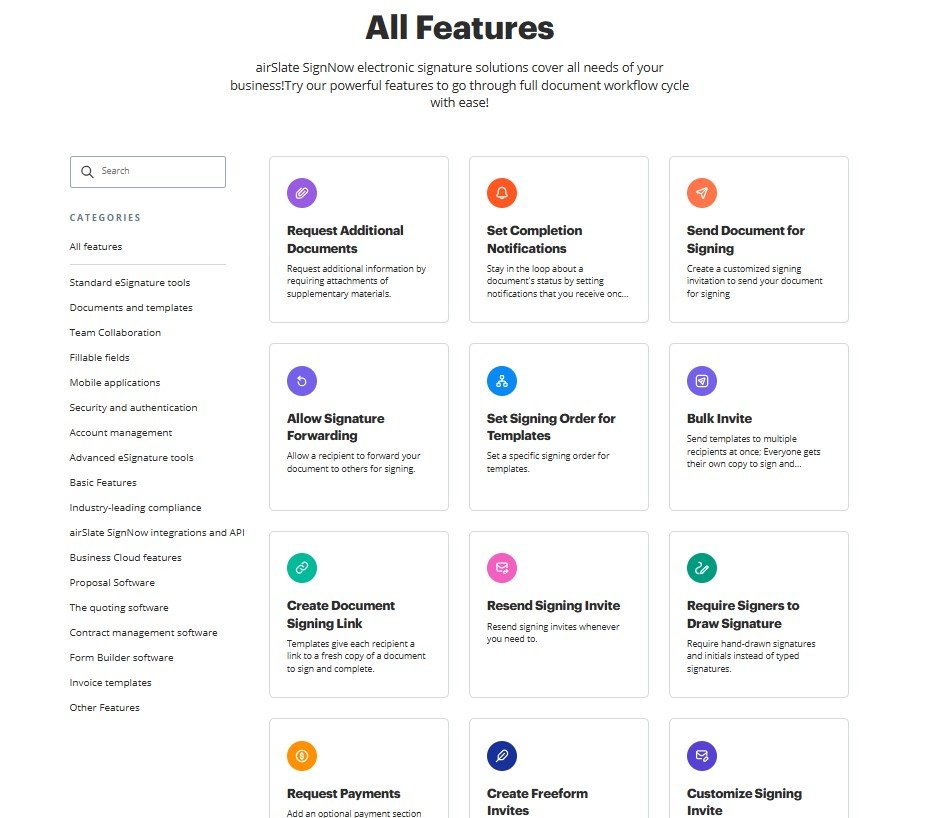
airSlate SignNow's feature set covers the complete e-signature workflow — from document preparation and template creation through multi-party signing, real-time tracking, and integration with your existing business tools.
📄 Document Management and Template Creation
Upload any document type — PDFs, Word files, Excel spreadsheets — and add signature, initials, date, text input, checkbox, and payment collection fields to any position in the document. Once configured, save the document as a reusable template. Templates are the time-saving core of SignNow's value for businesses that sign the same document types repeatedly — a client onboarding agreement or NDA template lets you send a professional, perfectly formatted signing request in seconds rather than rebuilding the document from scratch each time.
👥 Multi-Party Signing and Sequential Routing
Configure documents to require signatures from multiple parties — clients, legal approvers, internal signatories — in any sequence you define. SignNow handles the routing automatically: once one party signs, the document advances to the next signer in the sequence with an automated notification. Automated reminders are sent to signers who have not completed their portion by a configured deadline, and the sender is notified in real time when each step is completed or declined. In-person signing is also supported — multiple parties can sign the same document on a single shared device, useful for on-site signings in real estate, financial services, and retail environments.
📊 Document Tracking and Audit Trail
SignNow's document tracking shows you in real time exactly where each document stands — who has opened it, who has signed, who has not yet responded, and whether anyone has declined. The complete audit trail records every action taken on a document: who sent it, who opened it, who signed it, when each event occurred, from which IP address, and on which device. This tamper-evident record is what makes the signature legally enforceable — it provides the evidence needed to demonstrate in any dispute that the right person signed the document willingly and with full visibility of its contents.
🔄 Workflow Automation and Bulk Send
Automate repetitive signing workflows — automatic expiry dates after which unsigned documents are voided, conditional document routing based on signer inputs, and scheduled reminders that run without manual intervention. The bulk send feature (available from the Business Premium plan) allows you to send a single document to a large list of recipients simultaneously, with each receiving a personalised instance showing their own name and relevant details. This is particularly valuable for businesses sending the same agreement to many clients — annual terms updates, event waivers, or supplier onboarding packs.
💳 Payment Collection
SignNow's Enterprise plan includes payment collection fields — embedding a payment request directly within a document so clients can sign and pay in the same step. A consulting firm can send a service agreement that requires the client to sign and pay a deposit before work begins, with both steps completed from the same signing interface. This eliminates the two-step friction of a separate payment request following contract signature.
🔗 270+ App Integrations
SignNow integrates natively with over 270 business applications — the most commonly used in day-to-day business workflows:
- Microsoft — Teams, Microsoft 365 (Word, Outlook), OneDrive
- Google — Google Drive, Google Workspace (Gmail, Docs)
- Salesforce — pre-filled contracts generated from CRM records, activity logged automatically in Salesforce after signing
- AWS — productivity and collaboration workflows
- Cloud storage — Box and Dropbox for document storage and retrieval
- Zapier — connects SignNow to thousands of additional applications for custom automation workflows
Signing Options — Every Method Covered
Draw Signature
Draw your signature using a mouse, trackpad, or finger on a touchscreen — replicating a natural handwritten signing motion.
Type Signature
Type your name and select from a range of signature fonts — fast and accessible for signers without a mouse or touchscreen available.
Upload Signature
Upload a photograph of your physical handwritten signature and insert it digitally — for users who want to preserve the look of their existing signature.
Sign Pad
Use a hardware sign pad or tablet device to capture a physical signature — useful in retail, healthcare, and financial environments with specialist signing hardware.
Digital Signatures
Cryptographic digital signatures that are tamper-evident and provide the strongest legal and compliance standard — used for regulated industries and high-value contracts.
In-Person Signing
Multiple parties sign the same document on a single shared device sequentially — without each signer needing their own device or account.
airSlate SignNow Pricing Plans
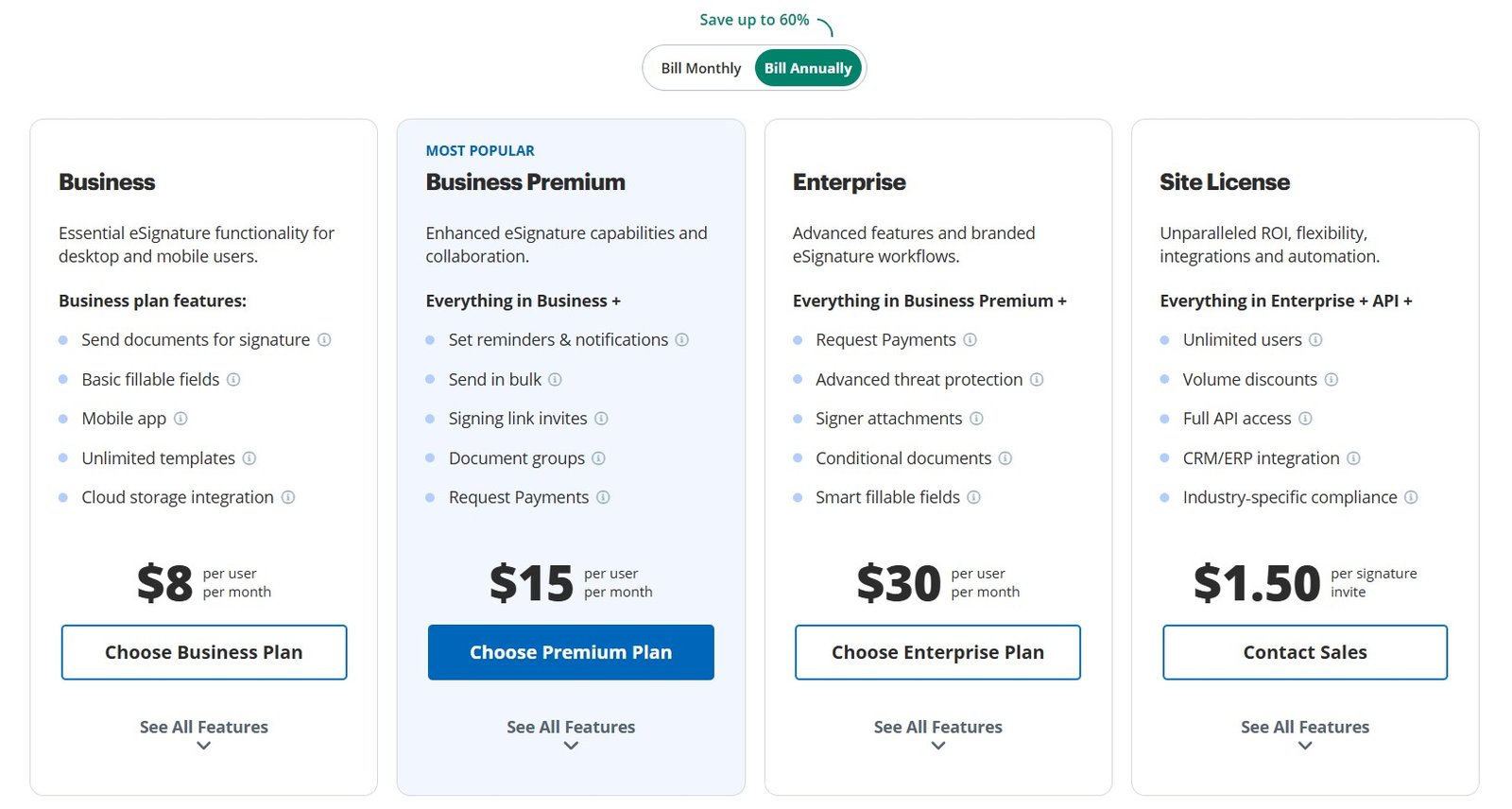
airSlate SignNow pricing starts at $8/user/month on annual billing — with up to 60% savings over monthly plans. A 7-day free trial and 30-day money-back guarantee are available on all plans.
- All signing options (draw, type, upload, pad)
- Customisable fields and templates
- 100 signature requests per year per user
- Document tracking and audit trail
- Cloud storage (Box, Dropbox)
- 1 additional in-person signer
- 270+ integrations
- 7-day free trial
- All Essentials features
- 2 additional in-person signers
- Advanced document settings
- Priority support
- All Business features
- Bulk document sending
- Advanced workflow automation
- 2 additional in-person signers
- All Business Premium features
- Custom branding on signing pages
- Payment collection fields
- HIPAA compliance and BAA
- Dedicated account manager
- Advanced admin controls
All plans include a 7-day free trial and a 30-day money-back guarantee — full risk-free evaluation period. Annual billing saves up to 60% compared to monthly billing. At 100 signature requests per year per user, the per-request cost on the Essentials plan works out to approximately $0.96 per document signed at the $8/month rate. Always verify current pricing at signnow.com.
Security and Compliance
SOC 2 Type II Certified
Annual independent audit of security controls confirming that SignNow meets enterprise-grade data security and availability standards.
ESIGN and UETA Compliant
Signatures are legally enforceable under US federal (ESIGN Act) and state (UETA) electronic signature law — the same legal standing as handwritten signatures.
eIDAS Compliant
Meets EU eIDAS requirements for electronic signatures — legally enforceable for business contracts across EU member states.
HIPAA Compliant (Enterprise)
Enterprise plan includes HIPAA compliance and Business Associate Agreement (BAA) — required for healthcare businesses handling Protected Health Information.
Malware Scanning
All uploaded documents are automatically scanned for malware on upload — protecting all parties from malicious file attachments within the signing workflow.
Two-Factor Authentication
Signer authentication can be configured to require 2FA before document access — preventing unauthorised parties from completing a signing request.
Customer Support
SignNow provides multiple support channels, with availability varying by plan tier:
- 24/7 live chat — available across all paid plans. Agents typically respond quickly and answer thoroughly — the live chat quality is a consistently positive element in user reviews.
- Email/ticket support — submit a detailed support request with a specified topic (selected from a dropdown menu) for issues that benefit from asynchronous communication.
- Phone support — available only for airSlate Business Cloud plan subscribers. Lower-tier plan users do not have access to phone support.
- Knowledge base and FAQ — a self-service resource covering common questions. Note that some FAQ articles contain outdated information — the frequently updated blog is often more current for specific questions.
- SignNow Academy — a separate learning resource providing structured courses on using electronic signature software. Requires a separate subscription but provides meaningful depth for teams implementing SignNow at scale.
Live chat support quality is generally strong and responsive, which is the channel most users will interact with most frequently. The absence of phone support on lower tiers is a limitation, but for the vast majority of issues encountered with e-signature software, live chat and email support are sufficient. If phone support is a hard requirement, the airSlate Business Cloud plan or Enterprise plan is needed.
Who Should Use airSlate SignNow?
🏢 Small and Medium Businesses
The core target market for SignNow. Affordable pricing, comprehensive features, and 270+ integrations make it the most complete e-signature package at the SMB price point — particularly compared to DocuSign at higher monthly costs.
💼 Digital Agencies and Consultancies
Agencies signing client onboarding agreements, project contracts, and NDAs benefit from SignNow's template library and multi-party routing. The Salesforce integration is particularly valuable for agencies managing client relationships in a CRM.
👥 HR and Recruiting Teams
Employment contracts, offer letters, policy acknowledgements, and onboarding documents — all high-frequency signing events for HR teams that benefit from SignNow's templates, bulk send, and automated reminder workflows.
🏠 Real Estate Professionals
In-person signing support, multi-party document routing, and the ability to send from mobile devices make SignNow practical for agents executing purchase agreements, lease contracts, and disclosure forms in field environments.
🏥 Healthcare Providers (Enterprise)
The Enterprise plan's HIPAA compliance and BAA availability make SignNow suitable for healthcare businesses that need to collect patient consent, authorisation forms, and treatment agreements with regulatory compliance.
🌍 Remote and International Teams
Browser-based signing (no app download) and mobile-first design allow documents to be signed from anywhere in the world on any device — essential for distributed teams and international client bases.
Try airSlate SignNow Free for 7 Days
Full feature access · 7-day trial + 30-day money-back guarantee · No credit card required to start · From $8/user/month on annual plans
Frequently Asked Questions About airSlate SignNow
Yes. Signatures executed through airSlate SignNow are legally binding in the United States under the ESIGN Act and UETA, in the EU under eIDAS, and in many other jurisdictions worldwide. The platform maintains a tamper-evident audit trail for every document — recording who signed, when, from which IP address and device, and what the document contained at the moment of signing. This audit trail is the evidence that makes an e-signature legally enforceable and dispute-resistant. For the vast majority of business documents — contracts, NDAs, employment agreements, service agreements — a properly executed SignNow signature provides the same legal standing as a wet ink signature on paper.
No. Recipients do not need a SignNow account or any app installed to sign a document. They receive an email with a signing link, click the link, and the document opens in their browser on any device — desktop, tablet, or smartphone. They can sign using any of the available methods (draw, type, upload their existing signature) and return the completed document in minutes. This frictionless experience for recipients is one of the most important factors in achieving high completion rates — requiring account creation would significantly reduce the proportion of documents that get signed promptly.
airSlate SignNow's Essentials plan starts at approximately $8/user/month on annual billing — with the full platform offering up to 60% savings on annual vs monthly billing. The Business plan is around $15/user/month, Business Premium around $23/user/month (which adds bulk send and advanced automation), and Enterprise has custom pricing for organisations needing HIPAA compliance, custom branding, and payment collection. All plans include a 7-day free trial and a 30-day money-back guarantee. Verify current pricing directly at signnow.com as rates may change.
SignNow integrates with over 270 business applications. The most commonly used integrations include Microsoft Teams, Microsoft 365 (Word, Outlook), Google Drive, Google Workspace, Salesforce (for pre-filled contract generation and automatic activity logging), AWS, Box, Dropbox, and Zapier (which connects SignNow to thousands of additional tools). The Salesforce integration is particularly valuable for sales teams — contracts can be generated pre-filled from CRM data and signed documents are automatically logged against the relevant Salesforce record without manual data entry. For a full list of SignNow integrations, see our SignNow industry use cases guide.
Both SignNow and DocuSign are strong, fully-featured e-signature platforms with comparable compliance certifications and core signing capabilities. The primary differences are in pricing and ecosystem depth. DocuSign's entry-tier pricing is approximately double SignNow's at comparable feature levels — making SignNow significantly more affordable for small to medium businesses that do not need DocuSign's enterprise-specific features or its deeper Salesforce integration. DocuSign has a larger market share and broader brand recognition, which can matter in enterprise procurement decisions. For smaller businesses and entrepreneurs, SignNow typically provides equivalent operational value at materially lower cost. See our detailed SignNow vs DocuSign comparison for a full breakdown.
HIPAA compliance is available on SignNow's Enterprise plan. The Enterprise plan includes HIPAA compliance features and, critically, SignNow will execute a Business Associate Agreement (BAA) with Enterprise subscribers — which is a legal requirement for any vendor handling Protected Health Information (PHI) under HIPAA. Healthcare practices, medical offices, telehealth providers, and health insurance businesses that need to collect patient consent forms and authorisation documents electronically should ensure they are on the Enterprise plan and have a signed BAA in place. HIPAA compliance is not available on the Essentials, Business, or Business Premium plans.
Final Verdict — Is airSlate SignNow Worth It?
airSlate SignNow delivers a strong case for the title of best-value e-signature platform in the market. Starting at $8/user/month with 270+ integrations, multiple signing methods, robust security, comprehensive document tracking, and workflow automation, it provides a feature set that competes with platforms charging significantly more — while maintaining a clean, intuitive experience that most team members can learn without training.
The limitations are genuine but narrow: no permanent free plan (only a 7-day trial), phone support restricted to top-tier plans, and the broader airSlate product ecosystem can be confusing for users who just want a standalone e-signature tool. For solo operators signing fewer than a few documents per week, lighter tools may be more appropriate.
For small and medium businesses, agencies, HR teams, real estate professionals, and any organisation that signs documents regularly and needs reliable compliance coverage at a competitive price, airSlate SignNow is one of the clearest recommendations in the e-signature category.
Start Your airSlate SignNow Free Trial
7-day free trial + 30-day money-back guarantee · Full feature access · From $8/user/month annual · Legally binding e-signatures in minutes