

Table of Contents
- Why Start a Blog in 2026?
- What You Need to Start
- Step 1: Choose a Web Host
- Step 2: Choose Your Blog Niche
- Step 3: Install WordPress
- Step 4: Choose Your Blog Theme
- Step 5: Install Essential Plugins
- Step 6: Create Great Content
- Step 7: Promote Your Blog
- Mistakes That Kill Blog Growth
- Frequently Asked Questions
Why Start a Blog in 2026?
Most of the advice on the internet about how to start a blog is outdated. Taking blogging advice from someone who built their audience ten years ago is like asking for driving directions from someone still reading a paper map. The blogging landscape has fundamentally changed, and the strategies that work in 2026 are very different from what worked in 2015.
Here is what has not changed: a well-built blog is still one of the most powerful business assets you can own. I launched this blog in 2018 and turned it into a six-figure business within two years.
The system I used is the same one I teach inside AIpreneur Academy, and in this step-by-step guide, I am sharing the same process with you for free.
By the end of this guide, you will have:
- A live WordPress blog on your own hosting
- A professional theme installed and configured
- The essential plugins that power serious blogs
- A content strategy built on search intent
- A promotion and monetisation plan ready to execute
What You Need to Start a Blog
Bluehost gives Nwaeze David readers 63% off hosting plus a free domain name. No technical skills required.
Your web host is the foundation everything else sits on. Before proceeding with this step, review our full list of the best WordPress hosting services for a complete comparison. For this guide, I am using Bluehost, one of WordPress.org's officially recommended hosts and the best beginner setup at the lowest cost with the most features.
Here is my recommended beginner setup; follow these steps exactly to get your self-hosted WordPress blog live in under 30 minutes:
- Click here to go to Bluehost.com (that link applies your reader discount automatically) and click Get Started Now
- Choose the Choice Plus Plan — it includes domain privacy and automated backups at the same price as the Plus tier
- Enter the domain name you want to use (e.g., yourblogname.com)
- Enter your account information
- Under Package Information, choose your account plan length. A 30-day money-back guarantee applies to all plans, so there is no risk.
- Uncheck the Package Extras — you do not need them
- Complete your purchase, choose your password, and log in to your Bluehost account
- Answer the onboarding questions or skip them, but choose "Blog" when prompted
- Click "Skip" when it comes to selecting a theme — we will handle that in Step 4
- From the Bluehost dashboard, click the WordPress button on the top right. You will land on your WordPress dashboard.
You now have your own self-hosted WordPress blog. Self-hosted means you own the platform, you control the monetisation, and no one can take it down or limit what you do with it.
Choosing a Great Domain Name
Your domain is your brand on the internet. Here are the rules I follow when choosing one through a domain registrar:
- Make it memorable and not too difficult to type
- Keep the spelling simple and easy to pronounce — if you have to spell it out on the phone, it is too complicated
- Avoid using numbers and hyphens — they confuse people and hurt word-of-mouth referrals
- Keep the name broad enough to pivot to an adjacent niche later without the domain becoming misleading
- Go with a .com extension wherever possible — it is the most trusted and most clicked in search results

Choosing the right niche is the most important strategic decision you will make as a blogger
At this point, you know your blog needs a niche. Whether it is digital marketing, personal finance, health and fitness, parenting, food, or travel, there are endless topics you can blog about. The problem is that most blogging advice about choosing a niche is wrong.
Most bloggers will tell you to start with something you are passionate about. They say passion helps you "maintain a consistent writing schedule and push through failure." They will also tell you to find the intersection of passion, skills, and experience. If you want to make money blogging, this model is flawed — because it is missing the most important component: you as a brand.
As a blogger, you are the brand. Your niche is not just a topic — it is the combination of what you can teach, who you can reach, and where you have leverage that others do not.
The 4-Part Niche Framework
1. What Can You Teach?
What subjects can you explain easily and confidently? What knowledge do you have that others would pay to learn? Start here.
2. Where Is Your Experience?
Not what you want to be an expert at — what you already have a proven track record of succeeding at. Your expertise is what lets you monetise fast as a new blogger.
3. Can You Monetise It?
Passion does not pay the bills alone. Ask yourself honestly: are there affiliate products, courses, services, or advertisers in this niche? Is there buyer intent?
4. What Leverage Do You Have?
Do you have connections, insider knowledge, a unique skill set, or lived experience that others in this niche cannot match? That leverage is your competitive advantage.
Before finalising your niche, ask: "How can I uniquely extract value from this market?" Being passionate about a niche is not enough if you cannot position yourself distinctly within it. Your unique angle — your lived experience, your audience, your perspective — is what separates a profitable blog from an average one.
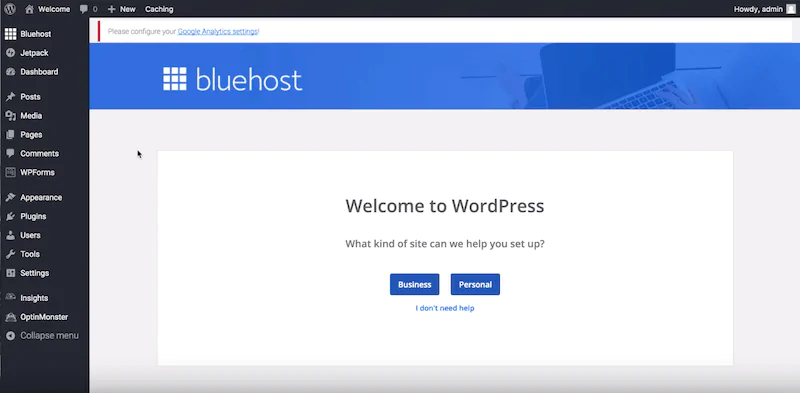
The WordPress welcome screen — your starting point after one-click installation via your hosting dashboard
Self-hosted WordPress is the best blogging platform for new bloggers because it gives you complete freedom and flexibility to design the blog you want, monetise however you choose, and install any plugins or tools you need. It powers over 43% of all websites on the internet for good reason.
Bluehost automatically installs WordPress with a single click directly from your hosting dashboard — making setup genuinely straightforward. After the installation is complete:
- You will land on a page prompting you to pick a theme — skip this for now, we will handle it in Step 4
- Click "Start Building" on the next page
- Select the type of site you are creating (Blog) and follow the prompts, or click "I don't need help" to go directly to your dashboard
- Enter your Site Title and Site Description
- Spend a few minutes familiarising yourself with the WordPress dashboard — the left sidebar is your primary navigation
You can always log in to your WordPress admin at yourdomain.com/wp-admin. Bookmark this URL immediately — you will visit it every time you work on your blog.
A WordPress theme controls the visual design of your blog — its layout, fonts, colours, and structure. When you first install WordPress, a default theme is applied automatically. Your blog will look something like this:
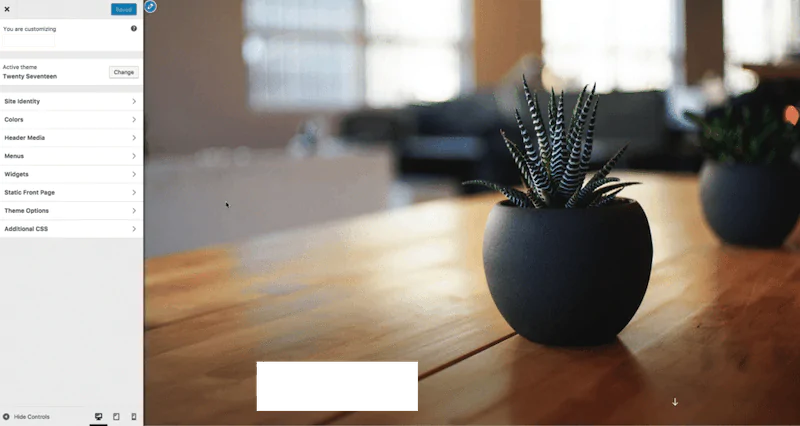
Default WordPress theme — what your blog looks like before installing a proper theme. This needs to change before you launch.
You have two options when choosing a theme:
Option 1 — Free or Freemium Themes: My recommendations are Kadence (excellent free version, best for beginner bloggers) and ThriveThemes (optimised for conversions and email list building). Both are well-supported, fast, and regularly updated.
Option 2 — Premium Themes from a Marketplace: Browse and purchase a professional WordPress theme from ThemeForest (Envato Market) — the largest marketplace for premium WordPress themes, with options for every niche and design preference.
How to Install a New Theme in WordPress
Log in to your WordPress admin at yourdomain.com/wp-admin. Your dashboard will look like this:
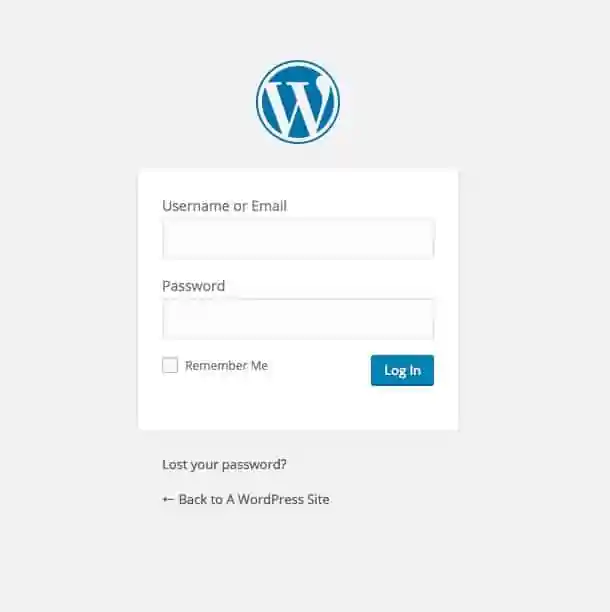
WordPress login page — access your admin at yourdomain.com/wp-admin
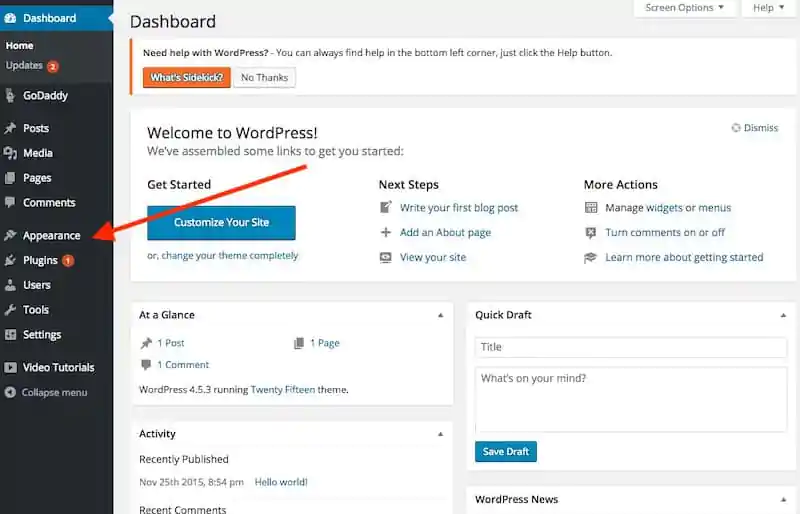
WordPress dashboard — your blog's main control panel. The left sidebar gives you access to everything.
From your WordPress dashboard, click Appearance in the left sidebar, then click Themes:
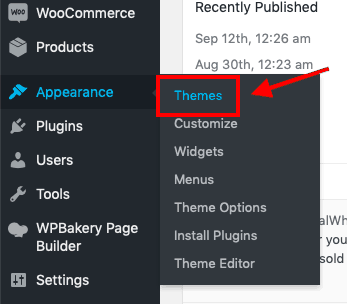 Themes menu in the sidebar" />
Navigate to Appearance > Themes from the WordPress sidebar
Click Add New at the top of the page to browse WordPress's free theme library:
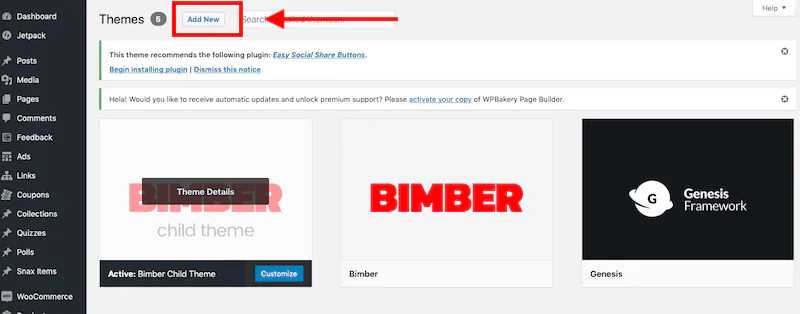
Click Add New to browse thousands of free themes from the WordPress repository. Preview multiple themes before choosing.
If you are installing a theme from an external source like ThriveThemes, Kadence, or ThemeForest, you will have downloaded a .zip file. Go to Appearance > Themes > Add New, click Upload Theme, choose the zip file, and click Install:
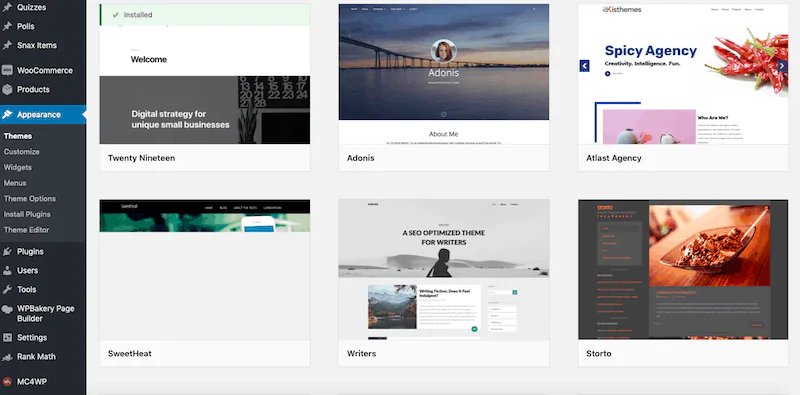
Browse free WordPress themes and click Preview to see how each looks before activating
Do not spend weeks agonising over your theme before launching. Pick a clean, fast theme (Kadence is excellent and free), launch, and refine as you grow. A mediocre design with great content will always outperform a beautiful design with poor content.
Plugins extend WordPress's functionality. When starting a blog, focus on a small set of essential plugins that directly improve SEO, speed, and content quality. Avoid installing unnecessary plugins — each one adds load time and potential conflicts.
Here are the four plugins I use on every blog I build:
🏭 Elementor Pro
The drag-and-drop page builder I used to create my homepage, about page, and landing pages. The free version is useful, but Elementor Pro unlocks significantly better templates, theme builder capabilities, and popup forms that are essential for list building. This is the single most important design tool on my blog.
📷 WP-Optimize
Compresses all images and screenshots automatically so they are smaller files that load faster. It also cleans your database and caches your pages. I have tested many image compression tools and WP-Optimize consistently performs the best without visible quality loss.
⚡ WP Rocket
The best all-in-one site speed plugin available. WP Rocket minifies HTML, CSS, and JavaScript; integrates with your CDN; reduces database bloat; enables lazy loading; and dramatically improves Core Web Vitals scores — all through a clean dashboard without touching code. Starts at $49/year. Worth every cent.
🔎 RankMath SEO
Manages your sitemap, robots.txt, SEO title tags, meta descriptions, schema markup, and 404 redirects. Includes an AI headline analyser, keyword rank tracking integration, and built-in suggestions as you write each post. A strong alternative is AIOSEO — both are excellent.
Install only what you need. Every unnecessary plugin slows your site and creates potential security vulnerabilities. If you do not know what a plugin does or why you need it right now, do not install it.

Modern bloggers use AI writing tools to create content faster without sacrificing quality
Your blog is live, your theme is set, your plugins are installed. Now comes the part that matters most: creating content that actually ranks on Google and converts readers into subscribers and customers.
Blogs in 2026 are not personal journals where you post random updates. They are Google-driven content businesses. Every post you publish needs to target a specific keyword, match the search intent behind that keyword, and provide a better answer than what is currently ranking. This is on-page SEO — and it must be built into every post you write.
On-Page SEO Checklist for Every Post
When you write your first blog post and every one after it, focus on one main target keyword and place it in these locations:
- The permanent URL (slug) of your post
- The title of your post (H1)
- The first or second paragraph of your content
- At least one H2 or H3 subheading
- Naturally throughout the body of your post
- The meta description
- The alt text of your featured image
Writing for Search Intent
Search intent is the psychology behind a search query. It is the most important concept in content strategy, and understanding it separates bloggers who rank from bloggers who do not.
Example: Your target keyword is "How to Get Rid of Pimples." When you search this in Google, you notice that the highest-ranking posts include terms like Fast, Overnight, Quickly, and Home Remedies in their titles:

Google search results reveal search intent: people searching this keyword want pimples gone quickly and discreetly — not a comprehensive guide to skincare
This data tells you exactly what people want: a quick fix, not a comprehensive educational guide. Do not write "The Ultimate Guide to Understanding Pimples." Write "7 Ways to Get Rid of Pimples Overnight" — matching exactly what searchers want.
Use DIIB and SurferSEO to analyse search intent and optimise your posts. Use Jasper AI to speed up the writing process without sacrificing quality.
Writing Tips for High-Quality Blog Posts
- Provide genuine value. Write with a clear beginning, middle, and end. Make even ordinary topics compelling by structuring them as a problem-solution narrative.
- Make your content visually accessible. Mix text with images, screenshots, infographics, and embedded videos. Content with multiple media types keeps readers engaged significantly longer.
- Format headings correctly. Use H2 for main sections and H3 for subsections. No paragraph should exceed 3–4 sentences. Short paragraphs are not a stylistic choice — they are essential for readability on mobile.
- Write conversationally. Especially in your first posts. A conversational tone builds emotional connection with readers faster than formal writing.
- Use readable fonts and white space. Body text should be no wider than 850px. Line spacing should be generous. White space is not wasted space.
- Bold your most important sentences. Readers scan before they read. Bolded text acts as a second headline that stops skimmers and draws them into the full paragraph.
- Eliminate typos and grammatical errors. Use Grammarly or a similar proofreading tool before publishing every post.
The 5 Pages Every Blog Needs at Launch
1. Home Page
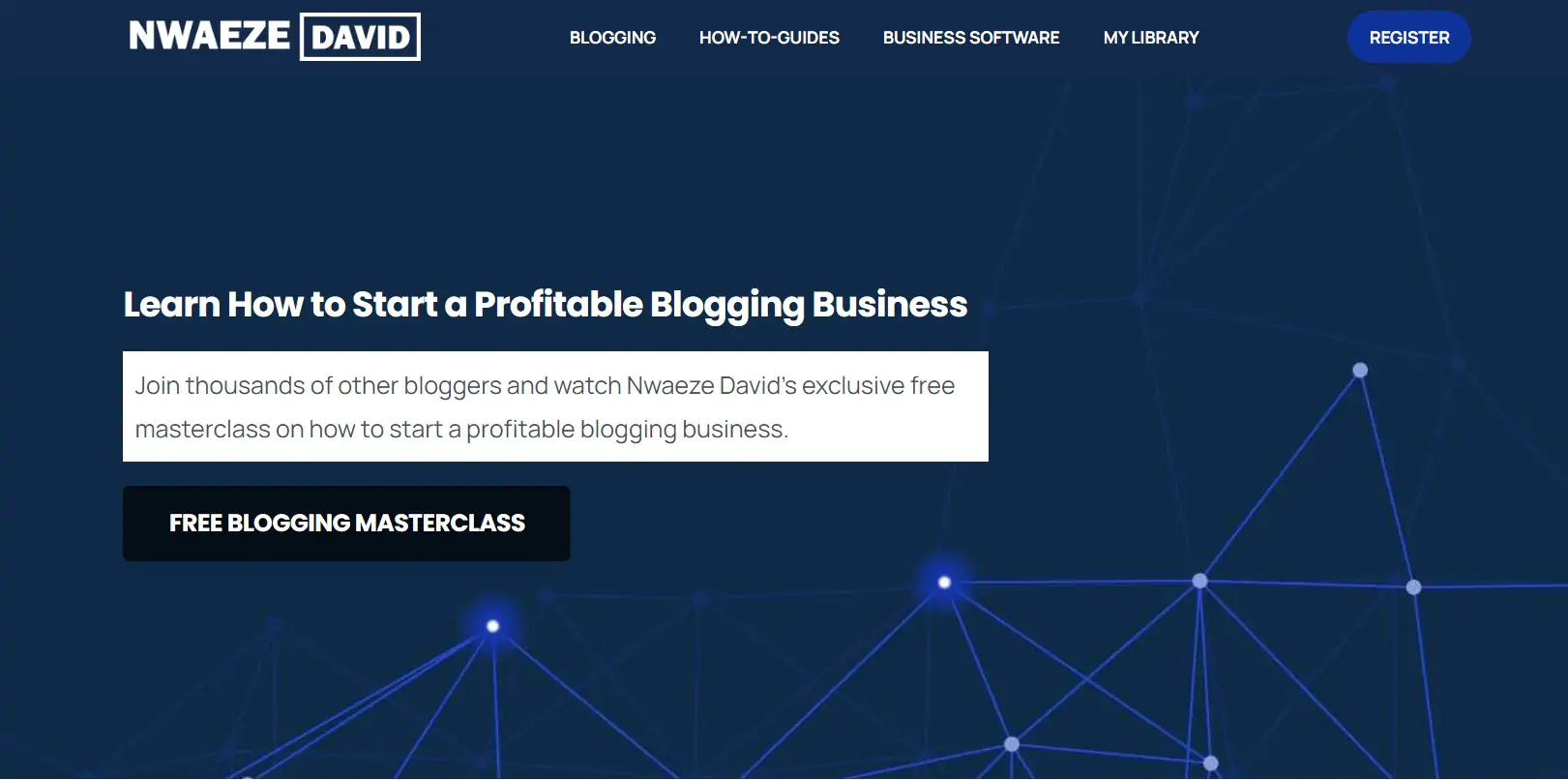
A professional blog homepage communicates your value proposition immediately and directs readers to your most important content
Your homepage should sell your unique value proposition within two seconds. If a visitor cannot immediately understand what your blog is about and who it is for, they will leave. Build your homepage with Elementor and make sure it includes: a hero section with your headline and subheadline, a clear primary call-to-action, internal links to your key content, and an email opt-in form.
2. About Page
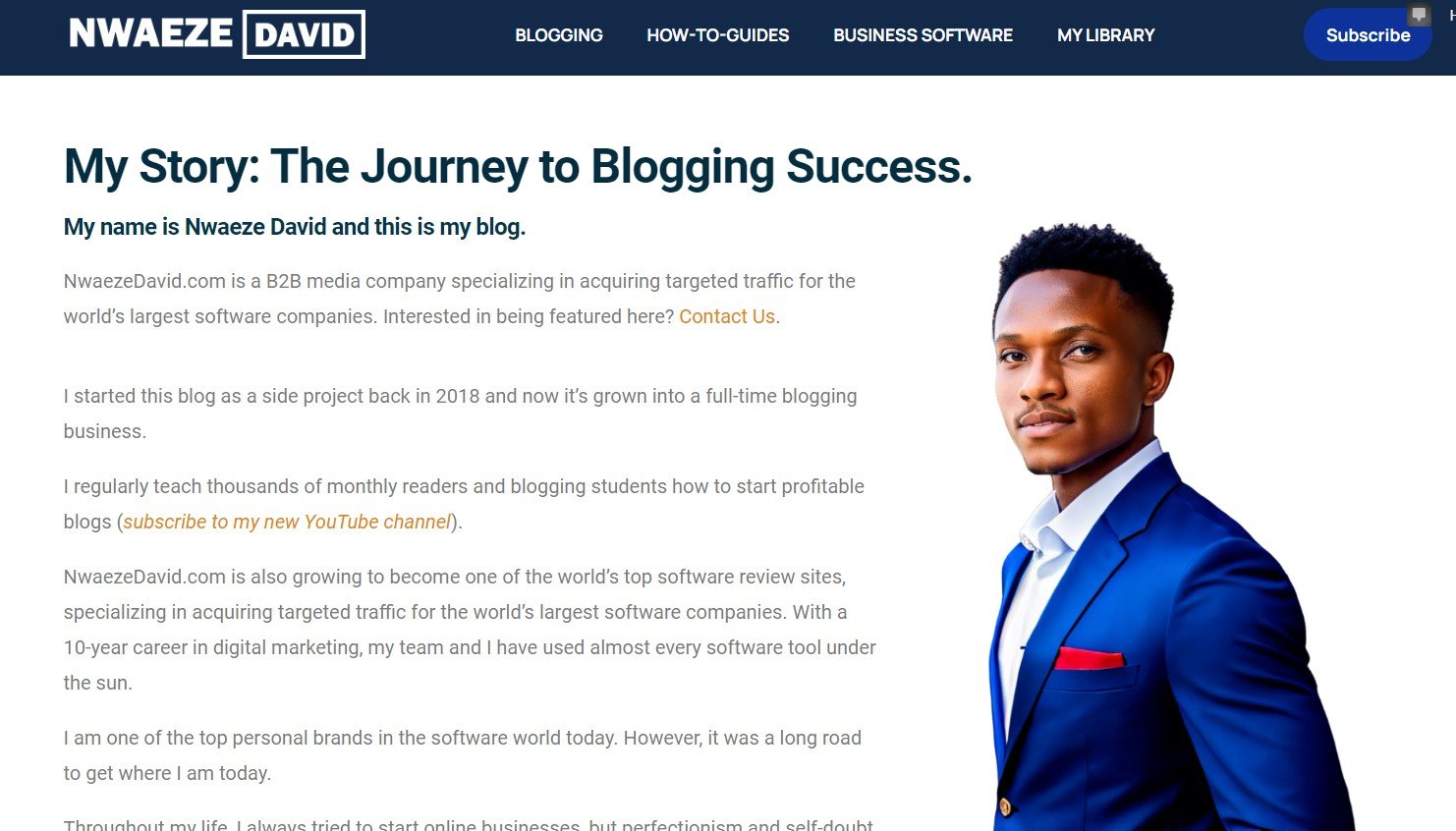
Your About page is where readers decide whether to trust you. Make it personal and honest — write it like a story, not a CV.
Your About page is often the second most visited page on a new blog. Write it like a story — not a list of credentials. Cover who you are, what made you start your blog, your expertise and background, the problem you solve, and a call-to-action. People connect with vulnerability and shared experience, not boasting. Show your struggles alongside your wins.
3. Blog Post Template
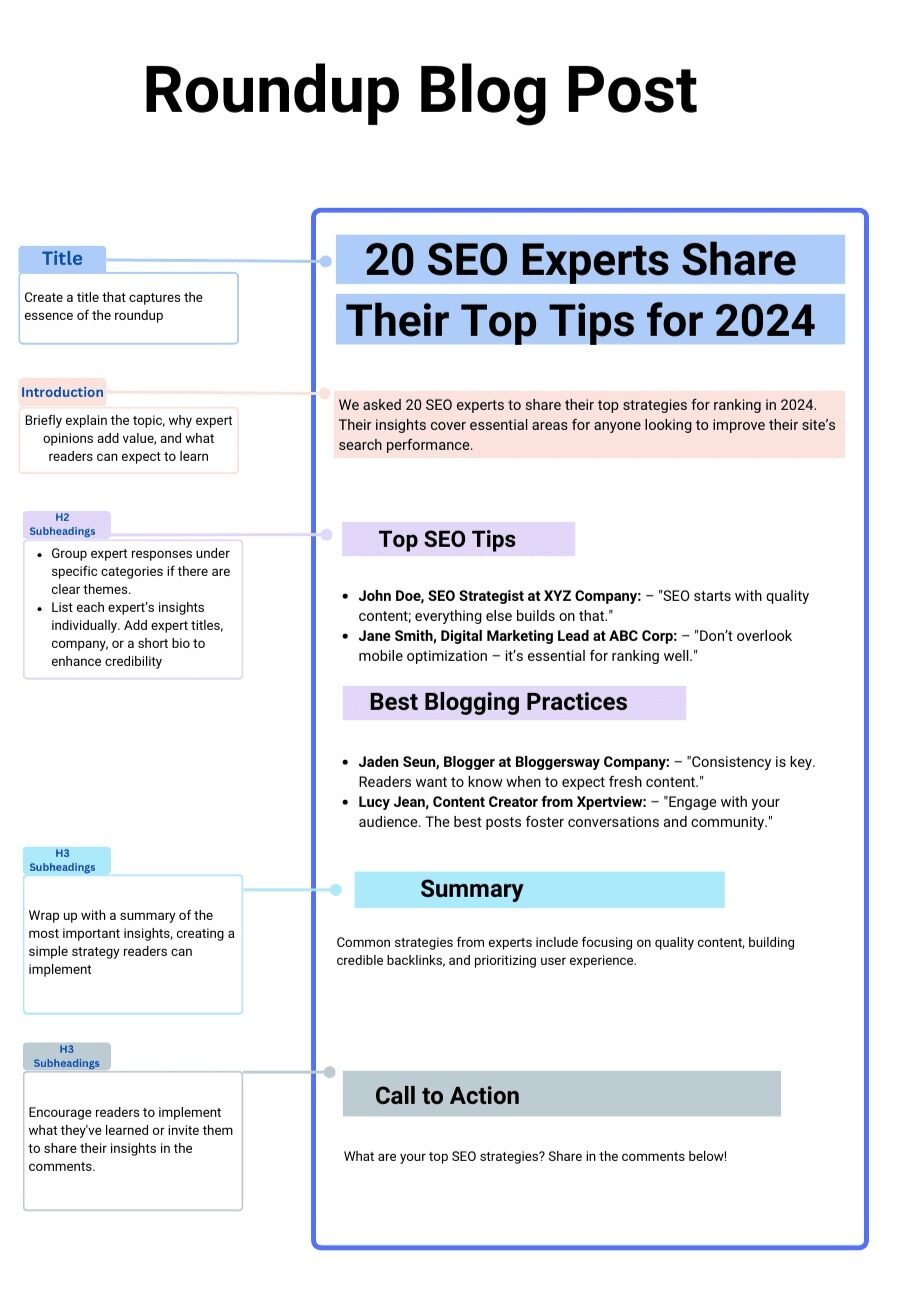
Establish a consistent blog post template before publishing your first post. Consistency in format improves readability and makes content creation faster over time.
Before publishing your first post, establish a consistent template for how your posts look. This includes text size, font, background colour (black text on white background is non-negotiable), maximum text width (no wider than 850px), line spacing, and heading hierarchy. A consistent template makes every post faster to produce and easier for readers to navigate.
4. Blog Archive Page (/blog)
Every blog needs a /blog page — a chronological archive of all your posts. Keep it simple: display no more than 10 posts per page with a clear, scannable layout. This is also what you link to from your navigation menu so readers can explore your full content library.
5. Contact Page
A simple contact form is essential for reader inquiries, collaboration requests, and media outreach. Include a confirmation message when someone submits the form (“Thank you for reaching out. I will get back to you as quickly as possible.”) and make sure the form submits to your active email address.
Content Planning: Your Keyword Spreadsheet
Before writing each new post, evaluate it against these keyword metrics in a simple spreadsheet:
- Target keyword — what search query are you targeting?
- Blog post title — the headline that matches search intent
- Monthly search volume — how many people search for this per month?
- Keyword difficulty score — how hard is it to rank for?
- Priority — high / medium / low based on the above
This spreadsheet becomes your content roadmap. Start with lower-difficulty keywords that have meaningful search volume, build your domain authority over the first 6–12 months, then progressively target more competitive keywords as your rankings grow.
You could have the best blog in the world. If you have no visitors, none of it matters. Promotion is as critical as creation — and in 2026, the most important promotional activity is building links to your blog.
Links are the currency of the internet. The more high-quality links pointing to your blog, the more Google trusts it — and the faster your new posts rank after publishing. Here are the most effective blog promotion strategies:
Guest Blogging
Guest blogging is one of the most powerful promotional strategies available because it accomplishes three things simultaneously: it builds your authority in your niche, earns backlinks to your blog, and exposes you to a new, relevant audience. The key to guest blogging is approaching it from a value-giving perspective — what can you contribute to the host blog's readers? Approach other bloggers with a clear, compelling pitch focused on the value you will deliver to their audience, not on what you want in return.
Link Building Strategies That Work
Guest posting is one link-building approach among many. Here are the others that work consistently:
- Create inherently linkable content: Unique research, original statistics, comprehensive resources, and detailed case studies attract links naturally without outreach. This is the highest-return form of link building.
- Broken link building: Use Ahrefs to find blogs in your niche with broken external links. Email the site owner noting the broken link and suggesting your relevant content as a replacement. You solve their problem; they give you a link.
- Link reclamation: Search for your brand name or blog name in Ahrefs Content Explorer to find mentions of your site that are not linked. Contact the author and ask them to add the link.
- Link partnerships: Build genuine relationships with other bloggers in your niche. Cross-link to each other's content where contextually relevant.
- Competitor backlink research: Use Ahrefs to see which sites are linking to your competitors and reach out to those same sites with your content.
SEO Technical Foundations
Getting found in search engines requires more than great content. Make sure these technical elements are in place:
- Title tags: Your SEO title appears in search results and must include your target keyword while compelling people to click. Keep it under 60 characters.
- Meta descriptions: The preview text below your title in Google. Write these to include your keyword and summarise the value of the post. Under 160 characters.
- Sitemap: Submit your XML sitemap via Google Search Console so new content is indexed as quickly as possible. RankMath and AIOSEO both generate and submit sitemaps automatically.
- On-page SEO: Target keyword in the URL, H1, first H2 as a question, and naturally throughout the content. Use SurferSEO to optimise each post against what is already ranking.
Social Media Promotion
Choose one or two social platforms where your target audience is most active and commit to consistent presence there. Do not try to be everywhere at once.
Repurpose your blog content into short-form posts, carousels, and clips for social. The goal is to drive social followers back to your blog where you capture them on your email list.
Common Mistakes That Kill Blog Growth
If you have been blogging for any period of time and not seeing the results you want, one of these mistakes is likely the reason.
Focusing on Inputs Instead of Outputs
One of the most common blogger mistakes is spending all your time on inputs — researching topics, writing content, tweaking your design — without focusing on outputs: getting your content in front of people. Publishing great content is only half the job. If you are spending 90% of your time creating and 10% promoting, reverse that ratio until you have more traffic.
Ignoring Link Building
Many bloggers avoid link building because it feels uncomfortable or like too much work. But without backlinks, even excellent content will remain invisible in search results. Link building is not optional — it is how your blog gets taken seriously by Google. Start with guest posting and broken link building as your primary tactics.
Having No Content System
If you publish only when inspiration strikes, your blog will never gain traction. Readers and search engines both reward consistency. Build a content system: a keyword research process, a writing workflow, a publishing schedule, and a promotion checklist for every post. That system becomes the engine of your blog business.
Expecting Overnight Results
New blogs typically take 6–12 months to gain meaningful organic traction. This is not a flaw in the strategy — it is how SEO works. Google takes time to trust new sites. Do not evaluate your strategy at month two. Build consistently, trust the process, and keep publishing.
Having Unrealistic Monetisation Expectations
Many new bloggers expect to be earning significant income within a few weeks and give up when that does not happen. Realistic expectation: most bloggers see their first meaningful income between 6 and 18 months of consistent effort. Bloggers who earn faster are typically those with a monetisation plan from day one — affiliate links placed correctly from the first post, not added later as an afterthought.
Not Building an Email List from Day One
Your email list is the most valuable asset your blog can own. Unlike social media audiences, your email list cannot be taken from you by algorithm changes. Every month you delay starting your list is a month of potential subscribers lost forever. Set up an email opt-in form before you publish your first post — even if only ten people sign up in month one.
Ready to Launch Your Blog?
Start your self-hosted WordPress blog today from $2.95/month with Bluehost — free domain included. Join AIpreneur Academy for the complete blogging course that took me from zero to six figures.
FAQs On How To Start a Blog
The minimum cost to start a professional self-hosted WordPress blog is approximately $30–$50 for the first year. This breaks down as: hosting from Bluehost at $2.95/month (totalling about $35 for a 12-month plan) with a free domain name included. Beyond the basics, I recommend budgeting for WP Rocket ($49/year for speed), which is the one paid plugin I consider non-optional for a serious blog. Everything else — WordPress itself, RankMath SEO, WP-Optimize, Kadence theme — is free. For a fully professional setup including Elementor Pro and ThriveThemes, budget around $150–$200 for the first year. You can always start lean and add premium tools as your blog begins generating income.
No — you do not need any coding knowledge to start a professional blog in 2026. WordPress with Elementor as your page builder handles all design and layout through drag-and-drop. Your hosting provider (Bluehost) handles server setup. Your plugins (RankMath, WP Rocket) handle SEO and performance. The entire setup described in this guide requires zero code. That said, as noted in the blogging tips guide, developing a basic familiarity with HTML and CSS over time gives you more control and saves money on developer fees. But it is not a prerequisite for starting.
I recommend having at least 5–10 published posts before actively promoting your blog to new audiences. This ensures that when a new visitor discovers your blog through promotion, there is enough content for them to explore and a reason to subscribe or return. However, do not use "I need more content first" as a reason to delay promotion indefinitely. You should be promoting from day one through SEO optimisation (every post you publish is promotion if it ranks), and active outreach should begin once you have your first 5 posts live. The blog post that gets you your first link, your first subscriber, or your first affiliate commission is never the hundredth post you wrote — it is usually one of your first ten.
Absolutely — and this is exactly what I did. I launched this blog from Nigeria in 2018 and earned my first international affiliate commissions within 6 months. There are no geographic restrictions on blogging income. The keys for African bloggers are: write content in English targeting international search audiences, monetise with affiliate programmes that pay internationally (PartnerStack, ShareASale, Impact, Amazon Associates), collect earnings via Wise, Payoneer, or Grey.co, and run your hosting and tools on international payment methods. The operational infrastructure exists to run a globally competitive blog from anywhere in Africa.
This is one of the most common sources of confusion for new bloggers. WordPress.com is a hosted blogging platform where WordPress provides both the software and the server. It is free at the entry level but restricts monetisation, limits plugin installation, and means your blog ultimately lives on WordPress's platform rather than one you own. WordPress.org is the self-hosted option: you download the free WordPress software and install it on your own hosting account (like Bluehost). This is what every serious blogger uses because it gives you complete ownership, unlimited plugin access, and full control over monetisation. When I say "install WordPress" in this guide, I always mean WordPress.org — self-hosted.
The fastest path to first income for most new bloggers is affiliate marketing — particularly through programmes like PartnerStack, Amazon Associates, or direct brand partnerships in your niche. Place affiliate links naturally within your posts from day one, targeting keywords with buyer intent (comparison posts, review posts, "best X" posts). Your first affiliate commission can come from your very first post if it targets the right keyword and includes the right link. Other fast-to-income paths include: selling a simple digital product (ebook or template) from your first month, and offering 1:1 consulting or services in your niche while your organic traffic builds. Display advertising (AdSense, Mediavine) should generally be your last monetisation focus, not your first — it requires significant traffic to generate meaningful income. For the full monetisation breakdown, see our guide: 41+ Best Blogging Tips to Make Your First $25k/Month.

What is AI and What Does it Mean for Technology?
This is quite interesting
Interesting to learn
Very interesting
Thanks for coaching
I will learn more from u.
This so great…This for this great opportunity
This post is very impactful nice one thanks for sharing
This is really good 👍
This is really amazing
This is amazing
Amazing
This is really great
That’s self explanatory
I like this
This is incredible
Nice one
Very Helpful and detailed. Thank you
This is very interesting to learn
Very helpful details I love this information
This is very helpful, thanks.