📋 Table of Contents

Auvik — the cloud-based network management platform giving IT teams and MSPs real-time network maps, automated configuration backups, traffic analysis, and proactive alerting across every device on the network.
Most businesses do not lose money to spectacular cyberattacks. They lose it to slow troubleshooting, unexpected downtime, and IT teams spending hours manually tracing which device is connected to which switch on a network that nobody has properly documented in years. The map in someone's head and the map on paper rarely match the network that is actually running.
Auvik is a cloud-based network management platform that solves this problem at scale. It automatically discovers every device on your network, builds and maintains a live topology map, monitors performance metrics in real time, backs up device configurations automatically, and alerts you to problems before users start noticing them.
For IT teams, managed service providers (MSPs), and small businesses that take their network infrastructure seriously, Auvik removes the manual monitoring burden that quietly consumes enormous amounts of IT time.
This review covers Auvik's features, pricing, how it works technically, and who it is best suited for — giving you everything you need to evaluate whether it fits your network management requirements.
What Is Auvik Network Mapping Software?
Auvik Network Mapping Software (auvik.com) is a cloud-based network management and monitoring solution that automates the most time-consuming aspects of IT network oversight.
Rather than relying on manually updated network diagrams and spreadsheet-based device inventories, Auvik continuously scans your network, discovers all connected devices, and maintains a live, accurate network map that updates automatically as the network changes.
The platform is widely used by IT departments at small and medium businesses and by managed service providers (MSPs) managing networks across multiple client organisations.
Its multi-tenant architecture allows MSPs to monitor multiple separate client networks from a single Auvik account; simplifying the management of complex, distributed IT environments.
Auvik begins its discovery process as soon as installation is complete; scanning for devices, pulling topology data from protocols like CDP, LLDP, ARP tables, and VLAN associations, and immediately surfacing a network view that most teams have never had before.
Quick Verdict at a Glance
Auvik Pros and Cons
✓ What Auvik Does Well
- Easy onboarding and deployment — scanning begins immediately after collector installation
- Automated network discovery — continuous, no manual mapping required
- Automated configuration backups — protects against data loss
- Remote firewall access built-in — manage devices without being on-site
- Preconfigured and custom alerting — surface issues before users are affected
- Hardware lifecycle data — know when devices are approaching end-of-life or end-of-support
- Well-organised knowledge base for self-help and troubleshooting guidance
- Multi-tenant support — MSPs manage multiple clients from one account
- 14-day free trial available — no credit card required
✗ Limitations Worth Knowing
- Initial configuration of SNMP and server credentials can be complex for non-technical users
- Pricing — custom and typically on the higher end for small teams or startups with tight IT budgets
- Pricing is not publicly listed — requires a conversation or trial to get specific figures
- Agent-based deployment means individual collector setup is required per network segment
- Out-of-the-box KPI customisation has some limitations — advanced monitoring requires manual configuration
Auvik Features — Full Breakdown
🗺️ Automated Network Discovery and Mapping
Auvik's auto-discovery is the platform's foundational capability. The collector scans your network continuously (using CDP, LLDP, forwarding tables, ARP tables, IP assignments, and VLAN associations) to build a real-time, accurate picture of every device on the network and how each is connected. Layer 1, Layer 2, and Layer 3 topologies are all modelled and kept current as the network changes.
This eliminates the most common IT blind spot: networks grow, devices are added and removed, and manually maintained network diagrams become outdated within weeks. Auvik's map is always current because it is generated from live network data, not from a diagram someone drew six months ago.
When an issue occurs, your troubleshooting starts from an accurate picture of what the network actually looks like — not what it looked like at the last documentation update.
📊 Network Traffic Analysis — Auvik TrafficInsights
Auvik TrafficInsights provides deep visibility into what is actually consuming your network bandwidth. Using machine learning and traffic classification, TrafficInsights identifies which applications (Dropbox, Netflix, Slack, Zoom, Microsoft Teams, or any other recognisable application) and which protocols are using what proportion of available bandwidth at any point in time.
This data is actionable in ways that raw bandwidth monitoring is not. When users complain about slow performance, TrafficInsights tells you whether the issue is a rogue backup process consuming bandwidth, a video streaming application running during business hours, or a legitimate capacity constraint that justifies a network upgrade. The data makes the case for infrastructure investment in terms that business leadership can understand.
💾 Automated Configuration Backups
Network device configurations (the settings that define how your routers, switches, and firewalls operate) are among the most critical data in any IT environment.
Manual configuration backup practices are notoriously inconsistent; in practice, configurations often go unbacked for weeks or months between changes.
Auvik automatically backs up the running configuration of supported network devices on a scheduled basis and whenever a configuration change is detected.
The backup history is stored in the cloud and accessible from the dashboard, providing a reliable restore point if a misconfiguration causes an outage, and a change audit trail for compliance and troubleshooting.
📡 Performance Monitoring and Alerting
Auvik monitors key performance metrics across all discovered network devices and sends preconfigured alerts when thresholds are crossed or anomalies are detected.
Monitored metrics include network utilisation, CPU load, memory usage, disk space, interface error rates, latency, and uptime. Both real-time and historical data are available; Auvik stores network data for years, creating a rich archive useful for trend analysis, capacity planning, and retrospective troubleshooting.
Alerts can be preconfigured (available out of the box for common conditions) or custom-defined for specific thresholds and device types. Alert notifications integrate with popular ticketing systems, so network incidents can be automatically converted into support tickets in your existing workflows.
📋 Automated Device Inventory
Auvik's automated inventory captures full details for every device on the network — make, model, serial number, IP address, MAC address, firmware version, and the specific physical switch port to which each device is connected.
This inventory updates automatically as devices are added, removed, or modified on the network.
The hardware lifecycle feature extends this by pulling support contract status, end-of-life dates, available firmware updates, and product availability information for supported devices.
IT teams can see at a glance which devices are approaching end-of-support and plan replacements proactively rather than reactively when a failure occurs.
🔒 Security Monitoring and VPN Oversight
Auvik detects unusual network activity and surfaces security alerts through the monitoring dashboard.
Its four-tier cloud architecture includes data isolation, encryption in transit and at rest, access controls, single sign-on (SSO) support, two-factor authentication (2FA), and role-based access controls — protecting the management platform itself from unauthorised access.
VPN monitoring is particularly valuable for organisations with remote workforces.
When SSL VPN monitoring is enabled on a firewall in Auvik, administrators can see in real time how many VPN sessions are active and whether the firewall is approaching its licence limit; preventing remote workers from being locked out due to capacity constraints that were not visible until users started calling the helpdesk.
🔗 Multi-Client and Multi-Site Management
For managed service providers and IT teams managing infrastructure across multiple locations or organisations, Auvik's multi-tenant architecture is a significant operational advantage.
A single Auvik account can monitor multiple separate client networks or business sites, consolidating visibility into one dashboard without mixing data between clients.
This eliminates the need to log in and out of multiple separate tools when managing different clients — and provides a unified reporting layer that makes MSP service delivery both more efficient and more demonstrably valuable to clients.
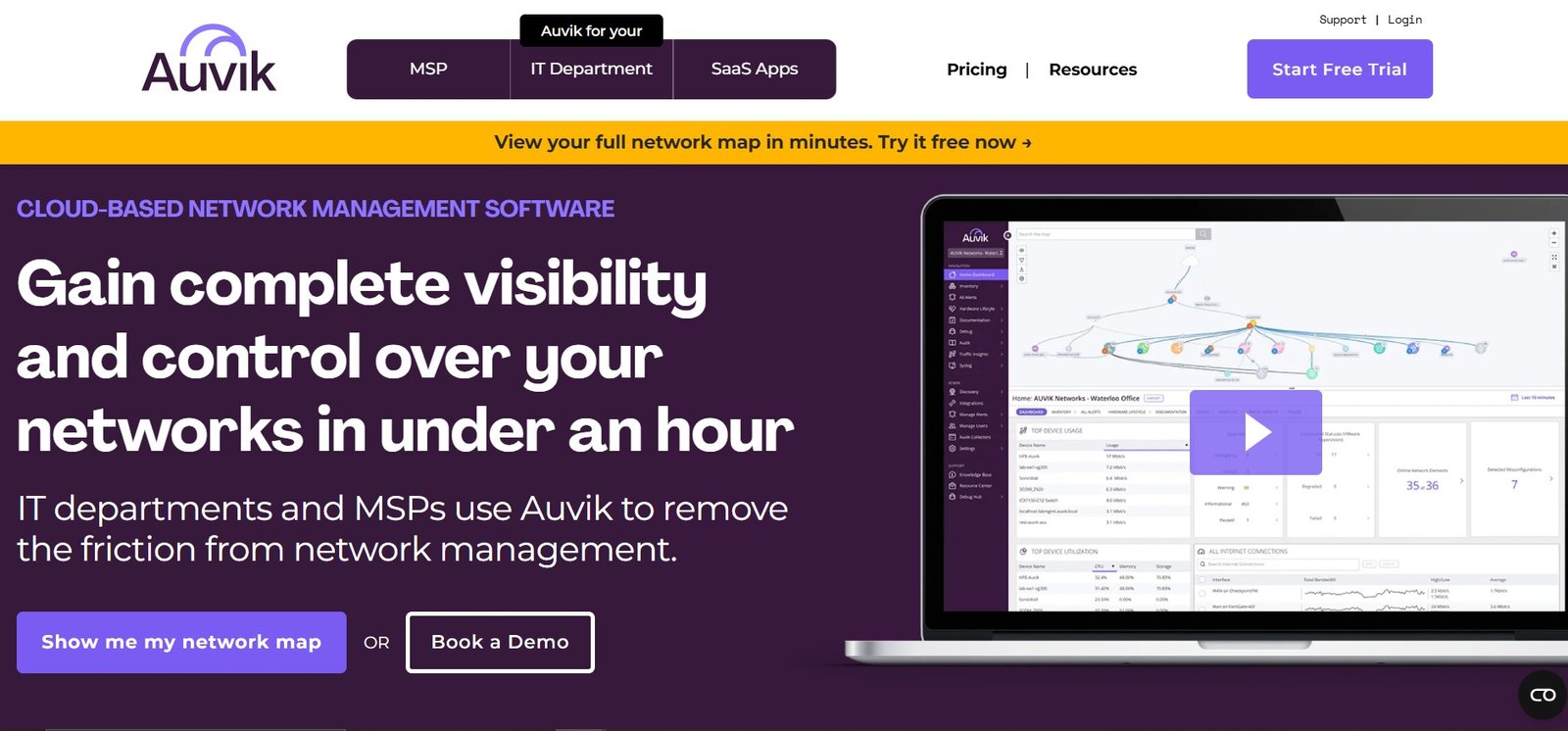
Auvik's network management dashboard — real-time network topology map with all discovered devices, performance metrics, alert status, and configuration backup history accessible from a single interface.
Auvik Pricing Plans
Auvik's licensing comes in two tiers: Essentials and Performance. Pricing is per managed network device — specifically switches, routers, firewalls, and physical Wi-Fi controllers. Access points and endpoints (workstations, phones, printers) are monitored for free regardless of quantity.
All plans include unlimited users, unlimited network sites, unlimited endpoints, unlimited support, and no additional maintenance fees — the cost scales only with the number of managed network infrastructure devices.
| Feature | Essentials | Performance |
|---|---|---|
| Number of users | Unlimited | Unlimited |
| Number of network sites | Unlimited | Unlimited |
| Number of endpoints | Unlimited | Unlimited |
| Full support | Unlimited | Unlimited |
| Remote management | ✓ | ✓ |
| APIs and integrations (ticketing, documentation, dashboarding) | ✓ | ✓ |
| Centralized syslog collection | ✓ | ✓ |
| Network flow monitoring and analytics (TrafficInsights) | ✓ | ✓ |
| Unified troubleshooting dashboards (flow, syslog, performance) | ✓ | ✓ |
| Advanced performance monitoring and enhanced data retention | — | ✓ |
Auvik does not publicly list per-device pricing on their website. Specific pricing is provided after contacting their sales team or beginning a trial — the cost typically varies based on the number of managed devices and whether volume discounts apply for larger deployments. A 14-day free trial is available without a credit card, giving you full access to test the platform on your actual network before any financial commitment. Start your trial at auvik.com.
How Auvik Works — Technical Overview
Collector Installation
Auvik deploys using a local agent called a collector — a lightweight piece of software installed on a machine within your network. The collector uses industry-standard protocols to communicate with network devices, gather topology and performance data, and send that information to Auvik's cloud servers over encrypted connections. All collector-to-cloud communication is outbound and encrypted, meaning no inbound firewall exceptions are required for the basic connection. Firewall configurations may need minor adjustment to allow SNMP and other monitoring traffic to pass between the collector and the network devices being monitored.
Network Discovery
Once the collector is running, it immediately begins scanning the local subnet. As it discovers additional networks connected to the initial subnet, it presents these for administrator approval — you control which networks Auvik scans. After approval, Auvik uses Nmap and network protocols (SNMP, WMI, SSH, telnet, VMware, CDP, LLDP) to discover and identify active devices, open ports, and device characteristics including make, model, firmware version, and connectivity relationships.
Topology Modelling
Using data pulled from ARP tables, forwarding tables, IP assignments, VLAN associations, CDP/LLDP, and other sources, Auvik builds Layer 1, Layer 2, and Layer 3 network models. Where definitive connection data is available from protocols, Auvik uses it precisely. Where connectivity must be inferred, the platform uses proprietary algorithms to model the remaining connections — producing a network map that is significantly more accurate than anything achievable through manual documentation.
Continuous Monitoring
With the initial discovery complete, Auvik moves into continuous monitoring mode — polling devices for performance metrics, detecting changes in topology as devices are added or removed, backing up device configurations, and monitoring traffic flows through TrafficInsights. The network map and device inventory update automatically. Historical data is retained for years, providing a long-term archive for trend analysis, capacity planning, incident investigation, and compliance reporting.
Why Small Businesses in Tech Need Auvik
- Eliminates manual network documentation. Network diagrams maintained manually are outdated by default — every change that does not trigger a documentation update creates a gap between the map and reality. Auvik's automated discovery means the map is always current.
- Reduces troubleshooting time dramatically. When a network issue occurs, the first step is typically understanding what is connected to what. Auvik provides this context instantly — reducing mean time to resolution (MTTR) for network incidents significantly.
- Proactive problem detection over reactive firefighting. Auvik's alerting surfaces degrading performance before it crosses the threshold into user-visible downtime — shifting IT from reactive support to proactive management.
- Configuration backup as operational insurance. A misconfigured router or switch can take hours to diagnose and recover without a configuration backup. Auvik's automated backups create a recovery path that would otherwise require hours of reconstruction from memory or sparse documentation.
- Defensible hardware lifecycle planning. Auvik's lifecycle data shows which devices are approaching end-of-support and which have pending critical security updates — enabling planned replacement budgeting rather than emergency procurement.
Industry-Specific Use Cases
Retail Businesses
Retailers depend on network reliability for point-of-sale systems, inventory management, and payment processing. Auvik monitors POS device connectivity in real time and alerts staff to connectivity issues before they disrupt sales. Configuration backups ensure that a failed POS switch can be replaced and reconfigured quickly — minimising the revenue impact of hardware failures during peak trading periods.
Healthcare Providers
Healthcare networks carry patient records, diagnostic systems, and communications infrastructure where downtime has direct patient care implications. Auvik's network visibility helps healthcare IT teams maintain compliance with data security requirements by surfacing unauthorised devices, monitoring access control systems, and ensuring that connected medical devices remain properly segmented on the network.
Tech Startups
Startups typically operate with lean IT teams or no dedicated IT staff at all. Auvik's automation handles the network monitoring tasks that would otherwise require a full-time network engineer — freeing technical co-founders and small IT teams to focus on product development rather than network maintenance. The 14-day free trial makes it accessible to evaluate without procurement risk.
Managed Service Providers
MSPs managing networks across multiple clients are Auvik's most intensive users. The multi-tenant architecture consolidates all client network monitoring into a single dashboard — enabling MSP technicians to manage more clients per engineer without proportionally increasing labour costs, and providing the monitoring depth that SLA commitments require.
Education Institutions
Schools and universities manage complex networks spanning multiple buildings, hundreds of access points, and thousands of student and staff devices. Auvik's automated inventory and topology mapping provide the visibility needed to manage this complexity — and its bandwidth monitoring helps identify and control the application traffic (streaming, gaming, social media) that consumes educational network capacity during class hours.
Manufacturing and Industrial
Manufacturing environments increasingly depend on network-connected equipment — SCADA systems, industrial controllers, and IoT sensors. Auvik's device discovery and monitoring covers these industrial network devices alongside traditional IT infrastructure, providing unified visibility into operational technology (OT) and information technology (IT) networks from a single platform.
Try Auvik Free for 14 Days
No credit card required. Deploy the collector, discover your network, and see exactly what Auvik maps for your specific infrastructure before making any purchasing decision.
FAQs About Auvik Network Mapping Software
Auvik monitors a wide range of network-connected devices — routers, switches, firewalls, physical Wi-Fi controllers, access points, servers, workstations, laptops, mobile phones, printers, IoT devices, and industrial network equipment. Auvik's pricing is based on managed network infrastructure devices (switches, routers, firewalls, physical Wi-Fi controllers). All other devices — including access points, workstations, phones, and printers — are monitored for free regardless of how many there are on the network. The automated discovery system identifies device type, make, model, serial number, and connectivity relationships for every device it finds.
Auvik is a cloud-based platform — there are no on-premise server requirements and no software to install beyond the Auvik collector. The collector is a lightweight agent installed on a machine within your network (a server, workstation, or virtual machine) that communicates outbound to Auvik's cloud infrastructure over encrypted connections. All monitoring data, network maps, configuration backups, and historical metrics are stored and accessible through the Auvik cloud dashboard from any browser, from anywhere.
Auvik's discovery process uses a combination of industry-standard network protocols and Nmap scanning to find and identify devices. It pulls topology data from CDP (Cisco Discovery Protocol), LLDP (Link Layer Discovery Protocol), ARP tables, MAC forwarding tables, IP assignments, and VLAN associations. It uses SNMP (Simple Network Management Protocol), WMI (Windows Management Instrumentation), SSH, telnet, mDNS, and SMB/Samba to gather detailed device information including make, model, serial number, firmware version, and running services. Discovery begins automatically as soon as the collector is installed and scanning is approved — no manual device entry required.
Auvik TrafficInsights is the platform's network traffic analysis feature. It uses machine learning and traffic classification to identify which applications and protocols are consuming network bandwidth — going beyond raw bandwidth utilisation to show specifically whether Zoom, Dropbox, Netflix, Microsoft Teams, or any other recognisable application is the source of bandwidth consumption at any point in time. This application-level visibility is what makes bandwidth data actionable — knowing that 40% of bandwidth is consumed by video streaming tells you something very different from knowing that 40% of bandwidth is consumed by a business-critical backup process. TrafficInsights provides the context needed to make informed network management decisions.
Yes. Auvik has multi-tenant architecture that allows managed service providers to monitor multiple separate client networks from a single Auvik account. Each client's network data is fully isolated from other clients within the same account, protecting data privacy between clients while enabling the MSP technician to access all client networks from one dashboard. This consolidation significantly reduces the operational overhead of managing multiple clients compared to maintaining separate monitoring tools for each client — and provides a unified reporting and alerting layer across the entire client portfolio.
Auvik stores network monitoring data for years — providing a long-term historical archive that supports troubleshooting retrospective analysis, capacity planning, compliance reporting, and trend identification. The ability to compare current network behaviour against historical baselines is particularly valuable for identifying gradual performance degradation that would not be visible when looking at only current metrics. If a network performance issue emerges over weeks rather than occurring suddenly, the historical data makes the trend visible and provides the evidence needed to justify infrastructure investment.
Final Verdict — Is Auvik Worth It for Your Business?
Auvik's value proposition is clear: it replaces the manual, inconsistent, inevitably outdated work of network documentation and monitoring with an automated system that maintains an accurate, real-time view of your network and alerts you to problems before they reach users.
For IT teams and MSPs spending meaningful time on network troubleshooting, documentation updates, and reactive incident response, the time savings alone typically justify the cost within the first quarter.
The platform's limitations are genuine but specific: the pricing model (per managed device, custom quotes) makes it less accessible for very small teams or budget-constrained startups, and the initial setup of SNMP credentials and firewall configurations can require technical comfort.
For businesses where these constraints apply, the 14-day free trial is the right way to evaluate whether Auvik's capabilities justify the investment for your specific environment.
For MSPs managing multiple client networks, growing IT teams that need better visibility without proportionally growing headcount, and businesses where network reliability directly affects revenue or patient outcomes, Auvik is one of the most capable and consistently recommended platforms in the network management space.
Start Your Free Auvik Trial Today
14 days free · No credit card required · Full feature access on your actual network · See your network map within hours of installation