

Table of Contents
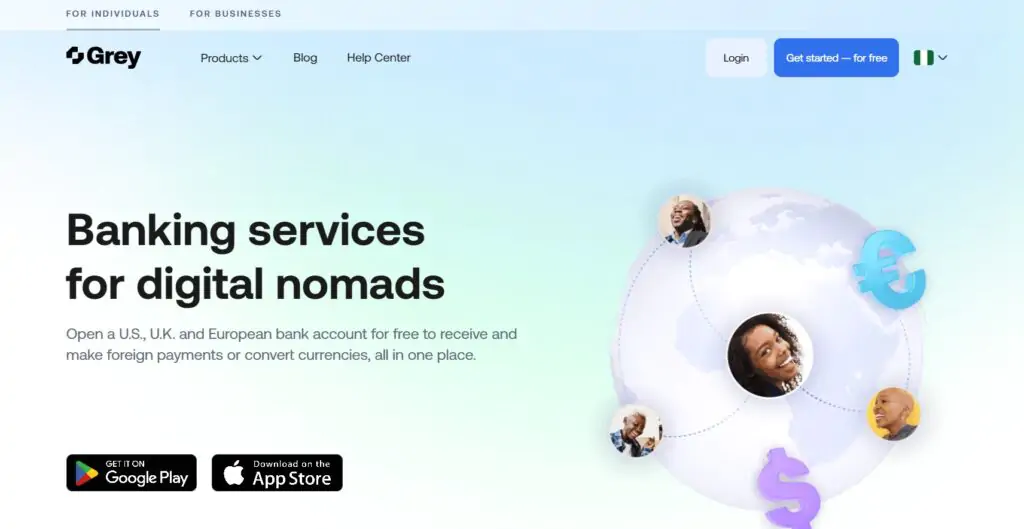
If you run an online business or freelance work in Africa, one of the most frustrating obstacles is accessing international payments and making dollar-denominated purchases. High conversion rates, blocked international cards, and the inability to receive foreign payments hold a lot of African entrepreneurs back from accessing global opportunities.
Grey.co solves this directly. In this guide, I will show you exactly how to open a virtual domiciliary account with Grey and get your dollar card (step by step) so you can send and receive money internationally, make online purchases, and stop worrying about currency conversion headaches.
What Is Grey Finance?
If you have heard of Payoneer or Wise, Grey works in a similar space, but it is built specifically for Africans. Grey.co is an online financial platform that lets users across Africa open virtual foreign currency accounts in countries like the United States and the United Kingdom.
You get a real US bank account number, a UK account number, and a Euro account (all issued in your name) that you can use to receive international payments as if you were banking locally in those countries.
Beyond receiving payments, Grey gives you a virtual dollar card that works for online purchases on international platforms (from paying for software subscriptions to advertising spend to international services) without needing to convert Naira or other local currencies at unfavourable bank rates every time.
Why Use Grey.co?
Real Foreign Bank Accounts
Get an actual US, UK, and Euro account number in your name — not just a payment gateway. Clients and platforms can pay you directly as if you bank there.
Virtual Dollar Card
A Visa or Mastercard dollar card for online purchases — works on international platforms, subscription services, and anywhere that accepts cards online.
Better Exchange Rates
Convert between USD, GBP, EUR, and your local currency at rates significantly better than traditional bank rates — saving money on every transaction.
Send Money Internationally
Send money to international recipients directly from your Grey account — useful for paying for services, tools, and international contractors.
Mobile App Available
Full app on iOS and Android — manage accounts, fund your wallet, convert currencies, and monitor transactions from your phone.
Available Across Africa
Serves Nigeria, Ghana, Uganda, Kenya, Rwanda and more — built for African entrepreneurs who need access to the global financial system.
Step-by-Step: Open Your Grey Account and Get a Dollar Card
You will need a valid government-issued ID (National ID card, International Passport, or Driver's Licence) and a clear photograph for the identity verification step. Make sure the name you use during signup matches exactly what is on your ID card.
Go to grey.co on your browser or download the Grey app from the App Store or Google Play. Click on Register or Get Started and enter your details: full name (exactly as it appears on your ID), email address, and phone number.
During registration, you will see a Referral Code box. Use the code below to support this guide and get any referral bonuses Grey offers to new users:
Use this referral code when signing up
Paste this into the Referral Code box during registration
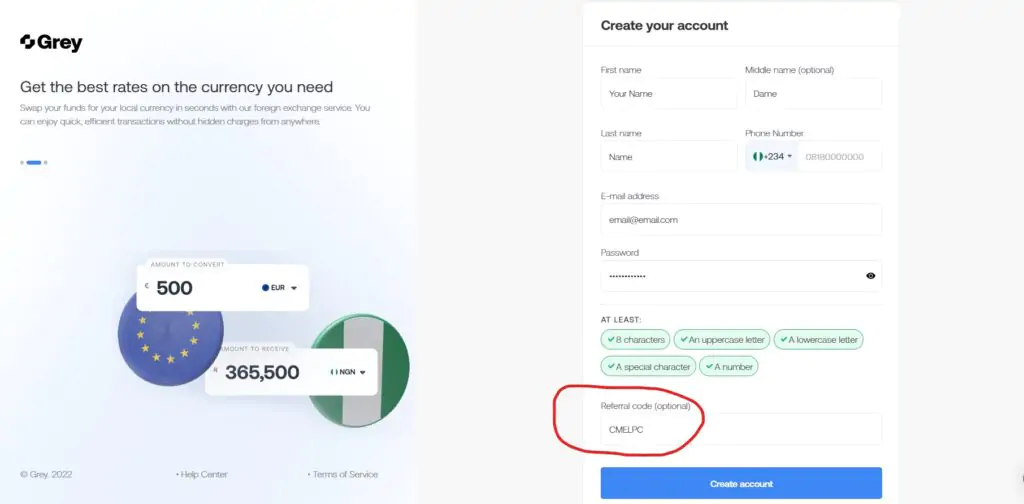
Step 1: Fill in your details on the Grey registration page. Make sure your name matches your ID exactly.
Once your account is created, Grey will prompt you to verify your identity before you can access any banking features. This is a standard Know Your Customer (KYC) process — required by financial regulations and the same process every legitimate bank or fintech platform uses.
You will be asked to submit a photograph of your ID document (National ID, Passport, or Driver's Licence) and a selfie for facial matching. Make sure your photo is clear, well-lit, and the text on your ID is readable. Submit the documents and wait for Grey's review team to approve your account — this typically takes a few hours but can occasionally take up to 24 hours.
Once approved, you will receive a notification and your account will be fully active, ready for you to request foreign currency accounts.
With your account verified, you can now request foreign currency bank accounts. Grey offers USD (US Dollar), GBP (British Pounds), and EUR (Euro) accounts — all issued in your name with real account numbers you can share with clients, platforms, and payment processors.
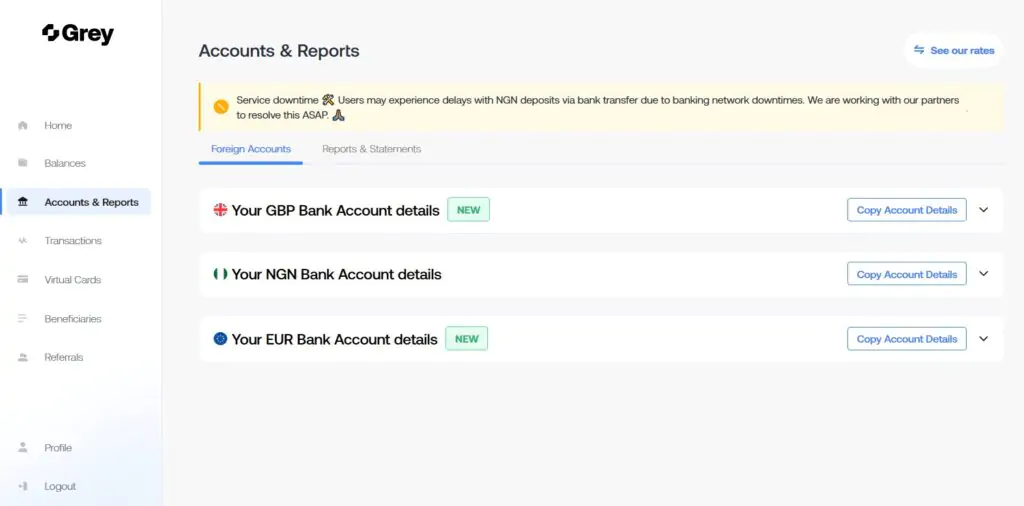
Step 3: Click Request on each currency account you want. Grey uses your verified identity details to issue the accounts.
From your dashboard, find the accounts section and click Request for each currency account you want. Grey uses the information you submitted during identity verification to create the accounts — no additional information is needed. Once created, you will see your account number, sort code (for UK accounts), and routing/account number (for US accounts) directly in your dashboard.
These are the account details you share when freelancing, receiving client payments, or collecting earnings from platforms like YouTube, Amazon, or any service that pays to a US or UK bank account.
Request all three accounts (USD, GBP, EUR) at once — even if you only plan to use one right now. Having all three available means you can accept payments in any major currency without coming back to request additional accounts later.
Once your USD account is active, you can request your virtual dollar card. This is the card you will use for online purchases on international platforms — advertising accounts, software subscriptions, course platforms, and any other service that requires a dollar-denominated card.

Step 4: Navigate to the Cards section and click Request to create your virtual dollar card.
You need at least $10 in your Grey USD wallet before you can create your dollar card. Fund your account first (see the next section) and then return to request the card.
Navigate to the Cards section in your Grey dashboard and click Request Card. Once created, your virtual card details (card number, expiry date, and CVV) will appear in your dashboard — ready to use immediately for online purchases.
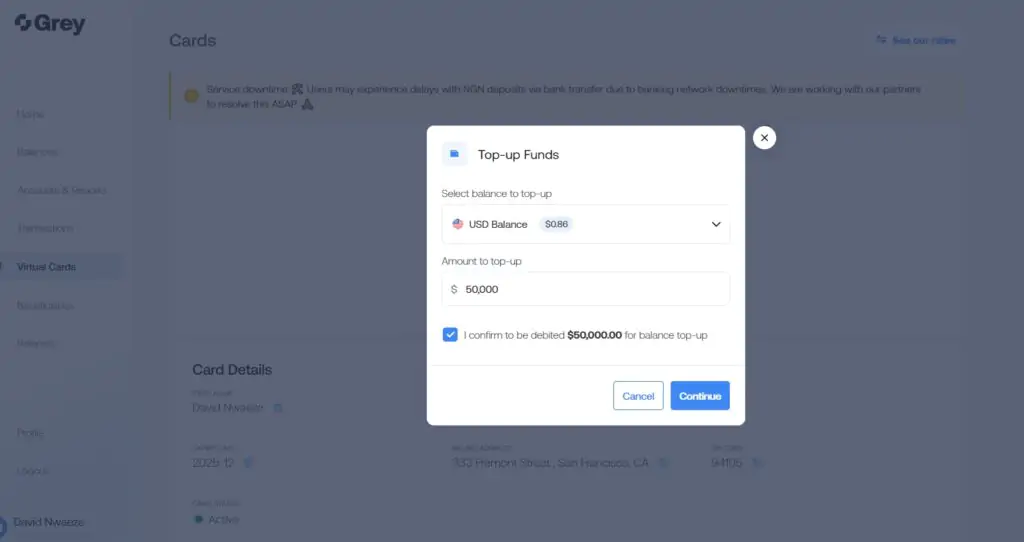
Once your card is active, use the Add Money option to top it up from your Grey wallet before making purchases.
To add money to the card for spending, click Add Money and select the wallet you want to transfer from (your USD wallet). Enter the amount and confirm.
How to Fund Your Grey Wallet with Local Currency
To get dollars into your Grey account, you first fund your local currency wallet (e.g. NGN for Nigeria) and then convert to USD at Grey's exchange rate. There are two ways to fund your local wallet:
Option 1: Direct Bank Transfer (Easiest)
When you request a local account (e.g. a Nigerian Naira account), Grey creates a dedicated local bank account number for you. Transfer Naira from your existing bank account to this Grey-issued account number — just like a normal local bank transfer. The funds reflect in your Grey NGN wallet almost instantly.
Option 2: Linked Banking App
From the Grey app, go to Balance and click Deposit NGN. You can link your existing mobile banking app directly to Grey and authorise transfers from within the Grey interface.
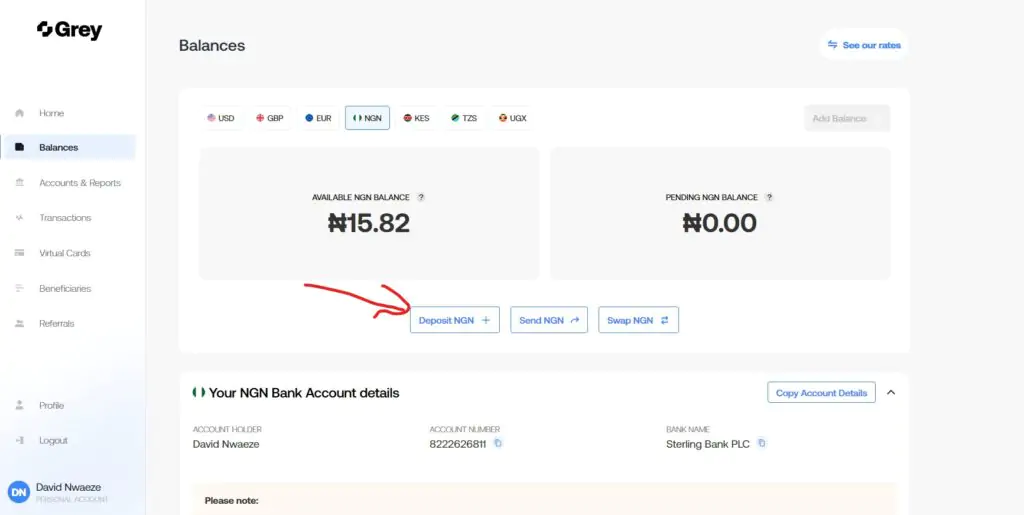
The Grey NGN balance screen — click Deposit NGN to choose your preferred funding method
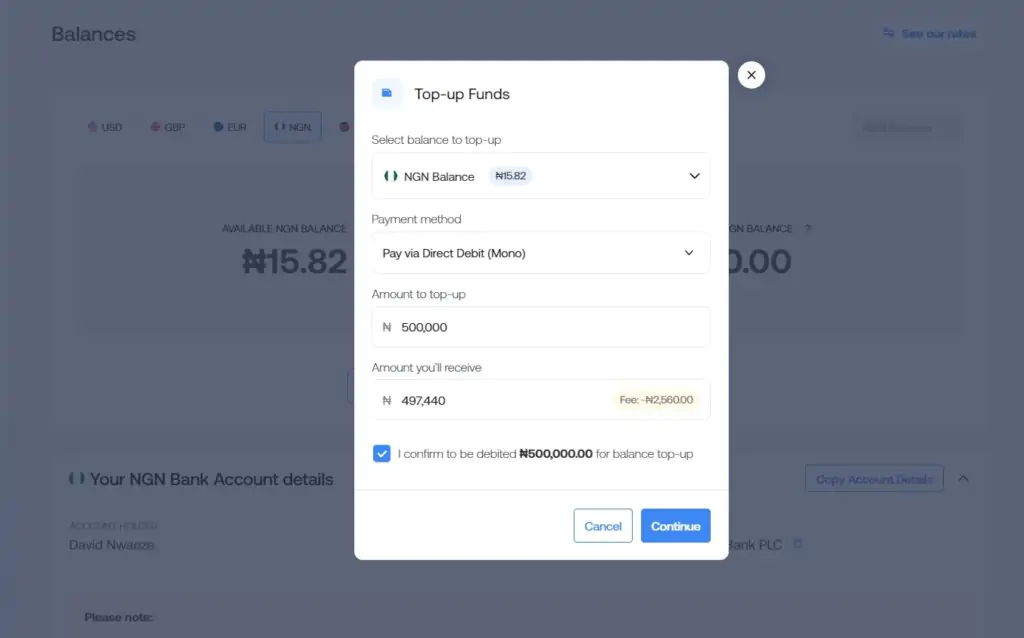
Enter the amount you want to deposit and follow the prompts to link your banking app and authenticate the transfer
Option 1 (direct bank transfer to the Grey-issued account) is simpler and faster for most users. Option 2 (linked banking app) works if your bank supports the integration, but involves more steps. Either way, once the Naira is in your Grey wallet, you can convert it to USD at Grey's current exchange rate and proceed to fund your card.
For more on managing international payments from Africa, read our guides on how to open a Stripe account in Nigeria and how to convert Naira to dollars online.
Grey.co Alternatives
Payoneer
Payoneer is one of the most widely used international payment platforms for freelancers and remote workers in Africa and globally. It provides a US payment service account and a Mastercard debit card, and integrates directly with platforms like Upwork, Fiverr, Amazon, and Airbnb for receiving payments. Payoneer is more established in the freelancing ecosystem than Grey, though Grey tends to offer more flexible local currency conversion options.
Try PayoneerWise (formerly TransferWise)
Wise offers multi-currency accounts with some of the best exchange rates available for international transfers. Like Grey, you get real bank account details in multiple currencies (USD, GBP, EUR, and more). Wise is particularly strong for users who transfer money between currencies frequently and want transparent, low-fee conversions. It is available in more countries than Grey, making it useful for both African and diaspora users.
Try WiseAirwallex
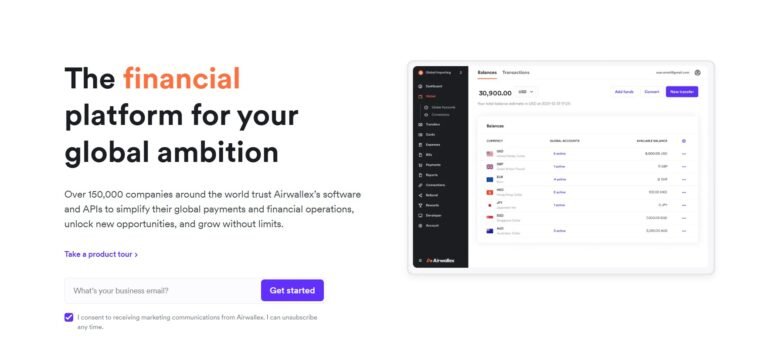
Airwallex is a business-focused international banking platform that provides multi-currency accounts, virtual cards, and global payouts — well-suited for African entrepreneurs and agencies running business operations across multiple countries. Better for business use cases than personal remittances. See our Airwallex business account review.
Learn About AirwallexFrequently Asked Questions About Grey.co
Grey.co is available to users in multiple African countries, including Nigeria, Ghana, Uganda, Kenya, and Rwanda. The platform was built specifically for African users who need access to foreign currency accounts and international payment infrastructure. During signup, you select your country of residence, and Grey creates the relevant local currency account (e.g. NGN for Nigeria, GHS for Ghana) alongside the foreign currency accounts. If your country is not currently supported, check Grey's official website for the latest list of supported countries as the platform continues to expand its African coverage.
Yes - Grey.co is a legitimate fintech platform operating under the regulatory frameworks of the countries it serves. Nigerian users are served under CBN (Central Bank of Nigeria) regulatory compliance. The platform uses bank-level security including identity verification (KYC) for all account holders, encrypted data storage, and secure authentication for login and transactions. As with any fintech platform, do not share your login credentials, OTPs, or card details with anyone else. Grey's customer support will never ask for your password or PIN. The platform is used by hundreds of thousands of African users and has established partnerships with licensed banking institutions for its foreign account issuance infrastructure.
Grey's identity verification typically takes a few hours to complete. In some cases - particularly during high-volume periods or if your ID document requires manual review - it may take up to 24 hours. Make sure your submitted documents are clear and well-lit, your name matches exactly across all submitted information, and the ID document is not expired. If your verification takes longer than 24 hours, contact Grey's customer support through the app or their official support channels. Once approved, you can immediately request your foreign currency accounts and proceed to the dollar card setup.
You need a minimum of $10 in your Grey USD wallet before you can create and activate your dollar card. This minimum balance is required at the time of card creation - it ensures the card has a usable balance from the moment it is activated. To get dollars into your Grey wallet, first fund your local currency wallet via bank transfer and then convert the local currency to USD at Grey's exchange rate. Once you have at least $10 in USD, return to the Cards section in your dashboard and request your card.
Yes - the Grey virtual dollar card is a standard Visa or Mastercard card that can be used on any platform that accepts international card payments online. This includes platforms like PayPal (for funding a PayPal account or making purchases), Amazon, Google Ads, Facebook Ads, Shopify, ClickFunnels, Hostinger, and virtually any other international platform or subscription service that accepts dollar-denominated online card payments. The card details (card number, expiry date, and CVV) are available in your Grey dashboard and are entered at checkout just like any other card. Note that some platforms have additional verification steps for virtual cards, so you may need to confirm the card with a small test charge that is then refunded.
Once your Grey USD account is active, you will have a real US bank account number and routing number. Share these details with your clients or platforms as your payment details - just like giving someone a US bank account to transfer money to. The payment arrives in your Grey USD wallet, where you can then convert it to your local currency and withdraw to your local bank account, or keep it in USD to pay for international services. For UK payments, use your GBP account details. For European payments, use your EUR account details. Many African freelancers use Grey specifically to receive payments from international clients on Upwork, Toptal, or direct client arrangements without needing a US or UK address to open a bank account there in person.
Take Your Online Business Global
Join AIpreneur Academy for practical guides on building a profitable online business from Africa - including tools, strategies, and frameworks that have helped thousands of students earn in dollars.

Please what are your social media handles? Will love to follow you.
Hello, Elizabeth, You can follow me on social media using the following links:
Facebook: https://facebook.com/nwaezedavid
LinkedIn: https://linkedin.com/in/nwaezedavid
Twitter: https://twitter.com/nwaezeedavid
YouTube: https://youtube.com/@nwaezedavid
Thanks for sharing