📋 Table of Contents

How Cloudways Works
When it comes to cloud hosting, Cloudways has established itself as one of the most capable managed cloud hosting platforms available. Founded in 2009 by Uzair Gadit, Aquib Gadit, and Pere Hospital and headquartered in Malta, Europe, Cloudways has since been acquired by DigitalOcean; a move that has the potential to further strengthen its infrastructure and small business offering.
Cloudways takes a fundamentally different approach from traditional hosting providers. Rather than building and operating its own server infrastructure, Cloudways acts as a managed layer on top of five of the world's leading cloud infrastructure platforms.
You choose which cloud provider you want to host your site on, and Cloudways handles the server configuration, maintenance, security, updates, and management on your behalf.
The five cloud providers available through Cloudways:
Once you have chosen your provider and server resources, Cloudways configures the server with a hybrid Apache + Nginx stack, implements multiple caching layers (Nginx, Varnish, and Memcached, plus optional Redis), secures the environment, and keeps everything updated.
You interact with your sites and servers through Cloudways' own custom dashboard, which takes care of all the underlying complexity so you can focus on building your site rather than managing the infrastructure.
This approach delivers excellent performance at competitive pricing, particularly at the entry level, where the $10/month DigitalOcean server offers cloud performance that most traditional budget hosts cannot match.
It does require slightly more technical awareness than simple shared hosting, so complete beginners may find providers like Bluehost, Hostinger, or Pressable a more accessible starting point.
Cloudways at a Glance
Who Cloudways Is Best For
🔧 Experienced Web Developers
Developers who are comfortable with cloud concepts but want to avoid raw server administration find Cloudways ideal — cloud-level performance with a managed layer handling the operational complexity.
🏢 Agencies Managing Multiple Client Sites
No site count limits, team collaboration features, site cloning, and staging environments make Cloudways particularly suited to agencies that build and maintain multiple WordPress sites across different clients.
📈 Growing WordPress Sites
Sites that have outgrown shared hosting but do not want the operational complexity of unmanaged VPS benefit from Cloudways' vertical scaling — upgrading server resources takes a few clicks without server migration.
🛒 eCommerce Stores Needing Performance
WooCommerce and Magento stores that experience traffic variability benefit from Cloudways' cloud infrastructure scalability and multi-layer caching stack — handling traffic spikes without performance degradation.
💰 Performance-Value Focused Users
At $10/month for the entry DigitalOcean server, Cloudways offers cloud-level performance that rivals hosts charging $25-40/month — making it one of the best performance-per-dollar options available.
Cloudways is more involved than traditional shared hosting — you will need to choose a cloud provider, select server resources, understand the server/application distinction in the dashboard, and handle email hosting separately (no email included). If you are launching your first website and have no hosting experience, start with Bluehost, Hostinger, or A2 Hosting and migrate to Cloudways once you are comfortable with how web hosting works.
Core Features
☁️ Choice of Five Premium Cloud Providers
The ability to choose from five cloud infrastructure providers is Cloudways' most distinctive feature — no other managed WordPress host gives you this flexibility. Each provider has different strengths:
- DigitalOcean — best value for money; excellent performance on the entry plans; our recommended starting point
- Vultr High-Frequency — slightly more expensive than DigitalOcean entry plans but better raw performance; our recommended upgrade from DO
- Linode — solid performance, competitive pricing, good for North American audiences
- AWS (Amazon Web Services) — fastest raw performance of the five, but significantly more expensive for equivalent specs
- Google Cloud Platform — strong global CDN and data center coverage; suitable for international audiences
Each provider has data centers across multiple global regions — you choose the physical server location closest to your primary audience when setting up, directly reducing latency for visitors in that region.
⚡ Multi-Layer Caching Stack
Cloudways configures every server with a high-performance caching architecture that most shared hosts do not offer even on premium plans.
The stack includes Nginx as the web server, Varnish for full-page caching, and Memcached for object caching; with an option to easily add Redis for more sophisticated caching scenarios.
This multi-layer approach is one of the primary reasons Cloudways performs so well in speed benchmarks, particularly under concurrent visitor load.
For WordPress specifically, Cloudways installs its own Breeze performance plugin by default, a free plugin that integrates directly with the Cloudways server-level caching for a coordinated optimisation stack between the WordPress layer and the server layer.
🔄 Backups, Staging, and Site Cloning
Cloudways provides a full backup and staging workflow at every plan level:
- Automatic server-level backups — scheduled backups of the entire server on a configurable frequency
- On-demand single-site backups — take a backup of a specific application (site) at any moment
- Staging environments — create a full staging site that mirrors your live site, with push/pull data synchronisation between staging and production
- Site cloning — clone any site to the same server or a different server in a few clicks; particularly useful for agencies creating new client sites based on a standard configuration
🔒 Server-Level SMTP for Reliable Email Delivery
One of Cloudways' most practically useful features for WordPress sites is server-level SMTP configuration. Most WordPress sites rely on PHP mail for transactional emails (contact form submissions, WooCommerce order confirmations, password resets) — which is unreliable and frequently flagged as spam. Most cloud hosting platforms require you to configure SMTP separately for each individual WordPress site.
Cloudways lets you configure SMTP at the server level once, applying it to all sites on that server — a significant operational convenience that improves transactional email deliverability across your entire hosting account.
📦 Full WordPress Management Feature Set
Beyond the server management layer, Cloudways provides a complete set of WordPress-specific tools:
Performance Test Results
To test Cloudways' real-world performance, a test site was set up on the entry-level $10/month DigitalOcean server (1 GB RAM, 25 GB SSD) using the default WordPress theme and demo content, with the Breeze performance plugin installed. Two testing methodologies were used.
WebPageTest — One-Off Speed Test
WebPageTest was used with a throttled FIOS connection to collect one-off performance metrics. Nine tests were run and the median value taken to account for any single-run variance.
Cloudways delivered a median load time of under half a second — one of the best results across all WordPress hosts tested, placing it firmly in the premium performance tier despite running on the cheapest available server configuration.
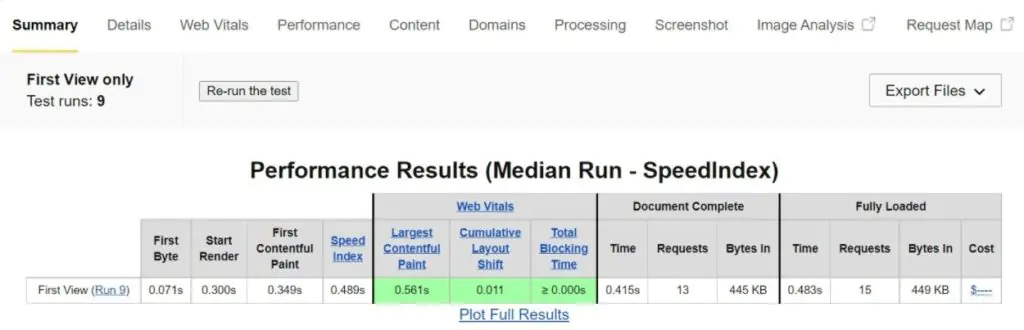
WebPageTest results — Cloudways delivered a median load time under 500ms on the entry-level $10/month DigitalOcean server
Load Focus — Traffic Surge Test
Load Focus simulated 20 concurrent visitors hitting the site within a 60-second window; equivalent to the load pattern of a small to medium traffic event.
The mean average response time was 582ms and the 90th percentile response time was 611ms — meaning even the slowest 10% of requests were handled in under 612ms.
These are among the better load test results across all the WordPress hosts tested. Nexcess and WP Engine performed marginally better under load, but both cost significantly more.
Cloudways at $10/month substantially outperforms every budget shared host tested under the same load conditions.
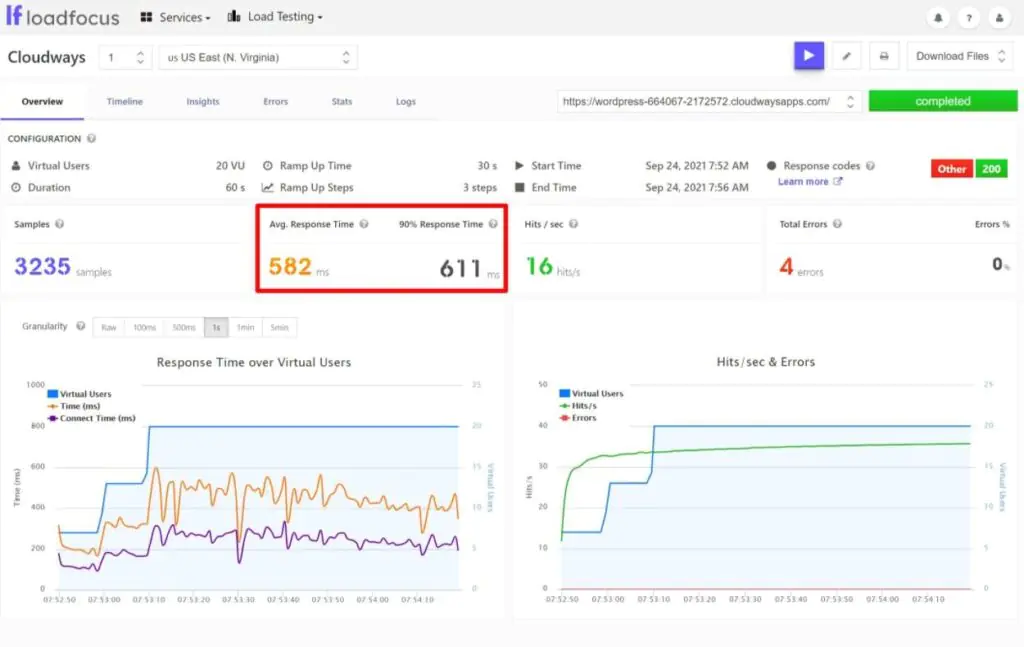
Load Focus results — 582ms mean average response time under 20 concurrent visitors in 60 seconds
These results were achieved on the cheapest $10/month DigitalOcean server — the absolute entry point. Most sites will never need more than this for standard WordPress or WooCommerce workloads. The fact that Cloudways delivers premium-tier performance at the entry price is its most compelling argument against more expensive managed WordPress hosts.
User Experience Walkthrough
Cloudways uses a custom platform — not cPanel or Plesk — built specifically for managing cloud servers and the applications (sites) running on them. The dashboard is structured around two primary views: Servers and Applications.
Launching a Server and Installing WordPress
When you first sign up, Cloudways prompts you to launch a server and deploy an application. An application is any software you want to install — WordPress, Magento, Laravel, and so on.
The setup process involves three key decisions: your cloud provider, the server resources (RAM, storage, bandwidth), and the physical server location.

Cloudways server launch — choose your cloud provider, resource tier, and the data center location closest to your audience
Managing Your Server
The Servers tab is where you manage the infrastructure level of your hosting.
From a server dashboard you can monitor resource usage, vertically scale resources (RAM, storage, bandwidth) without downtime, take full server backups, and configure server-level SMTP for all sites on that server.
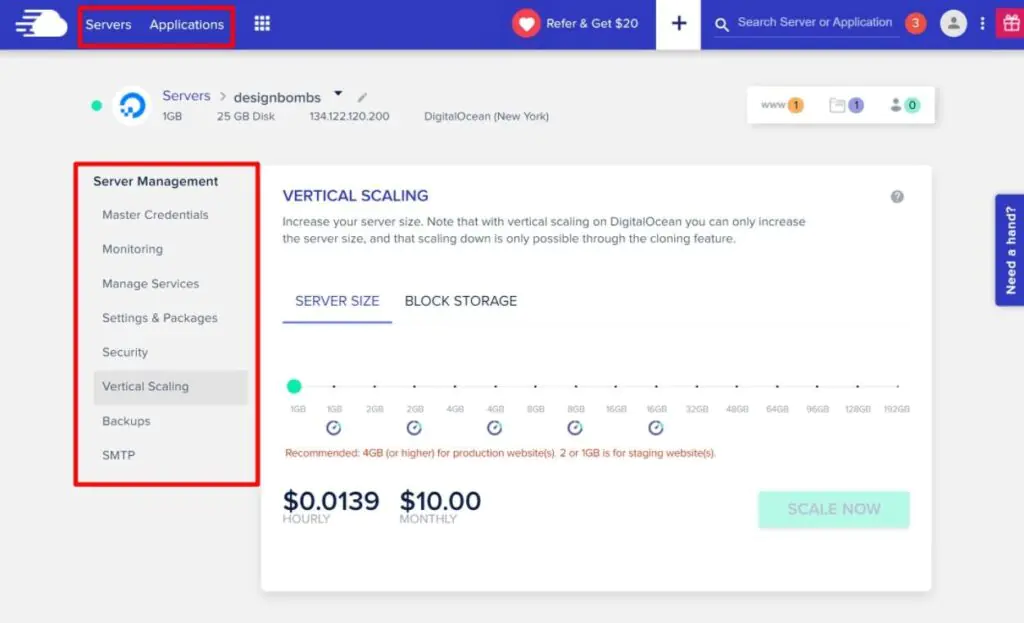
The Cloudways server dashboard — monitor resources, scale vertically, manage backups, and configure SMTP at the server level
Managing Your WordPress Site
The Applications tab lists all WordPress sites running on your servers. Clicking into a site opens the site-specific dashboard — covering domain association, SSL installation, cron jobs, access credentials (WP admin, FTP, MySQL), Git deployment, backups, and CDN integration.
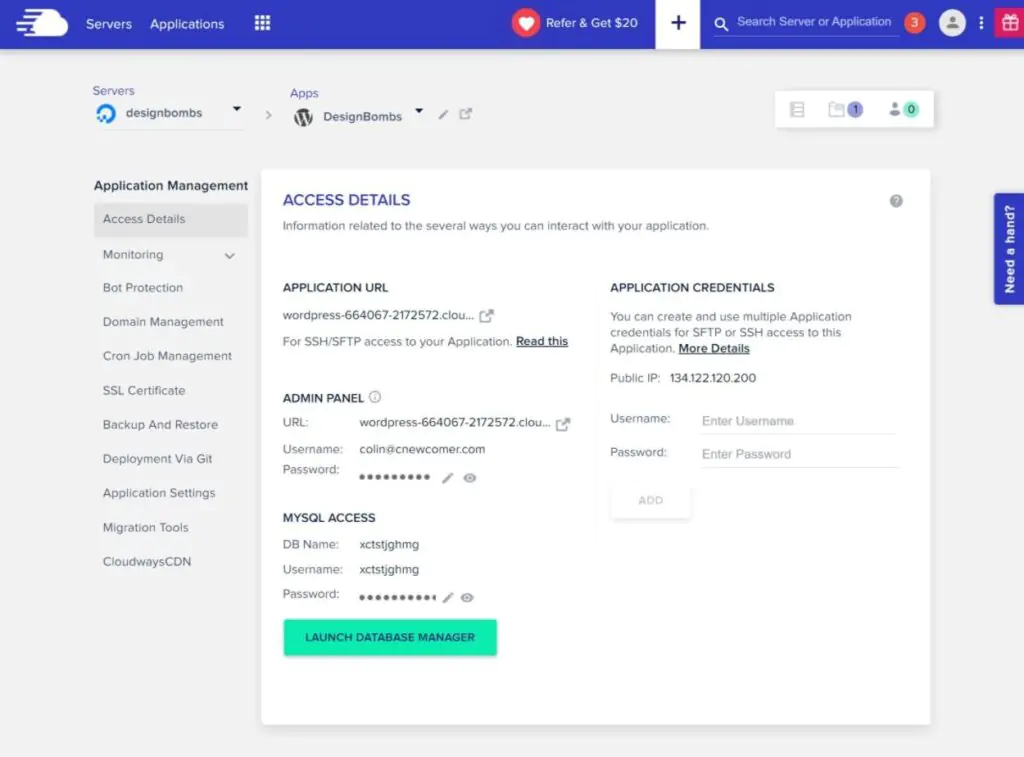
The Cloudways site (application) dashboard — manage domains, SSL, credentials, backups, CDN, and deployment from one screen
Staging and Site Cloning
From the Applications list, you can clone any site — either creating a true staging environment or replicating a site to a different server. Staging sites appear as their own separate applications with push/pull synchronisation between staging and production.
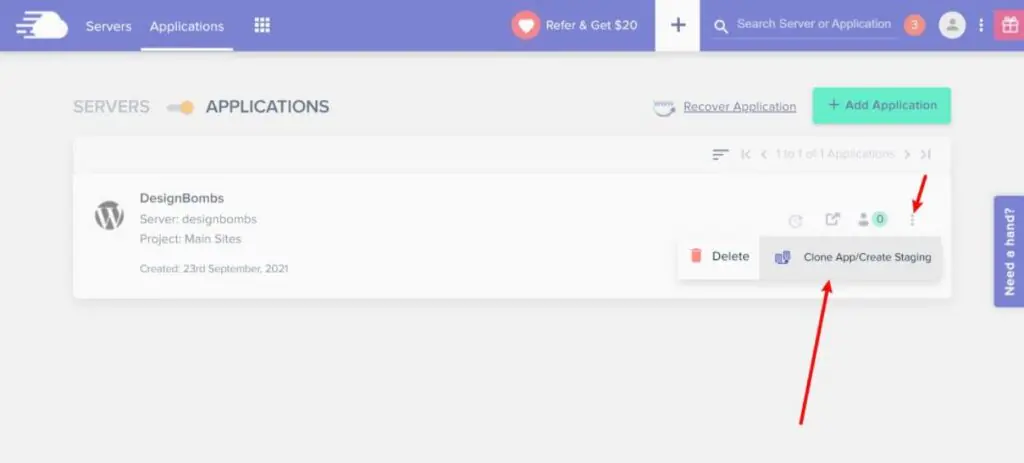
Cloudways staging and cloning — create a staging environment or clone a site to the same or a different server
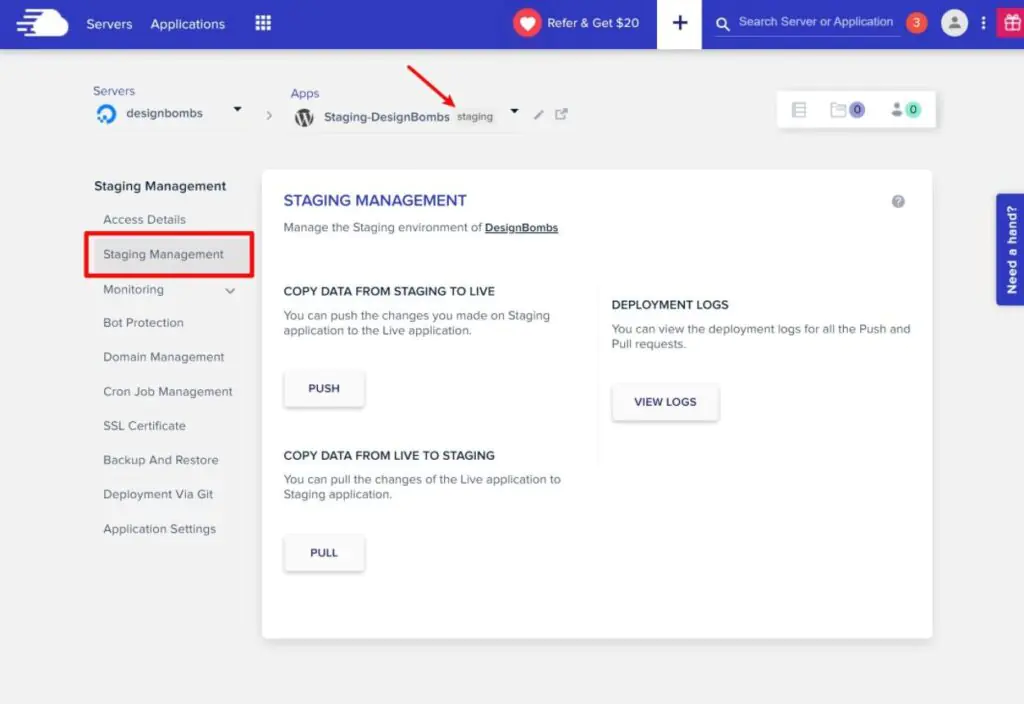
Staging site management — push or pull data between the staging environment and the live production site
Backups, Cron Jobs, and SSL
Site-level backups, cron job management, and SSL certificate installation are all available from clean, purpose-built tabs in the application dashboard.

Backup and Restore — create on-demand site backups in addition to the automatic server-level backups Cloudways takes
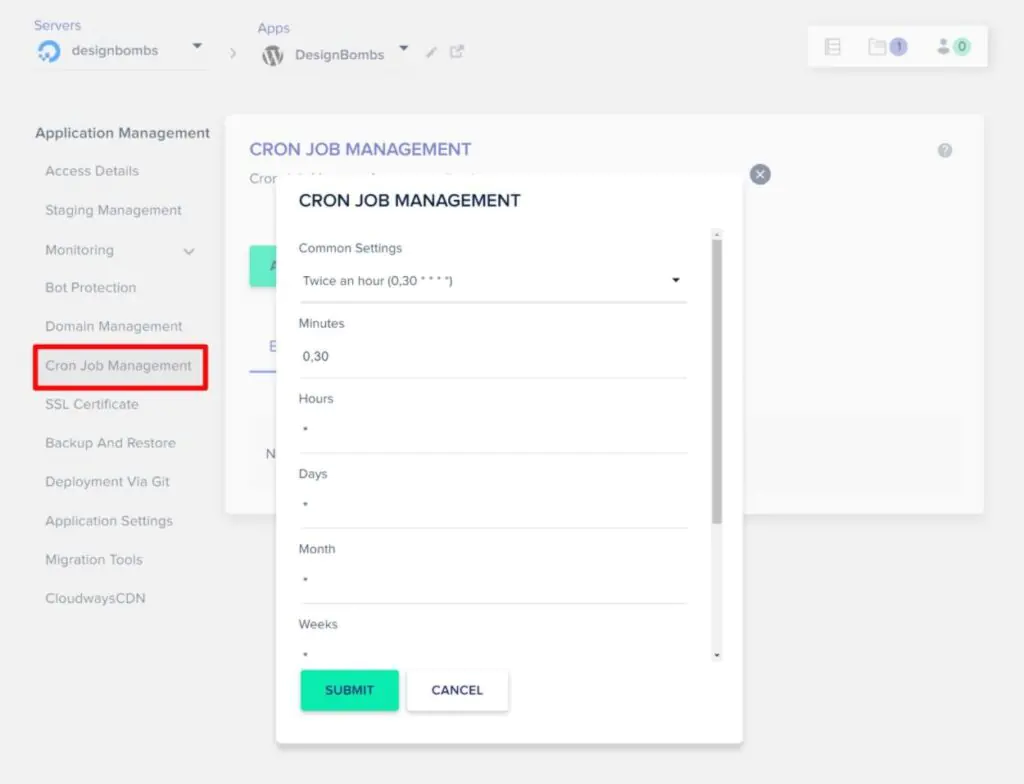
Cron Job Management — a clean interface for setting up scheduled server cron jobs without command-line access
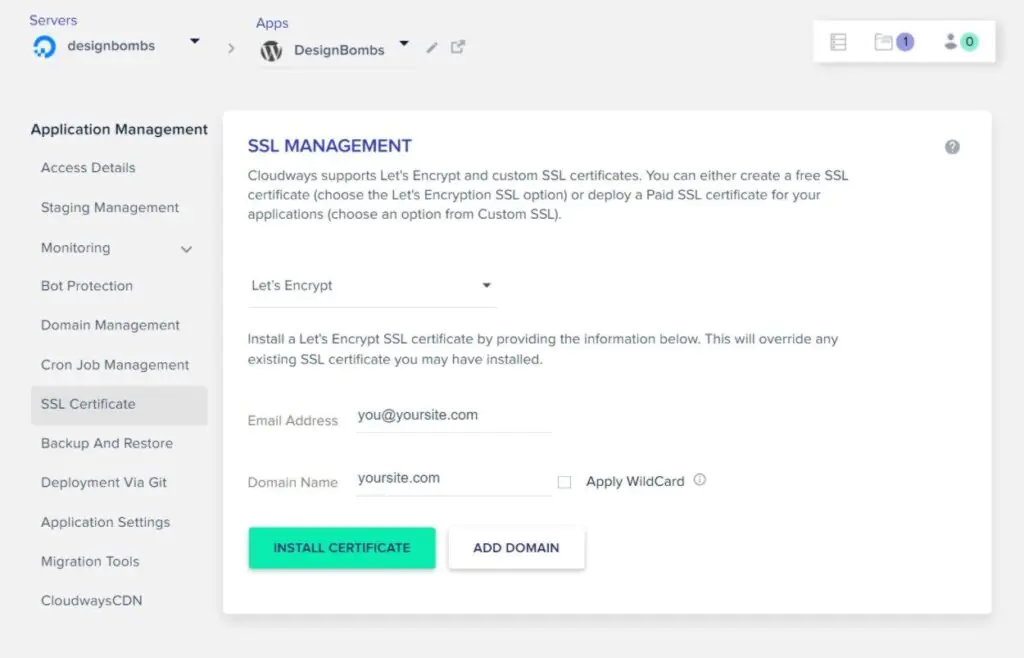
SSL Certificate tab — install a free Let's Encrypt SSL certificate on any domain in two clicks
Cloudways Pricing
Cloudways pricing works differently from traditional hosting. Rather than fixed plan tiers, you choose the cloud provider and the exact server resource level you need, and you pay for both the underlying cloud infrastructure and the Cloudways management layer in a single combined monthly bill.
There is no separate charge for cloud hosting infrastructure.
The price you see at Cloudways is the all-in price — it includes both the underlying cloud provider's cost and Cloudways' management fee. You do not pay DigitalOcean or AWS separately. Billing is pay-as-you-go on a monthly basis. A 3-day free trial is available — no credit card required — giving you full access to the platform to evaluate whether it fits your needs before paying anything.
DigitalOcean Pricing — Cost Breakdown
The entry-level DigitalOcean plan at $10/month is our recommended starting point for most users. The breakdown of what you are paying for:
| RAM | Total Price/mo | DigitalOcean Raw Price | Implied Cloudways Fee |
|---|---|---|---|
| 1 GB — Entry | $10 | $5 | $5 |
| 2 GB | $22 | $10 | $12 |
| 4 GB | $42 | $20 | $22 |
| 8 GB | $80 | $40 | $40 |
An important pattern in the table above: the implied Cloudways management fee increases proportionally as you scale up. On the entry 1 GB plan you are paying $5 for the Cloudways layer on top of $5 for DigitalOcean.
On the 8 GB plan you are paying $40 for the same Cloudways management layer on top of $40 for DigitalOcean. The platform itself does not change between tiers, only the underlying server resources do.
This means Cloudways is exceptional value at the entry level, and becomes progressively less competitive on price as you scale to high-resource servers.
For the $10/month entry plan, you are paying just $5/month for managed cloud hosting, an excellent deal. For the 8 GB plan, consider whether a managed VPS from a provider like Liquid Web or KnownHost might offer better value at that resource level.
Which Cloud Provider Should You Choose?
If you are not sure which provider to start with, the recommendation is Vultr High-Frequency servers. They cost slightly more than the entry-level DigitalOcean plans but deliver meaningfully better performance per dollar, faster NVMe storage and higher-frequency CPUs compared to standard DigitalOcean droplets.
Start with the lowest resource tier on Vultr HF and scale up if your site grows to need more.
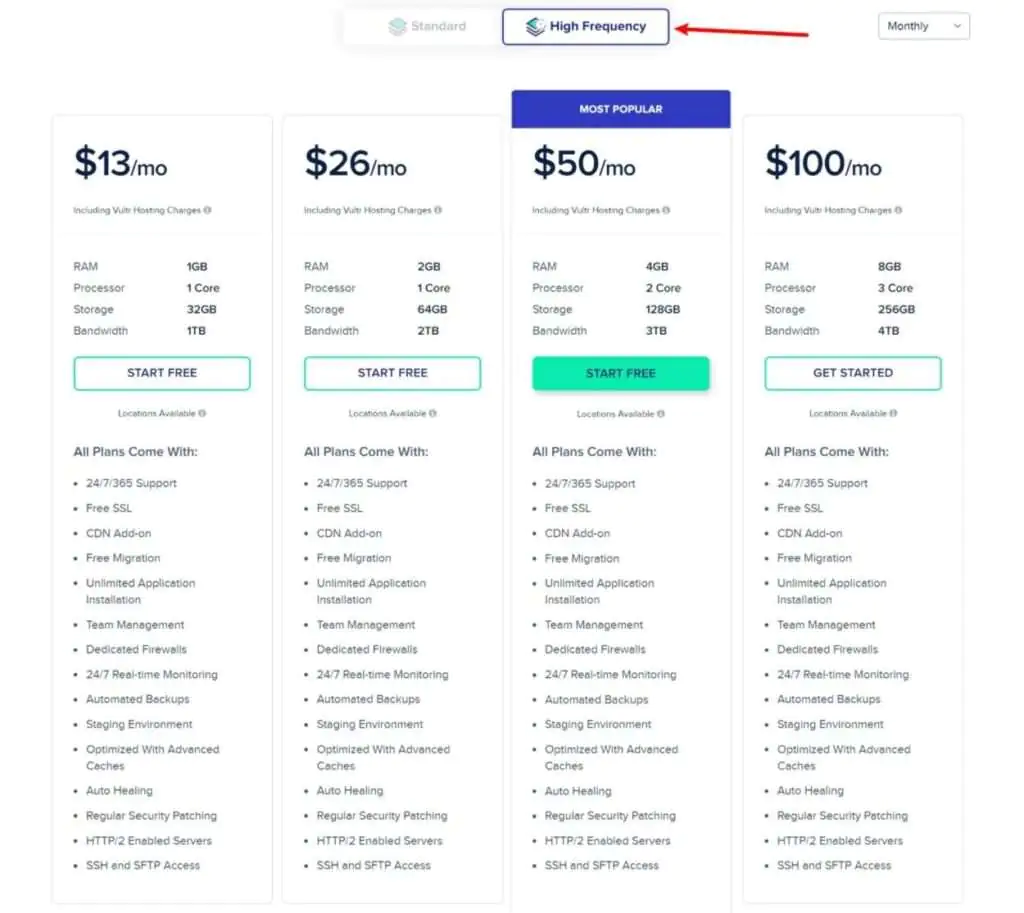
Vultr High-Frequency pricing on Cloudways — recommended for most users wanting better performance at a modest price premium over the DigitalOcean entry tier

Cloudways pricing across all five cloud providers — verify current pricing at cloudways.com as rates are updated periodically
One of Cloudways' practical advantages is vertical scaling — you can start on the cheapest server and upgrade your resources with a few clicks when you need more, without server migration. This makes it safe to start conservatively on the entry plan and scale only when your traffic and performance requirements justify it.
Cloudways Pros and Cons
✓ What Cloudways Does Well
- Excellent performance for the money — even the $10/month entry plan delivers results that rival hosts charging 3–4× more
- No arbitrary site limits — host as many websites as your server resources can support, with no artificial site count caps
- WordPress-specific toolset — staging, cloning, the Breeze performance plugin, Git deployment, and cron job management all built in
- Server-level SMTP — configure transactional email deliverability once for all sites on a server, rather than per-site
- Choice of five cloud providers — pick the infrastructure provider that best fits your budget, location, and performance requirements
- Vertical scaling on demand — upgrade server resources in a few clicks without site migration
- Multi-layer caching — Nginx + Varnish + Memcached out of the box; Redis available
- 3-day free trial — full platform access before any payment is required
- Team collaboration features — add team members with role-based access to servers and applications
- Pay-as-you-go billing — no long-term commitments or multi-year contracts required
✗ Limitations Worth Knowing
- More complex than traditional hosting — not recommended for complete beginners; assumes familiarity with basic hosting concepts
- Pricing premium scales with resources — the Cloudways management fee grows proportionally as you move to higher-RAM servers, making it less competitive at the high-resource end
- No email hosting included — you need a separate email hosting provider or the Cloudways email hosting add-on for custom email addresses
- No domain registration — domains must be purchased from a separate registrar (NameCheap, Domain.com, etc.) and pointed to Cloudways
- No phone support — support is web-based (live chat and tickets); no phone support channel
Cloudways Alternatives
Pressable
Owned by Automattic (the company behind WordPress), Pressable provides enterprise managed WordPress hosting with Jetpack Security, global CDN, staging, and WordPress-specialist support — without the cloud provider selection complexity of Cloudways. Best for users who want the managed WP experience without learning cloud infrastructure concepts. See our Pressable hosting review.
Try Pressable →Nexcess
Nexcess specialises in managed WordPress and WooCommerce with auto-scaling, free iThemes Security Pro, visual comparison testing on updates, and staging on all plans.
Marginally outperformed Cloudways in load testing — worth considering for high-traffic eCommerce sites where every millisecond of response time matters. See our Nexcess review.
Try Nexcess →WP Engine
WP Engine is the market leader in premium managed WordPress — slightly faster than Cloudways under load testing, with Genesis Framework included, one-click staging, and a globally recognised brand. The better choice if you want the most established managed WordPress name rather than the best performance-per-dollar.
Try WP Engine →Hostinger Cloud
Hostinger's cloud hosting plans offer cloud infrastructure at entry pricing closer to shared hosting — a more beginner-accessible cloud option than Cloudways, with cPanel included and a simpler setup process. For users who want cloud hosting without the Cloudways learning curve.
Try Hostinger Cloud →Liquid Web
For users who find Cloudways expensive at the 4–8 GB RAM tier, Liquid Web's managed VPS and dedicated hosting offers comparable management quality at that resource level with a 100% uptime SLA and industry-leading support — potentially better value than Cloudways' higher-resource pricing tiers.
Try Liquid Web →ResellerClub Cloud
ResellerClub's cloud hosting plans are available as an alternative for users already within the ResellerClub ecosystem — particularly relevant for agencies that use ResellerClub as a reseller platform and want cloud hosting managed from the same account.
Try ResellerClub Cloud →Final Verdict — Is Cloudways Right for You?
Cloudways is one of the strongest performance-per-dollar hosting options available for users who are comfortable with basic cloud hosting concepts. The performance test results (sub-500ms load time and 582ms mean response under load, on a $10/month entry server) make a compelling case: you are getting premium-tier performance without premium-tier pricing.
The managed layer is genuinely useful. Server configuration, security updates, the Apache/Nginx/Varnish stack, caching, backups, and the WordPress-specific toolset (staging, cloning, SMTP, the Breeze plugin) are all handled without requiring you to SSH into a server and manage things manually. You get the performance benefits of cloud infrastructure without the operational complexity of running unmanaged VPS.
The pricing model rewards entry-level users and becomes less competitive as you scale to higher-resource servers — at the 8 GB RAM tier, the implied Cloudways management fee matches the underlying DigitalOcean cost, which may not be the best value compared to alternatives like Liquid Web at that resource level.
For developers, agencies, growing WordPress sites, and anyone who has outgrown shared hosting and wants cloud-level performance without building and managing their own servers — Cloudways is an excellent choice. Start with the 3-day free trial to evaluate the platform with your own site before committing to a paid plan.
Try Cloudways Free for 3 Days
No credit card required. Full platform access. Launch a real server, deploy WordPress, and test the performance before paying anything.
FAQs About This Cloudways Review
Cloudways is a managed cloud hosting platform — it lets you host websites and web applications on leading cloud infrastructure (DigitalOcean, Vultr, Linode, AWS, Google Cloud) without managing the server yourself. It is primarily used for hosting WordPress sites and WooCommerce stores, but also supports Magento, Laravel, and other applications. The core value proposition is the same across all use cases: you get cloud-level performance and scalability, and Cloudways handles the server configuration, security, updates, caching, and maintenance on your behalf. It is used by individual freelancers building client portfolios, eCommerce entrepreneurs, agencies managing multiple client sites, and growing businesses that have outgrown shared hosting performance.
For most users starting out, Vultr High-Frequency is the recommended starting point — it costs slightly more than the entry-level DigitalOcean plans but delivers better raw performance through NVMe storage and higher-frequency CPU. If budget is the primary constraint, DigitalOcean at $10/month is excellent value and the plan used in our performance tests — it delivers sub-500ms load times on a basic WordPress site. AWS is technically the fastest of the five providers but also the most expensive for equivalent resources — typically only worth the premium for highly traffic-intensive applications. Google Cloud is well-suited for sites targeting global audiences due to Google's extensive CDN network. Linode is a solid mid-range choice with competitive pricing for North American audiences. Our general recommendation: start with Vultr HF on the entry resource tier and scale up if needed.
Cloudways is not a free hosting service, but it does offer a 3-day free trial — with no credit card required and full platform access. During the trial you can launch a real server, deploy WordPress, and test actual performance before making any payment commitment. After the trial period, all plans are pay-as-you-go on a monthly basis — there are no long-term contracts or annual commitment requirements. The entry-level plan starts at $10/month for a DigitalOcean 1 GB server. If you want to continue after the trial, you upgrade from the trial to a paid account and billing begins from that point.
Cloudways imposes no artificial limit on the number of websites you can host. You can run as many websites (applications) as your server's resources — RAM, CPU, and storage — can handle. On the entry $10/month DigitalOcean server (1 GB RAM), most single WordPress sites will run well; running multiple sites on the same entry server is possible but will reduce the resources available to each. Agencies and developers managing many client sites typically run multiple servers and distribute sites across them to maintain performance isolation between clients. There is no additional charge for adding more sites to a server — you pay for the server resources, and the sites themselves are unlimited.
No — Cloudways does not use cPanel or any other third-party control panel. It provides its own proprietary platform built specifically for managing cloud servers and web applications. The Cloudways dashboard is structured around two main views: Servers (where you manage infrastructure-level settings including resource scaling, monitoring, and SMTP) and Applications (where you manage individual websites including domains, SSL, credentials, backups, and cron jobs). The platform does not include cPanel's traditional features like email hosting through cPanel's email manager — email hosting on Cloudways requires a separate add-on or third-party email provider. Most developers find the Cloudways dashboard more intuitive than cPanel for cloud hosting tasks, though users migrating from cPanel environments will notice the interface is entirely different.
Yes — Cloudways offers email hosting as a paid add-on service, billed through your Cloudways account. This means you can create custom email addresses (you@yourdomain.com) without needing a separate email provider account, though the add-on does have a cost beyond the base server price. Alternatively, you can use a third-party email hosting service (Google Workspace, Microsoft 365, Zoho Mail, or similar) and point your domain's MX records to that provider while your website runs on Cloudways. This separation of web hosting and email hosting into distinct services is a common pattern in the cloud hosting space and gives you more flexibility in choosing the best email provider for your needs independently of your hosting provider.
No — Cloudways does not offer domain registration services. You need to purchase your domain from a separate domain registrar — NameCheap or Domain.com are both reliable options. Once you have purchased a domain, you point it to your Cloudways server by updating the domain's DNS nameservers or A record to your Cloudways server's IP address — this process is handled in the Applications tab of the Cloudways dashboard under Domain Management. The DNS change typically propagates within a few hours. Having your domain registered separately from your hosting is actually recommended practice — it means you retain full control of your domain even if you change hosting providers.
Of the five available cloud providers, AWS (Amazon Web Services) delivers the fastest raw performance — but at significantly higher pricing than the other providers for equivalent resource specifications. For most use cases, DigitalOcean offers the best overall performance-to-price ratio, particularly at the entry level. Vultr High-Frequency is the best balance of improved performance over DigitalOcean at a modest price premium — recommended for users who want better performance than the DO entry plans without the AWS price point. Google Cloud is well-suited for international audiences due to GCP's extensive global infrastructure. The performance differences between providers become more meaningful at higher traffic volumes — for a site receiving under ~10,000 monthly visitors, the entry DigitalOcean plan will perform comparably to much more expensive configurations.
The default PHP memory limit on Cloudways is 128MB per script. This means any individual PHP script that attempts to use more than 128MB of memory will return a "memory limit exceeded" error. For standard WordPress installations this limit is sufficient — the average WordPress site uses well under 128MB per page load. Memory issues typically arise with resource-intensive operations like large CSV imports, WooCommerce order processing on high-traffic stores, or complex page builder rendering. If you encounter memory limit errors, the PHP memory limit can be adjusted through the server settings in your Cloudways dashboard — increasing it to 256MB or 512MB is straightforward and does not require server SSH access.