

📋 Table of Contents
Nexcess Review Overview
Nexcess is a premium managed hosting provider built specifically for WordPress, WooCommerce, and Magento. While the pricing is above the budget tier, what you get in return (fully managed services, enterprise-grade performance, auto-scaling, built-in CDN, iThemes Security Pro, and hands-off WordPress management) justifies the cost for anyone running a serious content or eCommerce operation.
What Is Nexcess?
Finding the right hosting provider is one of the most consequential infrastructure decisions for an online business, and for WordPress and WooCommerce-focused sites, Nexcess is one of the strongest managed options available.
Founded in 2000 by Chris Wells, Nexcess has spent over two decades specialising in managed hosting for eCommerce stores, content management systems, and Magento applications.
Today it serves clients in over 130 countries. In 2019, Nexcess joined the Liquid Web family of brands — a group that also includes Liquid Web (managed dedicated and VPS hosting) and StellarWP (WordPress software and tools).
The companies operate independently — for existing Nexcess customers, there were no changes to products, pricing, or support teams, and Chris Wells remained in a senior technology leadership role.
The key distinction: Nexcess is purpose-built for WordPress and WooCommerce at the managed level, it handles updates, security, caching, backups, and performance optimisation on your behalf.
If you are looking for a host where you never have to think about the technical management of your site, Nexcess is one of the most capable platforms in that category. For a broader comparison, see our guide to the 21+ best WordPress hosting plans.
Who Nexcess Is Best For
🛒 WooCommerce Store Owners
The managed WooCommerce plans include auto-scaling for traffic spikes, order-per-hour limits scaled by plan, and one-click staging — making Nexcess one of the most capable dedicated WooCommerce hosts available.
📝 Serious WordPress Publishers
From single-site bloggers (Spark, $15/month) to publishers managing 250 sites (Enterprise, $832/month), Nexcess scales across every tier with fully managed WordPress on all plans.
🏢 WordPress and WooCommerce Agencies
The Maker through Enterprise plans (5–250 sites) are built for agencies maintaining multiple client sites — with stencils for fast site replication, staging environments, and free migration from existing hosts.
🏪 Magento eCommerce Businesses
Nexcess specialises in Magento hosting with dedicated Magento-optimised infrastructure — one of the few hosts where Magento performance is a genuine focus rather than an afterthought.
📈 High-Traffic Sites Needing Auto-Scaling
The built-in auto-scaling means traffic surges are handled automatically — no manual plan upgrades required during promotional events, product launches, or viral traffic spikes.
Nexcess is not a budget hosting option — plans start at $15/month and scale to $832/month. If you are launching a first blog or personal site on a tight budget, Hostinger ($1.99/month) or Bluehost are better starting points. Nexcess is also not suited for users who need dedicated server or VPS hosting — for those needs, its sister company Liquid Web is the better choice.
Features and Benefits
Performance Features
⚡ Server-Level Caching + Integrated CDN
Nexcess implements caching at the server level — meaning your WordPress site's pages are cached by the server before they ever reach a caching plugin.
This is faster and more reliable than relying on plugin-based caching alone, because it eliminates the PHP execution overhead entirely for cached requests.
Paired with an integrated Content Delivery Network (CDN) that distributes your static assets across global edge nodes, the result is fast load times for visitors regardless of their geographic location.
🖼️ Built-in Image Compression
Images are the largest contributors to page weight on most WordPress sites and the most impactful factor in page load times. Nexcess includes built-in image compression that automatically optimises images served from your site — reducing file sizes without requiring a separate image optimisation plugin or manual compression workflow.
📈 Auto-Scaling for Traffic Spikes
This is one of Nexcess's most operationally valuable features. Rather than requiring you to manually upgrade your plan before a high-traffic event (a product launch, a viral post, a seasonal sale), Nexcess automatically scales server resources to accommodate traffic surges in real time.
The stress test results confirmed this — 50 virtual users per minute (equivalent to approximately 50,000 monthly visitors) produced no performance degradation and no failures on the monitored site.
Security and Maintenance Features
🔄 WordPress Updates with Visual Comparison Testing
Nexcess handles WordPress core and plugin updates automatically, but what sets it apart is the visual comparison testing that runs before each update goes live on your production site.
This feature takes screenshots of your key pages before and after each update, then compares them to automatically detect visual regressions (broken layouts, missing elements, changed styling) before they affect real visitors. Most managed hosts apply updates automatically without this safety net, Nexcess applies them intelligently.
💾 Automatic Daily Backups + On-Demand Backups
All Nexcess plans include automatic daily backups stored offsite, plus the ability to trigger on-demand backups at any point. Daily backups run without any action required, and restoration is available directly from the Nexcess Client Portal.
On-demand backups are particularly useful before making significant changes to your site — theme overhauls, major plugin updates, or database restructuring.
🔒 Free iThemes Security Pro on Every Plan
iThemes Security Pro is a premium WordPress security plugin that normally requires a separate paid subscription — Nexcess includes it free on every hosting plan.
iThemes Security Pro provides brute force attack prevention, two-factor authentication enforcement for WordPress logins, malware scanning, and security logging.
Having this included at the hosting level means your WordPress security is managed as part of the hosting relationship, not as a separate responsibility.
🧪 One-Click Staging Sites
Every Nexcess plan includes one-click staging environments — a duplicate of your live site where you can test changes (new themes, plugins, code changes, major updates) in isolation before pushing to production. Staging eliminates the risk of breaking your live site when making significant changes. Once changes are verified on staging, they can be pushed to production with a single action.
Additional Features
🎨 Stencils — Pre-configured Site Templates
Stencils allow you to create reusable site configurations — a base WordPress setup with pre-configured themes, plugins, and settings that can be replicated to new sites in minutes.
For agencies building multiple client sites, this eliminates the repetitive configuration work of setting up each site from scratch. Define your standard stack once, then apply it to every new site creation.
✉️ Email Hosting Included
Every Nexcess plan (except the entry-level Spark plan) includes email hosting with unlimited storage — meaning your business email addresses can be managed alongside your hosting without a separate email hosting subscription. The Spark plan is the only exception to this inclusion.
Standout Metrics at a Glance
Existing websites migrated free of charge by Nexcess's team
Average page load time across monitored testing period
Average server response time across testing period
Unlimited email storage on all plans (except Spark)
SSL certificate included and auto-renewed on every plan
Phone, email, and live chat — phone available in Americas, UK, Australia
Nexcess Performance Test Results
Website speed affects visitor experience, SEO rankings, and conversion rates — which makes your hosting provider's performance one of the most commercially important infrastructure decisions you make. We put Nexcess through three tests over an extended monitoring period.
Uptime and Response Time
Over a two-month monitoring period, Nexcess recorded five outages totalling nine minutes of downtime, producing a near-perfect 99.99% uptime result.
Nexcess issues an official 100% uptime guarantee, which excludes unforeseen circumstances and scheduled maintenance; the monitored 99.99% reflects real-world performance against that standard.
Average server response time across the monitoring period was 479ms — well under the market average of 600ms, and within the range that Google considers acceptable for Core Web Vitals. Response times temporarily spiked above 1s during one of the five outage events before returning to baseline.
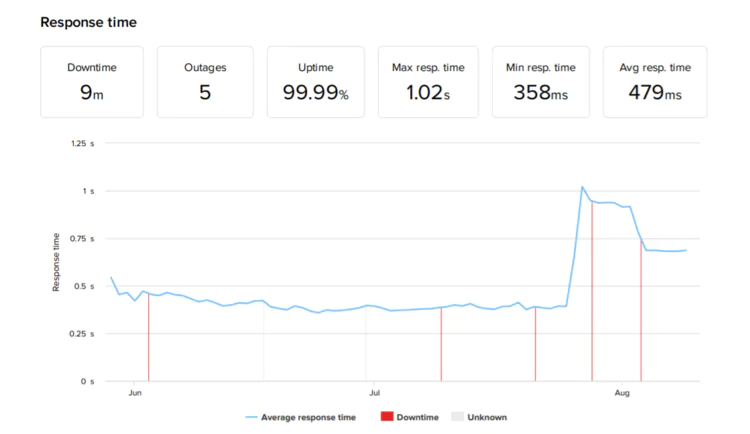
Nexcess uptime monitoring results — 99.99% uptime over a 2-month test window
Website Speed Test
Speed testing measured two key metrics: Largest Contentful Paint (LCP) — the time it takes to render the largest visible element on the page, which Google uses as a Core Web Vitals ranking signal — and fully loaded time, which covers all page elements.
Testing an empty WordPress site from three locations produced the following LCP results:
- San Antonio, USA (server location): 705ms — excellent, well under Google's 2.5s threshold
- London, United Kingdom: Slightly higher than San Antonio, but comfortably under 2.5s
- Mumbai, India: Higher than both US and UK results, but still under the 2.5s threshold
For sites serving international audiences, Nexcess operates eight data centers across the US, Europe, and Australia — allowing you to select the server location geographically closest to your primary audience, reducing latency for that region.
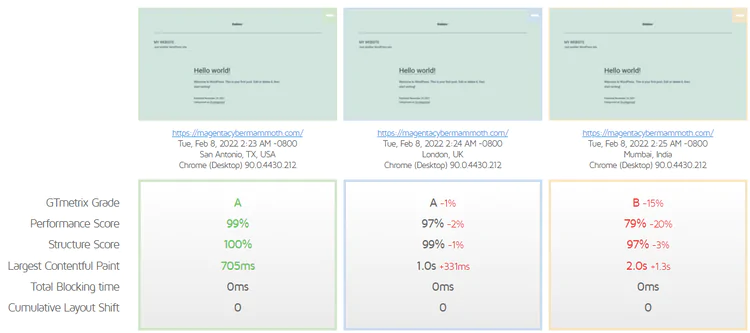
Nexcess load time test results — all three global locations stayed under Google's 2.5s LCP threshold
Stress Test — Traffic Surge Handling
The stress test sent 50 virtual users (VUs) simultaneously to the monitored site, a load equivalent to approximately 50,000 monthly visitors hitting the site every minute. This is a significant server load that would overwhelm most entry-level shared hosting plans.
Nexcess handled the full 50VU load without any performance degradation — page speed remained constant and stable throughout the entire test, and no request failures were recorded.
This confirms that the built-in auto-scaling works as described: traffic surges are absorbed automatically without affecting response quality for real visitors.
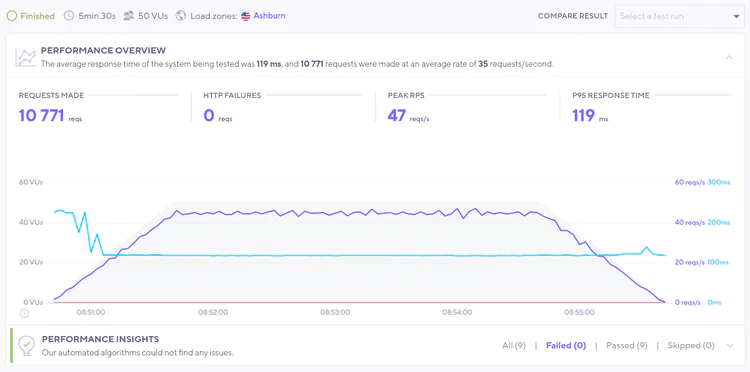
Nexcess stress test — speed (blue line) remained flat and stable; no failures (red line) at 50VU load
Nexcess delivered strong results on all three performance dimensions: 99.99% uptime, 479ms average response time (under the 600ms market average), sub-2.5s LCP from three global locations, and zero failures under stress test load. For a managed WordPress and WooCommerce host at this price point, these results are consistent with the premium tier positioning.
Nexcess Pricing Plans
All plans include a 30-day money-back guarantee. Annual billing gives two months free compared to monthly pricing. Verify current pricing at nexcess.net. All plans include: free SSL, WordPress core and plugin updates, daily offsite backups, one-click staging, server-level caching, integrated CDN, iThemes Security Pro, free migration, and auto-scaling.
Managed WordPress Hosting Plans
Seven plans scaling from individual bloggers to enterprise agencies — all cloud-hosted with the full Nexcess feature set. The primary differences between plans are site count, storage, and bandwidth allocation.
| Plan | Sites | Storage | Bandwidth | Price/mo |
|---|---|---|---|---|
| Spark | 1 | 15 GB | 2 TB | $15 |
| Maker | 5 | 40 GB | 3 TB | $65 |
| Designer | 10 | 60 GB | 4 TB | $90 |
| Builder | 25 | 100 GB | 5 TB | $124 |
| Producer | 50 | 300 GB | 5 TB | $249 |
| Executive | 100 | 500 GB | 10 TB | $457 |
| Enterprise | 250 | 800 GB | 10 TB | $832 |
The Spark plan ($15/month) is the right starting point for individual site owners — one site, 15 GB storage, and the full Nexcess managed feature set. The Maker plan ($65/month) is the most logical step for freelancers managing a handful of client sites. From Designer upwards, plans are targeted at established agencies and studios. Email hosting is not included on the Spark plan — all other plans include it with unlimited storage.
Managed WooCommerce Hosting Plans
Nexcess's managed WooCommerce plans mirror the WordPress tier structure but add an orders-per-hour limit for each plan — scaling from the entry Spark tier through to Enterprise.
All WooCommerce plans include the same full feature set as the WordPress plans, with the WooCommerce-specific performance optimisations and order throughput scaling built in.
For current WooCommerce plan pricing and per-plan order limits, visit nexcess.net/woocommerce-hosting — pricing is updated periodically and the order limits per tier are best verified directly. The 30-day money-back guarantee applies to WooCommerce plans as well.
Nexcess Pros and Cons
✓ What Nexcess Does Well
- 100% uptime guarantee — tested at 99.99% over a real monitoring period
- One-click staging sites on every plan — test changes safely before going live
- 30-day money-back guarantee on all packages
- Free daily automatic backups + on-demand backup capability
- Built-in CDN — static content served globally from edge nodes
- Free website migration — handled by Nexcess's technical team
- Auto-scaling handles traffic surges without manual intervention
- Free iThemes Security Pro on every plan — normally a paid plugin
- Visual comparison testing on WordPress updates — catches regressions before they go live
- Stencils for rapid site replication — major time-saver for agencies
- Part of Liquid Web / StellarWP group — enterprise backing with specialised WordPress focus
✗ Limitations Worth Knowing
- Domain name not included — purchase separately
- Higher pricing than most shared and budget managed hosts — Spark starts at $15/month
- Storage allocations are modest relative to pricing — 15 GB on Spark, 40 GB on Maker
- No DDoS protection included on any plan — a notable gap at premium pricing
- Email hosting not included on Spark (entry) plan
- No dedicated server or VPS option — for those needs, use Liquid Web instead
Nexcess Alternatives
Pressable
Owned by Automattic (the company behind WordPress), Pressable provides enterprise WordPress hosting with Jetpack Security, global CDN, staging, and WordPress-specialist support. The most WordPress-native alternative to Nexcess — and often at comparable pricing for single-site plans. See our Pressable hosting review.
Try Pressable →WP Engine
WP Engine is Nexcess's closest direct competitor — both are premium managed WordPress hosts with staging, CDN, daily backups, and expert support. WP Engine includes Genesis Framework and premium themes on all plans. Worth comparing directly on price-per-site if you are managing multiple WordPress sites.
Try WP Engine →Liquid Web
Nexcess's sister company in the same brand group. If you need dedicated server or VPS hosting rather than managed WordPress/WooCommerce, Liquid Web is the right product — it specialises in high-load infrastructure and offers a 100% uptime SLA backed by financial guarantees. See our Liquid Web review.
Try Liquid Web →Hostinger
At $1.99/month with LiteSpeed servers, 29 million users, free SSL, and free domain, Hostinger is the right choice if Nexcess's pricing is above your current budget. You lose the managed WordPress features, but Hostinger's performance at this price point is hard to match for starter sites.
Try Hostinger →Bluehost
One of WordPress.org's three officially recommended hosts, Bluehost is the most accessible entry point for first-time site owners — one-click WordPress install, free domain, Yoast SEO integration, and 24/7 support. For users not ready for the managed WordPress premium tier, Bluehost is the natural starting point.
Try Bluehost →A2 Hosting
A2 Hosting's Turbo servers (up to 20x faster than Apache using LiteSpeed) and anytime money-back guarantee make it a strong alternative for speed-conscious users at a mid-range price point — more affordable than Nexcess with strong performance characteristics across shared, VPS, and dedicated tiers.
Try A2 Hosting →Final Verdict — Is Nexcess Right for Your Business?
Nexcess is a well-justified investment for anyone running a serious WordPress or WooCommerce operation who wants the technical management handled by experts rather than managing it themselves.
The combination of auto-scaling, visual comparison testing on updates, iThemes Security Pro on every plan, one-click staging, and 99.99% uptime makes it one of the most capable managed WordPress environments available at this price point.
The cons are real but manageable: no domain included (purchase separately), modest storage on the lower tiers, no DDoS protection, and pricing that starts at $15/month and scales significantly as site count grows. For agencies managing dozens of client sites, the producer-level plans ($249+) will be the relevant comparison, not the Spark entry price.
The verdict: Nexcess earns a strong recommendation for WordPress publishers, WooCommerce store owners, and agencies who want to stop managing hosting infrastructure and start focusing entirely on their content or product.
If you are just starting out or on a tight budget, begin with Hostinger or Bluehost and migrate to Nexcess when your site's traffic and revenue justify the investment.
As a first step, Nwaeze David readers receive an automatic discount on their first Nexcess plan — click through to have it applied at checkout.
Try Nexcess — Managed WordPress Done Right
All plans include free migration, daily backups, one-click staging, iThemes Security Pro, built-in CDN, and a 30-day money-back guarantee. Nwaeze David readers get an automatic discount on signup.
FAQs About This Nexcess Review
Nexcess is a managed hosting provider specialising in WordPress, WooCommerce, and Magento hosting. "Managed" means Nexcess handles the technical infrastructure on your behalf — WordPress core and plugin updates (with visual comparison testing to catch regressions), security monitoring, daily backups, performance optimisation, caching, CDN, and staging environments. You focus on your content, products, or clients; Nexcess manages the technical stack. It suits individual site owners on the entry-level Spark plan all the way through to enterprise agencies managing 250 sites on the Enterprise plan. It also offers dedicated Magento hosting plans for businesses running the Magento eCommerce platform.
Nexcess is headquartered in Southfield, Michigan, USA. It operates eight data centers across the US, Europe, and Australia — giving you the option to host your site on infrastructure geographically close to your primary audience, which reduces server response latency for visitors in that region. When setting up your Nexcess account, you can select your preferred data center location. For US-based audiences, a US data center is optimal. For European audiences, one of the European nodes will reduce latency. For Australian audiences, the Australian data center is the best choice. The built-in CDN further distributes static content globally regardless of origin server location.
Nexcess does not use cPanel — instead, it provides its own proprietary Nexcess Client Portal. The portal provides all the core functionality you would find in cPanel: site management, staging environments, domain management, email configuration, backup management, and performance monitoring — presented in a cleaner, purpose-built interface designed specifically for managed WordPress and WooCommerce hosting. Most users find the Nexcess Client Portal more intuitive than cPanel for WordPress-specific tasks. If you are transitioning from a cPanel-based host, there is a brief learning curve, but the portal's task-specific design generally makes it faster to navigate for the actions managed WordPress users perform most frequently.
Both Nexcess and Liquid Web are part of the same parent brand group, but they serve different hosting needs. Nexcess specialises in managed WordPress, WooCommerce, and Magento hosting — its plans are structured around WordPress site counts (1–250 sites) and are fully managed, meaning no server administration required. Liquid Web specialises in managed dedicated servers, VPS, and enterprise hosting — its plans are structured around raw server resources (CPU, RAM, storage) and suit high-load applications, large eCommerce operations, and businesses that have outgrown managed WordPress hosting. In practical terms: if you are running a WordPress or WooCommerce site and want it fully managed, use Nexcess. If you need a dedicated server, a high-spec VPS, or infrastructure for a non-WordPress application, use Liquid Web. The two products complement each other at different stages of business growth.
Nexcess is part of the Liquid Web family of brands, which it joined in 2019. The group includes Liquid Web (managed dedicated and VPS hosting), Nexcess (managed WordPress, WooCommerce, and Magento hosting), and StellarWP (a collection of WordPress software and tools including iThemes, GiveWP, and LearnDash). Nexcess operates independently within the group — its team, products, pricing, and customer relationships were not changed by the acquisition, and founding CEO Chris Wells remained in a senior technology leadership role following the merger. For customers, the Liquid Web group association means access to a broader ecosystem of WordPress-related products through StellarWP, including the iThemes Security Pro plugin that Nexcess includes free on all plans.
It depends on your technical comfort level, time availability, and business stage. Managed WordPress hosting (like Nexcess) means the hosting provider handles WordPress core updates, plugin updates, security monitoring, daily backups, performance optimisation, and caching — you log in to create content and manage your site without worrying about the technical infrastructure. Unmanaged hosting (like standard shared hosting or unmanaged VPS) means you are responsible for all WordPress maintenance yourself — updates, security hardening, backup configuration, caching plugin setup, and performance tuning. Managed WordPress is better for business owners and content creators who want to focus on their site rather than its infrastructure, or for anyone who has experienced the consequences of an unpatched security vulnerability or a failed update breaking their live site. Unmanaged hosting is better for developers who want full control and are confident managing their own server environment. For most non-developer business owners, managed WordPress hosting is the better choice — the time saved and risk avoided justify the higher cost.
Nexcess offers a 100% uptime guarantee — meaning it commits to zero unplanned downtime for your hosted site. This guarantee excludes unforeseen circumstances outside Nexcess's control (such as upstream internet outages) and scheduled maintenance windows. In real-world testing over a two-month monitoring period, Nexcess recorded five outages totalling nine minutes of downtime, resulting in a measured 99.99% uptime — which is consistent with the stated guarantee and represents industry-leading reliability. 99.99% uptime translates to approximately 52 minutes of total potential downtime per year, compared to 8+ hours at the more commonly stated 99.9% level. If Nexcess fails to meet its uptime commitment in any given month, affected customers are eligible for service credits — check the current SLA terms on the Nexcess website for specific credit provisions.
Yes — Nexcess offers a 30-day money-back guarantee on all hosting plans. If you cancel within the first 30 days of your initial purchase, you are eligible for a full refund. To claim the refund, contact Nexcess's support team within the 30-day window. The guarantee applies to new accounts on first-time purchases — it does not apply to renewals or account upgrades. The 30-day window gives you sufficient time to evaluate the platform, test your site's performance, and assess whether the managed features meet your expectations before committing to an annual plan. Annual billing also gives you two months of hosting free compared to monthly billing, so the decision on billing frequency is worth considering at signup.


Very interesting details you have noted, thank you for posting.