Loading... document.addEventListener("DOMContentLoaded", function() { var days = ['Sun','Mon','Tue','Wed','Thu','Fri','Sat']; var months = ['Jan','Feb','Mar','Apr','May','Jun','Jul','Aug','Sep','Oct','Nov','Dec']; function tick() { var el = document.getElementById('wpclock-text'); if (!el) return; var now = new Date(); var h = now.getHours(), m = now.getMinutes(), s = now.getSeconds(); var ampm = h >= 12 ? 'PM' : 'AM'; h = h % 12 || 12; el.textContent = days[now.getDay()] + ', ' + months[now.getMonth()] + ' ' + now.getDate() + ' ' + String(h).padStart(2,'0') + ':' + String(m).padStart(2,'0') + ':' + String(s).padStart(2,'0') + ' ' + ampm; } tick(); setInterval(tick, 1000); });
QuickBooks Review 2026 | Pricing, Features, Pros & Cons of the QuickBooks HR/Payroll Provider
Table of Contents
QuickBooks Review Overview
QuickBooks Online is the #1 accounting software for small businesses globally, and for good reason. It covers virtually every financial management need a small to medium-sized business has: income and expense tracking, invoicing, tax preparation, payroll, receipt capture, mileage tracking, and real-time financial reporting, all from one cloud-based platform accessible on any device.
What sets QuickBooks Online apart is its seamless collaboration capability. You can grant access to your bookkeeper or accountant directly from the platform, meaning your financial data is always current and your accountant can work from the same live data you see. No more emailing spreadsheets or reconciling conflicting versions of your accounts at year-end.
If you are not sure whether QuickBooks is right for your business, the platform offers a 30-day free trial with full access to the Simple Start plan, no credit card required. You can also take 50% off your first three months when you purchase through the links on this page.
Get QuickBooks Online at half price for your first three months — applied automatically at checkout.
Who QuickBooks Is Best For
💵 Small Business Owners
From sole traders to businesses with up to 25 employees, QuickBooks scales across every stage. Start on Simple Start and upgrade as your team and financial complexity grow.
📋 Freelancers and Contractors
QuickBooks Self-Employed (from $15/month) is built specifically for freelancers and independent contractors, covering income tracking, mileage, expense categorisation, and quarterly tax estimates.
📈 Ecommerce and Product Businesses
The Plus plan adds inventory tracking and cost-of-goods management — essential for product-based businesses selling through multiple channels. QuickBooks syncs with Shopify, WooCommerce, and Amazon.
👥 Businesses Working with Accountants
QuickBooks is the platform most accounting professionals prefer. The My Accountant feature lets you invite your bookkeeper or accountant to your account with a few clicks. 94% of accounting professionals report that QuickBooks saves them time.
📱 Remote and Mobile Teams
The QuickBooks mobile app (4.7 stars on App Store) includes receipt capture via camera, mileage tracking via GPS, and invoice sending — allowing business owners to manage finances from anywhere.
QuickBooks is not ideal if you need to manage multiple companies from a single account (each requires a separate subscription), or if you need advanced inventory features like assembly management. For international payroll and global HR, look at Deel or Remote as complementary tools.
How to Use QuickBooks Online
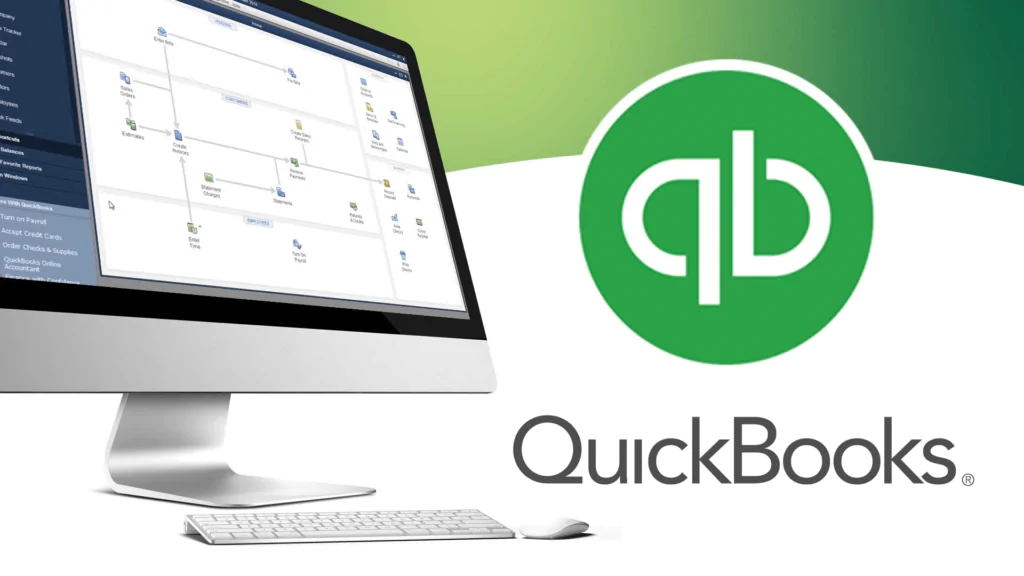
Getting started with QuickBooks Online is straightforward. After creating your account, you land on the main dashboard, which gives you an at-a-glance overview of your profit and loss, open invoices, recent expenses, and sales performance.
If you are migrating from another accounting platform, QuickBooks supports importing your existing data directly. The enhanced migration process now includes automatic user ID inclusion and supports up to 750,000 transactions (up from 350,000 in previous versions).
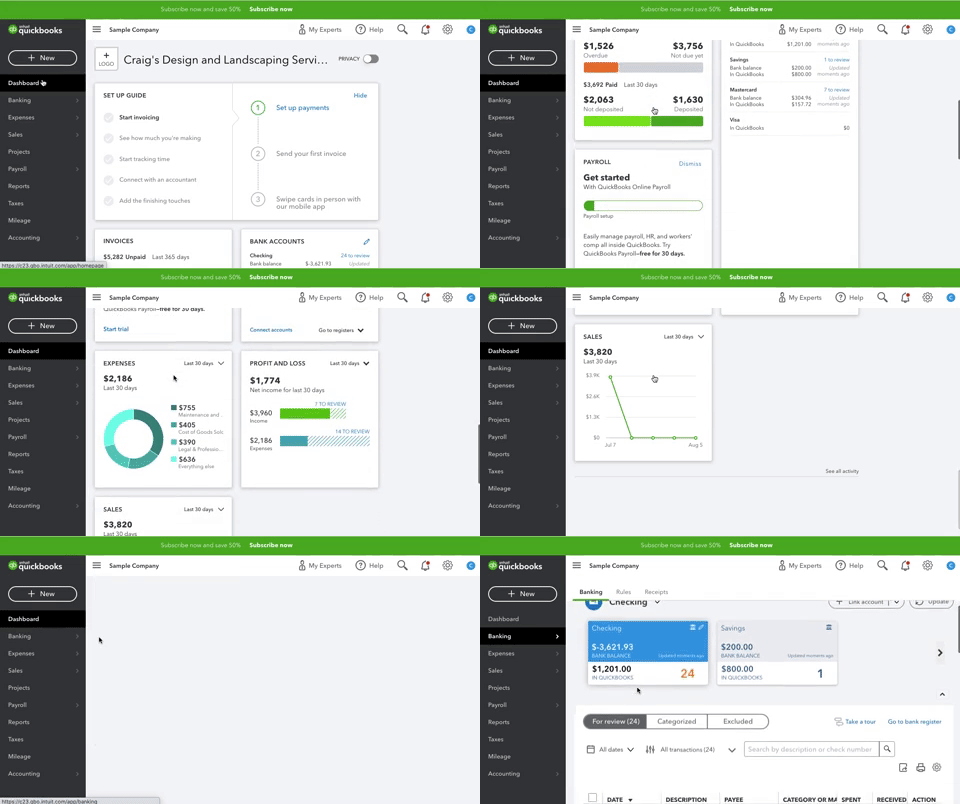
QuickBooks Online dashboard — real-time overview of your business finances with bank connection, invoice management, and expense tracking
The Banking tab on the left sidebar lets you connect your bank accounts and credit cards. Once connected, QuickBooks automatically imports transactions and categorises them based on your past categorisation patterns.
This dramatically reduces the time spent on bookkeeping, instead of manual entry, you review imported transactions in the For Review tab and confirm or adjust the categories.
Additional capabilities accessible from the dashboard include: customising invoice templates, setting up automatic sales tax tracking, managing 1099 contractor payments, entering mobile receipts and bills, and editing your account settings through the gear icon in the upper right corner.
Inviting your bookkeeper or accountant is done through the My Accountant tab or the Manage Users page in Settings. If you do not have an accountant yet, QuickBooks also has a ProAdvisor directory where you can find a verified QuickBooks professional.
QuickBooks Online offers a one-time complimentary virtual session with a QuickBooks ProAdvisor who will walk you through connecting your bank accounts, setting up your chart of accounts, customising invoices, and configuring reminders. This is available to paid subscribers (not included in the free trial) and does not cover payroll setup, desktop migration, or ongoing services.
QuickBooks Pricing Plans
Prices below are standard monthly rates. Nwaeze David readers get 50% off for the first 3 months through the links on this page. Alternatively, a 30-day free trial is available with no credit card required. All plans include mobile app access, customer support, and third-party integrations. QuickBooks Payroll and QuickBooks Payments are separate paid add-ons not included in the base plan cost. Verify current pricing at quickbooks.com.
- Track income and expenses
- Send invoices and accept payments
- Run and export financial reports
- Tax category sorting
- Receipt capture (mobile app)
- Mileage tracking (GPS)
- Cash flow monitoring
- Manage 1099 contractor payments
- 1 sales channel sync
- All Simple Start features
- Bill management and payment
- Billable time tracking
- Enhanced sales and AR/AP reports
- 3 sales channel syncs
- All Essentials features
- Inventory tracking and COGS
- Project profitability tracking
- Class and location tracking
- Budgeting reports
- All sales channels synced
- All Plus features
- Custom analytics and charts
- Batch invoicing and expenses
- Workflow automation
- Employee expense management
- Dedicated account team
- 24/7 phone + chat support
- HubSpot and DocuSign integrations
For most solo entrepreneurs and small businesses: Simple Start ($30/month) covers everything you need to manage your finances professionally. For businesses with a small team or requiring bill management: Essentials ($60/month). For product-based businesses needing inventory: Plus ($90/month) is the minimum. For larger teams needing automation, custom reporting, and a dedicated account manager: Advanced ($200/month).
If you are a freelancer or independent contractor, QuickBooks Self-Employed starts at $15/month and is specifically designed for the self-employed, covering income and expense tracking, mileage, receipt capture, and estimated quarterly tax calculations.
QuickBooks Features — 2026 Updates
🎯 Free ProAdvisor Setup Session
QuickBooks Online now offers a complimentary one-time virtual session with a certified QuickBooks ProAdvisor when you set up your company file.
The session covers connecting your bank and credit card accounts, setting up your chart of accounts, customising your invoices, and configuring payment reminders. This is an optional guided setup that removes the learning curve for first-time users.
⚡ 12% Speed Improvement
QuickBooks Online has been made 12% faster across the platform, reducing load times for reports, transaction entry, and dashboard navigation. For businesses processing high volumes of transactions daily, this improvement directly reduces time spent in the platform.
🔌 New Integrations — Advanced Plan
QuickBooks Online Advanced has added integrations with PandaDoc (e-signature and document automation), Centage (budgeting and planning), and Spreadsheet Sync (bidirectional Excel integration for advanced financial modelling). These additions make the Advanced plan more capable as a financial management hub for growing businesses.
🔄 Enhanced Migration Process
The migration process for moving from another accounting platform has been improved: user IDs are now automatically included in exports, and the transaction import limit has been raised from 350,000 to 750,000. This makes QuickBooks a more practical migration target for businesses with large existing transaction histories.
🏆 Better Customer Support
Intuit has invested in improving support quality, including building dedicated expert knowledge for QuickBooks Payroll and QuickBooks Payments queries, and reducing wait times across all support channels.
Advanced plan customers have access to a dedicated account team plus 24/7 phone or chat support.
📸 Mobile Check Deposit
QuickBooks now allows you to deposit checks directly from the mobile app by photographing the check — QuickBooks automatically generates the transaction digitally. Mobile deposits typically clear within five business days. This feature is available exclusively to users with a QuickBooks Checking account.
QuickBooks User Ratings Across Platforms
QuickBooks is one of the most reviewed pieces of software in the accounting category. Here are the current ratings across major review platforms.
Most positive reviews highlight the platform's extensive feature set, ease of adding customers and vendors, seamless accountant collaboration, and the quality of the mobile app for on-the-go receipt capture and mileage tracking.
The most common criticisms are the inability to manage multiple companies under a single account (each company requires its own subscription) and the absence of advanced inventory features like assembly management.
Intuit reports that 94% of accounting professionals feel QuickBooks Online saves them time and saves their clients money — reflecting the depth of accountant-specific features and the platform's dominance as the default choice for bookkeepers and CPAs.
QuickBooks Pros and Cons
What QuickBooks Does Well
- #1 accounting software for small businesses globally — the most trusted name in SMB accounting
- Four plan tiers covering solo freelancers through to 25-user teams — scalable within the platform
- Seamless accountant and bookkeeper collaboration via My Accountant and Manage Users
- Best-in-class mobile app (4.7/5 on App Store) with receipt capture, mileage tracking, and invoice sending
- Automatic bank transaction import and categorisation after initial setup
- 30-day free trial available with full Simple Start access
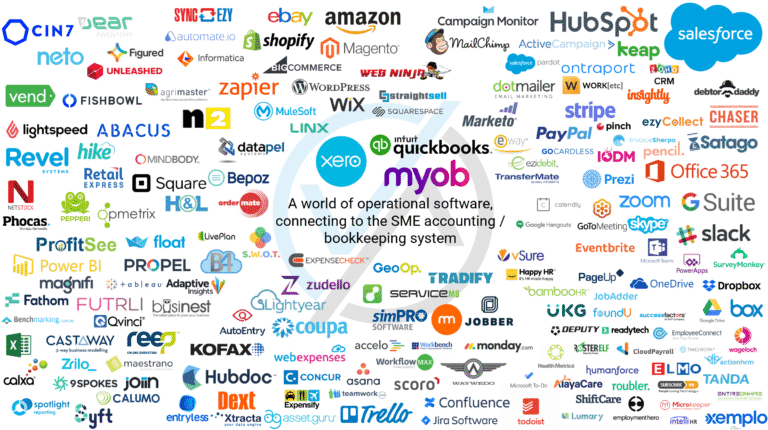
- Extensive third-party integrations (Shopify, PayPal, Gusto, Stripe, and 700+ more)
- New ProAdvisor setup session helps first-time users get started correctly
- 12% speed improvement in recent updates
- QuickBooks Self-Employed option for freelancers at $15/month
Limitations Worth Knowing
- Cannot manage multiple companies from a single account — each requires a separate subscription
- Lacks advanced inventory features like assembly or manufacturing management — not suitable for complex manufacturing businesses
- QuickBooks Payroll is a paid add-on, not included in base plan pricing
- Standard pricing ($30–$200/month) can be significant for very small businesses after the promotional period ends
- The Advanced plan at $200/month may be out of reach for smaller operations that need its features
QuickBooks Alternatives
Xero
Xero is the most direct competitor to QuickBooks at the small business accounting level — cloud-based, with integrated payroll in the UK, Australia, and New Zealand, strong bank reconciliation, and 600+ app integrations.
Many accounting firms work with both QuickBooks and Xero; Xero is sometimes preferred for its cleaner UI and better multi-currency support. For a full comparison, see our Xero Review.
Try XeroDeel
Deel is the leading global payroll and HR platform for businesses with international teams — covering contractors and employees in 150+ countries. While QuickBooks handles your core accounting, Deel handles the complexity of paying and managing international team members.
The two tools complement each other well. For a full comparison, see our Deel Review.
Try DeelRemote
Remote provides global employment, payroll, and HR services for distributed teams — with strong Employer of Record capabilities and IP protection for tech companies. Best used alongside QuickBooks for accounting rather than as a direct replacement. Pricing from $29/month for contractor management; EOR from $599/month per employee.
Try RemotePapaya Global
Papaya Global integrates your entire global workforce and payroll management onto a single platform, connecting you to a network of verified local vendors. Best for small to midsize companies needing affordable international payroll services. EOR services from $650 per employee; global payroll from $12 per employee.
Try Papaya GlobalIs QuickBooks Online Right for You?
QuickBooks Online is a great option for small business owners who need a reliable, comprehensive accounting platform that is trusted by millions of businesses and the majority of accounting professionals.
Its strengths (ease of use, depth of features, mobile app quality, accountant collaboration, and the breadth of integrations with other business tools) make it a well-justified first choice for businesses at the Simple Start through Plus plan levels.
Small business owners who want to manage invoicing, expenses, cash flow, and tax preparation from a single platform will find QuickBooks covers everything they need.
Freelancers and independent contractors are better served by the QuickBooks Self-Employed plan at $15/month. Businesses with inventory management needs should evaluate the Plus plan carefully, and note its assembly management limitations if that is a requirement.
The 30-day free trial gives you enough time to evaluate whether QuickBooks fits your workflow before committing. Start with the Simple Start plan and upgrade only when you genuinely need the additional features of a higher tier.
Try QuickBooks Online — 50% Off for 3 Months
The #1 accounting software for small businesses. Invoicing, expenses, payroll, tax, and real-time financial reports — all in one platform.
Frequently Asked Questions on QuickBooks Review
QuickBooks is available in two main formats: QuickBooks Online (cloud-based, accessible from any browser or mobile device) and QuickBooks Desktop (locally installed software on a Windows or Mac computer). This review covers QuickBooks Online. QuickBooks Desktop plans include QuickBooks Pro, QuickBooks Premier, and QuickBooks Enterprise — the Enterprise plan allows up to 40 users and includes industry-specific versions for manufacturing, retail, professional services, and nonprofits. For most small businesses starting fresh, QuickBooks Online is the recommended choice as it enables real-time collaboration with accountants, automatic updates, and access from any device.
QuickBooks Online is not free permanently, but there are two ways to access it at no cost initially. First, new customers can start a 30-day free trial with full Simple Start plan access and no credit card required. Second, educators and students can register for free access to QuickBooks Online through Intuit's education programme after a validation process. For working small businesses, the 30-day trial is the most practical evaluation path. If you are not sure whether you want a trial or the promotional discount, note that you cannot claim both — choose the 30-day trial if you want time to evaluate before committing, or choose the 50% off discount if you are already ready to purchase.
QuickBooks Online is the most widely used accounting platform among small business accounting professionals globally. Intuit reports that 94% of accounting professionals feel QuickBooks Online saves them time and saves their clients money. The platform is a standard part of most bookkeeper and CPA toolsets, meaning your accountant is very likely already familiar with it — reducing the learning curve for your working relationship. The My Accountant feature and Manage Users page make it easy to grant your accountant read or write access to your account, and the live financial data means your accountant always works from accurate, current information rather than period-end exports.
Yes — for most small businesses, QuickBooks Online is worth the investment at the Simple Start or Essentials tier. The time savings from automated bank transaction categorisation, one-click financial report generation, and seamless accountant collaboration typically justify the monthly cost within the first few weeks of use. Where QuickBooks delivers the most value is to business owners who take full advantage of its transaction tagging and reporting features — allowing you to clearly see which revenue streams are most profitable and where costs can be reduced. If you are not sure you are using QuickBooks to its full potential, ask your accountant to review your chart of accounts and categorisation approach to ensure you are getting maximum value from your subscription.
Yes — QuickBooks Online uses industry-standard security measures including data encryption (AES-256), multi-factor authentication, secure credential tokenization, and role-based access controls. Intuit is SOC 2 Type II certified, meaning its security practices have been independently audited and verified. Your financial data is stored in Intuit's secure cloud infrastructure and is automatically backed up. You can further protect your account by enabling multi-factor authentication (which requires a phone confirmation in addition to your password) and by carefully managing which users have access to your QuickBooks account through the Manage Users settings.
QuickBooks Online base plans do not include payroll — it is a separate paid add-on called QuickBooks Payroll. It integrates directly with your QuickBooks Online account so payroll data feeds automatically into your accounts without manual entry. QuickBooks Payroll is available in Core, Premium, and Elite tiers with pricing starting from around $45/month plus $6 per employee per month. For businesses needing payroll, the Core plan handles automated tax filings and direct deposits. Premium and Elite add same-day direct deposit, HR support, and tax penalty protection. Note that QuickBooks Payroll is US-only — for global payroll, look at Deel or Gusto.