Table of Contents

What Is Hostinger?
When it comes to launching a website without breaking the bank, Hostinger is one of the most recommended starting points available. Serving over 29 million users across 178 countries, Hostinger has grown into one of the largest web hosting companies in the world by offering genuinely affordable shared hosting paired with strong performance and an intuitive control panel.
Headquartered in Kaunas, Lithuania, Hostinger operates 7 data centers across the USA, Europe (Netherlands, Lithuania, United Kingdom), Asia (Indonesia, Singapore), and South America (Brazil) — giving you geolocation-specific hosting options that reduce latency for your primary audience regardless of their location.
What makes Hostinger stand out at its price point is the combination of LiteSpeed caching, Cloudflare CDN, free SSL, free site migration, and its own custom hPanel control panel; all included at entry-level pricing that most competing providers cannot match.
Nwaeze David readers get an exclusive 80% off plus a free domain name on qualifying plans. For a broader hosting comparison, see our guide to the 21+ best WordPress hosting plans.
Nwaeze David readers get an automatic 80% discount applied at checkout. No code needed.
Hostinger at a Glance
Who Hostinger Is Best For
Budget-Conscious Beginners
Hostinger's entry pricing is among the lowest available in the shared hosting market. For anyone launching a first website on a tight budget, it is the strongest starting point that still delivers solid performance and an easy setup experience.
Bloggers and Content Creators
1-click WordPress installation, LiteSpeed caching, free SSL, and Cloudflare CDN provide everything a blogger needs to launch and grow, at a monthly cost that easily pays for itself with minimal monetisation.
Small Business Owners
The Business plan supports up to 100 websites with 200 GB of SSD storage and handles ~100,000 monthly visits - sufficient for most small business web operations including eCommerce, service sites, and portfolio sites.
International Website Owners
7 global data centers mean you can host your site on the server geographically closest to your audience - reducing latency for visitors in the US, Europe, Southeast Asia, or South America from a single provider.
Developers Testing Ideas
The Single plan at under $2/month gives developers a sandbox environment to test new projects, staging sites, or early-stage ideas without committing budget to a more expensive hosting tier.
As your site grows beyond Hostinger's shared hosting resource limits, the natural upgrade path is to Hostinger Cloud or VPS plans - both available within the same account. For sites needing fully managed WordPress infrastructure, Pressable or WP Engine are the appropriate upgrades.
Key Features
LiteSpeed Caching + Cloudflare CDN
Hostinger uses LiteSpeed web server technology on its shared hosting infrastructure - the same technology that powers A2 Hosting's premium Turbo plans and commands a price premium at most other providers.
LiteSpeed handles concurrent connections significantly more efficiently than Apache, and includes built-in server-level caching that reduces PHP execution overhead for repeat visitors.
Combined with free Cloudflare CDN integration, your static assets are served from Cloudflare's 300+ global edge locations regardless of where your origin server is located - reducing load times for visitors worldwide without additional configuration.
hPanel - Custom Control Panel (cPanel Alternative)
Hostinger does not use cPanel - instead it provides hPanel, its own purpose-built hosting control panel. hPanel covers all the standard hosting management functions: 1-click CMS installation, file management (drag-and-drop file manager), database management, email account setup, domain management, PHP version selection, and SSL certificate management.
Most users find hPanel more intuitive than traditional cPanel due to its modern design and logical task grouping - particularly beneficial for beginners who have never used a hosting control panel before.
Advanced tools are also available inside hPanel: PHP manager for version and extension control, cache manager for LiteSpeed cache management, Git access for developer workflows, and security features including hotlink protection and directory listing control.
Free Site Migration + 1-Click WordPress Installation
Hostinger migrates your existing website to their hosting at no charge - handling the technical transfer of your WordPress files, databases, and configuration.
The 1-click WordPress installer in hPanel deploys a clean WordPress installation in minutes, with the option to install popular plugins and themes during the setup process. Both features eliminate the most common friction points when starting with a new hosting provider.
Free SSL Certificate + Professional Email
Free SSL certificates are included on all plans and configured automatically through hPanel - encrypting visitor connections and satisfying Google's HTTPS ranking requirement.
Professional email hosting (custom domain email addresses) is available on Premium and above plans, allowing you to create and manage @yourdomain.com email accounts directly from hPanel without a separate email provider subscription.
7 Global Data Centers - Geolocation Hosting
Hostinger's 7-data-center global footprint is one of its clearest infrastructure advantages over competing budget hosts, most of which operate from 1-2 data centers:
During account setup, you select the data center location that best serves your primary audience. Sites targeting Southeast Asian visitors should select Indonesia or Singapore; European sites should select Netherlands, Lithuania, or UK; Latin American sites should select Brazil.
The right data center selection reduces server response latency for your core audience, which contributes directly to faster page loads and better Core Web Vitals scores.
WordPress Acceleration + Managed Automatic Updates
Hostinger includes WordPress-specific acceleration tools beyond basic LiteSpeed caching - including WordPress speed optimisation settings accessible from hPanel and managed automatic WordPress core updates.
Automatic updates ensure your installation stays current with the latest security patches without requiring manual intervention, reducing the security risk that comes with running outdated WordPress core versions.
Hostinger Hosting Plans
All prices below are promotional introductory rates. Renewal rates are higher - check renewal pricing before committing to a plan length. A 30-day money-back guarantee applies to all plans. Verify current pricing at hostinger.com. Nwaeze David readers get 80% off through the links on this page.
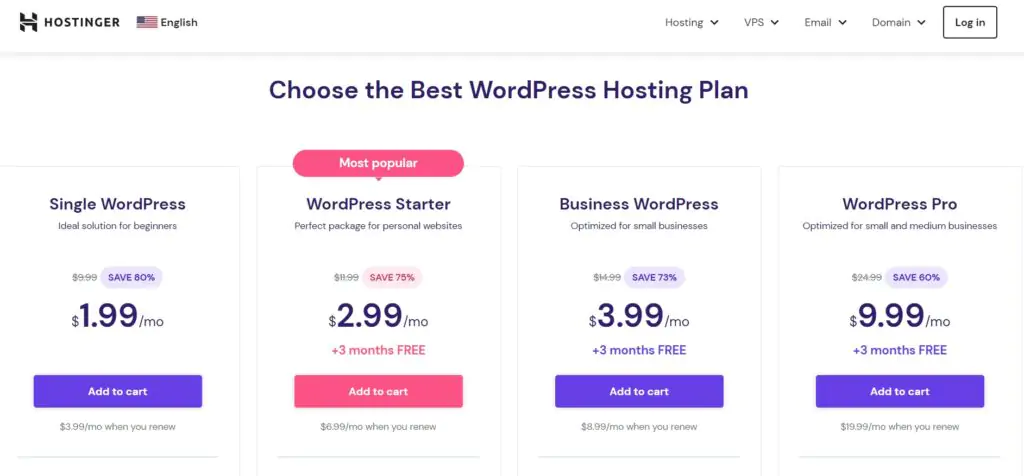
Hostinger's shared hosting plans - Single, Premium, and Business tiers with pricing and storage allocations
- 1 website
- 1 email account
- 30 GB SSD storage
- ~10,000 monthly visits
- Free SSL certificate
- No free domain
- 2 MySQL databases
- Up to 100 websites
- 100 email accounts
- 100 GB SSD storage
- ~25,000 monthly visits
- Free domain (1 year)
- Free SSL certificate
- Unlimited MySQL databases
- Up to 100 websites
- 100 email accounts
- 200 GB SSD storage
- ~100,000 monthly visits
- Free domain (1 year)
- Free SSL certificate
- Daily backups included
The Premium plan is the best starting point for most users. The Single plan's restriction to 1 website and 1 email account makes it too limited for anything beyond a one-page test site. Premium adds 100 websites, 100 email accounts, significantly more storage, and a free domain name - at just $1/month more than Single. The Business plan is the right choice if you need daily automatic backups included or anticipate traffic approaching 100,000 monthly visits.
Beyond shared hosting, Hostinger also offers:
The cloud and VPS plans provide dedicated CPU, RAM, and SSD storage resources for sites that have outgrown shared hosting resource limits - upgradeable directly from within your existing Hostinger account without a provider migration.
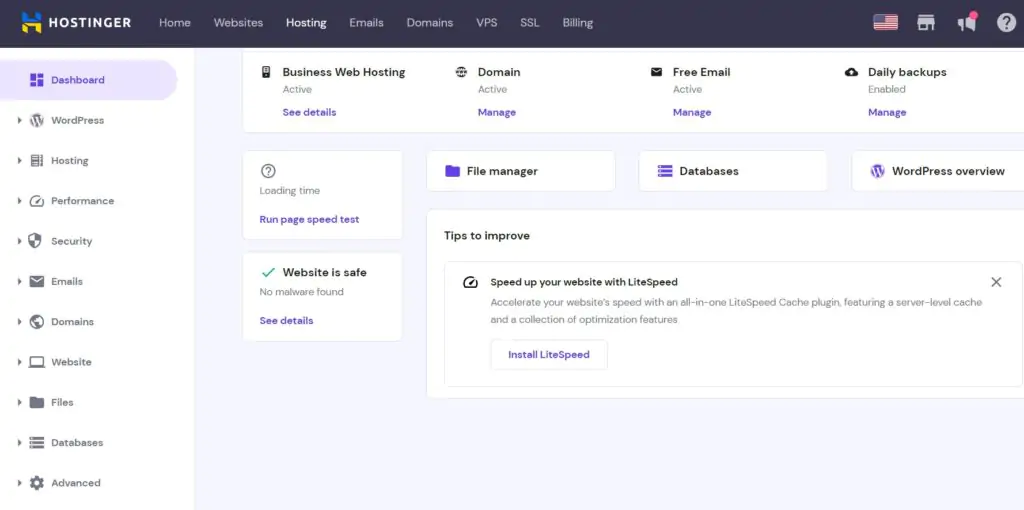
Hostinger's hPanel dashboard - intuitive control panel covering all hosting management tasks without traditional cPanel complexity
Performance Test Results
We created a test WordPress site on Hostinger using the default theme, populated with dummy content including images, to replicate the behaviour of an average production WordPress site. Four separate tests were run.
Speed Test - Pingdom
Pingdom was used to measure the test site's load time. The result was 460ms - a fraction of a second, and a strong result for a shared hosting account with no additional caching plugins or speed optimisation tools installed.
This confirms that Hostinger's LiteSpeed infrastructure delivers meaningful performance benefits at the base level before any WordPress-side optimisation is applied.

Pingdom speed test - Hostinger loaded the test WordPress site in 460ms with no caching or optimisation plugins
Stress Test - 100 Concurrent Users (K6)
K6 (formerly LoadImpact) was used to gradually build up to 100 virtual simultaneous users to test server performance under peak traffic conditions. The blue line represents page load time and the green line represents the number of active users on the site.
As the chart shows, response time remained steady throughout the entire test even as the concurrent user count climbed to 100 - no performance degradation and no failures. This means Hostinger can reliably handle sudden traffic spikes on a shared plan without slowing down.

K6 stress test - Hostinger's response time (blue) remained flat and stable as concurrent user count (green) climbed to 100
Server Response Time - Global (Bitcatcha)
Bitcatcha tests server response time from multiple geographic locations simultaneously, isolating the pure server response independent of page content. Results were strong across the board - particularly in Europe and North America, which reflects the proximity of the test server to those regions.
This validates the value of Hostinger's data center selection feature: hosting on a server geographically close to your audience produces the fastest response times.

Bitcatcha global response test - particularly strong performance in Europe and North America
Uptime Test
An uptime monitoring alert was active throughout the testing period. No downtime events were recorded during any of the performance tests, including the 100-user stress test - a period when some shared hosting servers experience brief outages under sudden load.
The site remained continuously available from start to finish.
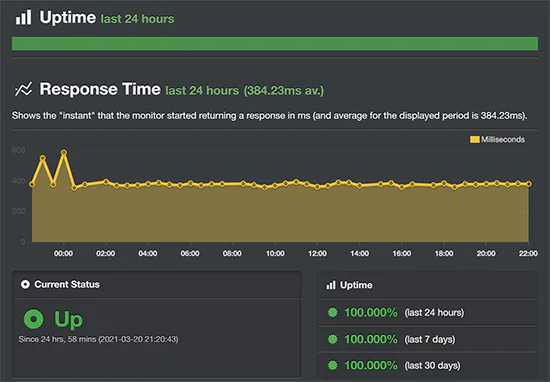
Uptime monitoring - no downtime was recorded throughout the full testing period including the stress test
Hostinger earned a Grade A performance score across all four tests. A 460ms load time, 146ms average response, stable performance under 100 concurrent users, and zero downtime represent excellent results for shared hosting at this price point - particularly notable given that no speed optimisation plugins were installed on the test site.
Customer Support
Hostinger provides 24/7 customer support via live chat for all plan tiers. Currently, phone support is not offered - all real-time support is handled through live chat.
Their technical support team is well-trained and response times are consistently fast, with most queries receiving a response within minutes rather than hours.
Support is available in English for global customers. If you purchased hosting through one of Hostinger's local language websites (which serve specific countries in their local languages), you may also be eligible for support in that language.
Beyond live chat, Hostinger maintains a comprehensive knowledge base covering the most common setup, configuration, and troubleshooting tasks across their entire platform - including step-by-step tutorials for WordPress, domain management, email setup, and hPanel navigation.
For users who prefer to resolve issues independently, the knowledge base handles the majority of standard questions.
Hostinger does not offer phone support. If 24/7 phone access is a requirement for your business, consider Bluehost or HostGator, both of which include 24/7 phone support alongside live chat.
Hostinger Pros and Cons
What Hostinger Does Well
- Lowest-cost entry pricing available - promotional plans from $1.99/month make Hostinger the most accessible entry point in shared hosting
- Strong performance for the price - Grade A, 460ms load time, and 146ms response time are excellent results at this pricing tier
- LiteSpeed caching included - server-level LiteSpeed technology at entry prices normally reserved for more expensive plans at competitors
- 7 global data centers - geolocation hosting across USA, Europe, Asia, and South America enables audience-specific server placement
- hPanel is beginner-friendly - more intuitive than traditional cPanel, particularly for users who have never managed hosting before
- Free SSL, CDN, and site migration - all included as standard; not charged as add-ons
- 80% discount for ND readers - plus free domain name on Premium and Business plans
- Responsive 24/7 live chat - consistently fast response times with well-trained support agents
- LiteSpeed + Cloudflare CDN combination - both fast server stack and global content delivery included at the base level
- 30-day money-back guarantee - full refund within 30 days on all plans
- Zero downtime in testing - stable through the 100-user stress test with no outages recorded
Limitations Worth Knowing
- Resource limits on entry plans - the Single plan (1 website, 1 email, no free domain) is too limited for most real use cases; the Premium plan is the practical minimum for most users
- No phone support - live chat only; no phone option for urgent issues
- Renewal pricing increases - promotional rates are substantially lower than renewal rates; check renewal cost before committing to a plan length
- Support primarily in English - full local-language support only available if purchased through a specific country's local Hostinger site
Hostinger Alternatives
Bluehost
One of WordPress.org's officially recommended hosts, Bluehost is the primary alternative to Hostinger for WordPress-focused users. Bluehost offers more polished WordPress-specific onboarding, SSD storage, and unlimited features on higher tiers - at a slightly higher price than Hostinger.
The trade-off: Hostinger's LiteSpeed performance at the entry tier is comparable or better. See our Bluehost review.
Try BluehostA2 Hosting
A2 Hosting's Turbo plans use LiteSpeed + NVMe SSD with an Anytime Money-Back Guarantee - a direct speed competitor to Hostinger. A2 Turbo plans consistently outperform Hostinger in benchmark comparisons, but at a higher price point. Also includes an anytime prorated refund policy more generous than Hostinger's 30-day limit. See our A2 Hosting review.
Try A2 HostingHostGator
HostGator and Hostinger are direct competitors at similar price points. HostGator counters Hostinger with 24/7 phone support (which Hostinger lacks), a 45-day money-back guarantee, and strong brand recognition. Hostinger counters with LiteSpeed, better international data center coverage, and a more modern control panel. See our HostGator review.
Try HostGatorNamecheap
Namecheap is the strongest alternative for users who prioritise domain registration alongside hosting. Namecheap offers permanent free WhoisGuard domain privacy, competitive domain prices, and shared hosting from $18.96/year.
Best for users who want a single provider for both domains and hosting with the lowest long-term domain costs. See our Namecheap review.
Try NamecheapPressable
When your site has outgrown Hostinger's shared hosting and needs fully managed WordPress infrastructure, Pressable (owned by Automattic, the company behind WordPress) is the natural upgrade - with Jetpack Security, global CDN, one-click staging, and WordPress-specialist support. See our Pressable review.
Try PressableFinal Verdict - Is Hostinger the Right Hosting for You?
Hostinger is our recommended starting point for any site owner whose primary concern is getting maximum performance and features for the lowest possible monthly cost.
The Grade A performance results - 460ms load time, 146ms response time, stable under 100 concurrent users, and zero downtime - are exceptional for a shared hosting provider at this price tier, and reflect the genuine infrastructure advantage that LiteSpeed and Cloudflare CDN provide even at entry pricing.
The 29 million users across 178 countries is not just a marketing figure - it reflects a platform that has scaled to handle genuine global demand. The hPanel control panel makes the experience accessible without technical expertise. And the 7-data-center global footprint means almost any audience can be served from a nearby server location.
The limitations are manageable: avoid the Single plan (too restricted for real-world use), check the renewal rate before committing to a long plan term, and accept that phone support is not available.
If phone support is a hard requirement, Bluehost or HostGator are the appropriate alternatives. For everyone else - particularly those building a first website, blog, or small business site on a budget - Hostinger offers the best performance-per-dollar available in the shared hosting market.
Try Hostinger - 80% Off for Nwaeze David Readers
Free domain, free SSL, LiteSpeed caching, Cloudflare CDN, 7 global data centers, and a 30-day money-back guarantee. Discount applied automatically at checkout.
FAQs About This Hostinger Review
Hostinger's headquarters is in Kaunas, Lithuania. However, the company operates globally with 7 data centers across four continents: the United States (US data center), Europe (Netherlands, Lithuania, and United Kingdom), Asia (Indonesia and Singapore), and South America (Brazil). When you sign up for Hostinger, you choose which data center location to host your site on during the account setup process. The best choice depends on where most of your website visitors are located - selecting a data center geographically close to your primary audience reduces server response latency and improves page load times for those visitors. If you are targeting a global audience, Hostinger's Cloudflare CDN distributes your static assets from whichever edge location is closest to each visitor, regardless of where your origin server sits.
Hostinger keeps entry prices low by limiting the CPU server resources available to customers based on their hosting plan tier. This is the standard model for shared hosting - multiple websites share a physical server's resources, and each account's CPU usage is capped to prevent any single site from consuming resources that would affect others on the same server. Hostinger then scales the resource allocations proportionally across its Single, Premium, and Business plans. As your website grows and hits the resource ceiling of your current plan, you upgrade to the next tier - or to cloud or VPS hosting where resources are dedicated rather than shared. This "pay as you grow" model is why Hostinger can offer a genuinely functional hosting service for under $2/month without the infrastructure being unsustainable. The promotional pricing is also subsidised by higher renewal rates, which is why checking the renewal cost before signup is important.
Yes - Hostinger is a reliable and well-regarded hosting company with years of experience in the shared hosting industry. Serving 29 million users across 178 countries represents genuine large-scale operational experience, and our independent testing confirmed Grade A performance with a 460ms load time, 146ms response time, and zero downtime across all test scenarios including a 100-user concurrent load test. The hPanel control panel is regularly cited by users as more intuitive than traditional cPanel alternatives, and 24/7 live chat support is available to all plan tiers. While phone support is not offered, Hostinger's live chat response times are consistently fast. The main caveats are the Single plan's significant limitations and renewal pricing that increases above the promotional rate - both of which are manageable with informed plan selection and budget planning.
Yes - Hostinger includes a free domain name for the first year on both the Premium and Business shared hosting plans. The Single plan does not include a free domain. The free domain is typically a .com, .net, .org, or similar popular extension - the specific options available may vary by region and are shown during signup. After the first free year, the domain renews at Hostinger's standard domain registration rates, which you should check during signup to factor into your long-term budget. If you purchase the Single plan and want a domain, you will need to register it separately either through Hostinger's domain service or through a domain registrar like Namecheap. Given that the Premium plan costs only slightly more than Single and includes the free domain alongside significantly better plan specifications, Premium is the practical minimum for most real-world use cases.
Hostinger and Bluehost are both strong hosting providers that suit slightly different user needs. Hostinger is better for users who prioritise the lowest possible monthly cost - its promotional pricing undercuts Bluehost significantly, and its LiteSpeed infrastructure provides comparable or better raw performance at that entry price. Hostinger also has a broader global data center footprint (7 data centers) compared to Bluehost's single US data center for shared hosting. Bluehost is better for users who prioritise WordPress-specific onboarding experience - it is one of WordPress.org's officially recommended hosts, auto-installs WordPress during signup, has a WordPress-optimised My Sites dashboard, and provides phone support alongside live chat (which Hostinger does not offer). For a first website on a tight budget: Hostinger. For the most seamless WordPress setup experience: Bluehost. Both include free SSL, free CDN, and a 30-day money-back guarantee. See our full Bluehost review for the detailed comparison.
Versus GoDaddy: Hostinger wins on both pricing and user experience. GoDaddy's strengths are in domain registration and brand recognition rather than hosting performance. Hostinger's LiteSpeed infrastructure and hPanel are more modern and cost-effective than GoDaddy's shared hosting offering at comparable price points. Versus HostGator: they are close competitors. HostGator offers 24/7 phone support and a 45-day money-back guarantee, which Hostinger lacks. Hostinger counters with LiteSpeed performance and better international data center coverage. If phone support matters: HostGator. If performance at the lowest price matters: Hostinger. Versus SiteGround: SiteGround is more expensive than Hostinger and does not include a free domain, but offers better security features and a faster platform overall. SiteGround is the better choice for users who need premium managed platform features; Hostinger is the better choice for users who need the lowest sustainable price with solid performance. See our HostGator review for the detailed Hostinger vs HostGator breakdown.