Table of Contents
What Is Bluehost?
If you are looking for the most beginner-friendly WordPress hosting provider available, Bluehost is the name that comes up most often for good reason. It is one of only three hosts officially recommended by WordPress.org, it powers over 2 million websites worldwide, and it has been part of the WordPress community since 2006.
For first-time site owners, bloggers, and small businesses getting started online, the combination of affordable pricing, a free domain, one-click WordPress installation, and 24/7 expert support makes Bluehost a consistently safe and practical choice.
Bluehost is headquartered in Utah, USA, where it operates its own 50,000 square foot primary data center. The company prides itself on its long-standing relationship with the WordPress community and employs WordPress engineers on its team to ensure its platform is optimised specifically for WordPress performance.
Plans range from entry-level shared hosting at $2.95/month through to VPS, dedicated servers, and managed WordPress hosting that scales to 500,000+ monthly visitors.
For a broader comparison, see our guide to the 21+ best WordPress hosting plans.
Nwaeze David readers get an automatic discount and free domain applied at checkout. No code needed.
Bluehost at a Glance
Who Bluehost Is Best For
First-Time Website Owners
Bluehost automatically installs WordPress during signup and provides an easy-to-navigate cPanel. The onboarding experience is the most polished among budget hosting providers - ideal for anyone building their first website.
Bloggers Getting Started
The Basic plan at $2.95/month with a free domain gives bloggers everything needed to launch - WordPress, SSL, CDN, and business email - without significant upfront investment.
Small Business Websites
The Choice Plus plan adds free domain privacy and automated backups at the same price as Plus - the clearest value tier for small businesses that want security features without paying more.
WooCommerce Starter Stores
Bluehost's shared and managed WordPress plans are compatible with WooCommerce. The starter plan covers initial eCommerce setup, with clear upgrade paths as store traffic grows.
WordPress Developers and Agencies
Managed WordPress hosting with staging environments, 200+ global servers, scheduled backups, and plans scaling to 500,000 monthly visitors suit professional WordPress development workflows.
Bluehost is best for starter to mid-tier sites. If you need high-end dedicated server performance, eCommerce at scale, or premium managed WordPress infrastructure, look at WP Engine, Nexcess, or Liquid Web for those requirements.
Key Features
WordPress.org Official Recommended Host Since 2006
WordPress.org maintains a short list of three officially recommended hosting providers - and Bluehost has been on that list since 2006. This is not a paid placement; it is a WordPress Foundation endorsement based on platform compatibility, performance, and support quality.
Bluehost employs WordPress engineers on its team and has optimised its hosting infrastructure specifically for WordPress at the server level. For anyone building a WordPress site, this official recommendation carries meaningful weight as a signal of technical alignment and reliability.
Free Domain + Free SSL + Free Cloudflare CDN
Every Bluehost hosting plan includes a free domain name for the first year, a free SSL certificate, and free Cloudflare CDN. The SSL encrypts visitor connections (required for HTTPS and Google's ranking signals).
The Cloudflare CDN distributes your static assets across a global network of edge servers, reducing load times for international visitors. Having all three bundled into the base plan price eliminates three of the most common additional costs new site owners encounter when setting up with other providers.
One-Click WordPress Installation with Auto-Setup
When you sign up for Bluehost hosting, WordPress is automatically installed and configured during the onboarding process - you do not need to download, upload, or manually configure WordPress files.
Bluehost's My Sites dashboard then provides a clean interface for managing WordPress installations, themes, plugins, and performance without requiring cPanel navigation.
This end-to-end WordPress onboarding experience is consistently rated as the most beginner-accessible in the shared hosting market.
24/7 Expert Customer Support
Bluehost provides 24/7 customer support via live chat and phone, staffed by knowledgeable agents with WordPress-specific training. An extensive knowledge base of detailed guides and video tutorials supplements live support for self-service troubleshooting.
Bluehost also has WordPress engineers on its team for escalated technical issues - meaning complex WordPress problems can be escalated to people who understand the platform at a code level, not just at a user interface level.
30-Day Money-Back Guarantee + No Hidden Fees
All Bluehost plans include a 30-day money-back guarantee with no questions asked. The signup process is transparent with no hidden charges added during account creation - what you see in the pricing tier is what you pay.
The upselling of add-ons (SiteLock and others) during signup is real, but all add-ons can be unchecked during checkout without affecting the core hosting plan.
Scaling Path from Shared to Managed to Dedicated
Bluehost provides a complete upgrade path within a single provider relationship: shared hosting for new sites, managed WordPress hosting for growing traffic (up to 500,000 monthly visitors), VPS for dedicated resources, and dedicated servers for maximum performance.
This means you can start at $2.95/month and scale to enterprise-grade infrastructure without migrating to a different hosting company - all account history, support relationships, and billing stay in one place.
Bluehost Pricing Plans
Shared hosting prices below are for 36-month upfront billing. 12-month and monthly plans are available at higher per-month rates. All plans include a 30-day money-back guarantee. Verify current pricing at bluehost.com. Nwaeze David readers get up to 69% off through the links on this page.
Shared Hosting
Best for new websites, blogs, and small businesses. All plans include free domain (1 year), free SSL, and free Cloudflare CDN.
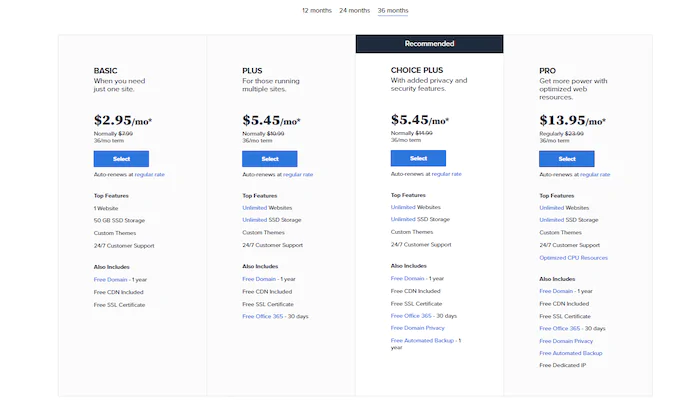
Bluehost shared hosting plans - four tiers from Basic to Pro
- 1 website
- 50 GB SSD storage
- Free domain (1 year)
- Free SSL certificate
- Free Cloudflare CDN
- 24/7 support
- Unlimited websites
- Unlimited SSD storage
- Microsoft 365 (30 days free)
- Free domain (1 year)
- Free SSL + CDN
- 24/7 support
- Unlimited websites
- Unlimited SSD storage
- Free domain privacy
- Free automated backup (1 year)
- Free domain (1 year)
- Free SSL + CDN
- Unlimited websites
- Unlimited SSD storage
- Additional CPU resources
- Free dedicated IP address
- Domain privacy + backup
- Priority support
The Choice Plus plan at $5.45/month is the clear recommendation for most users. It costs the same as Plus but adds free domain privacy (protecting your personal WHOIS data) and a full year of automated backups. Since the price is identical to Plus, there is no reason to choose Plus over Choice Plus unless you specifically need to avoid the backup inclusions.
VPS Hosting
Dedicated virtual resources within a shared server - better security and performance than shared hosting at a lower cost than dedicated.
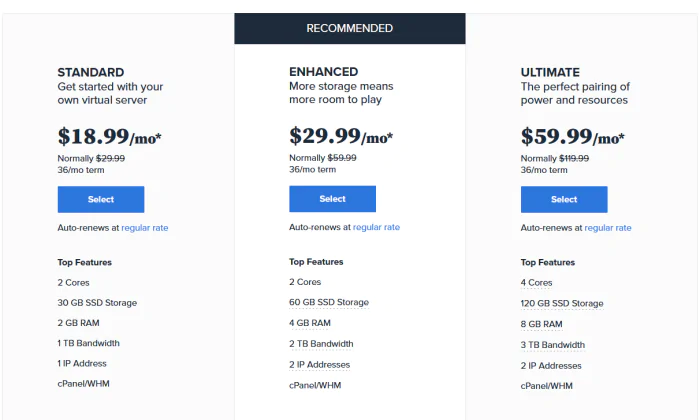
Bluehost VPS hosting plans - Standard, Enhanced, and Ultimate tiers
Bluehost VPS hosting starts at $18.99/month for the Standard plan, which includes 2 GB of RAM and 1 TB of bandwidth. VPS plans provide guaranteed dedicated resources on a virtual server - suitable for sites that have outgrown shared hosting but do not yet need a full dedicated server.
All VPS plans include root access, SSD storage, and enhanced security compared to shared environments.
Dedicated Hosting
Maximum performance and control with a dedicated physical server. Best for high-traffic sites with heavy resource requirements.

Bluehost dedicated hosting plans - entry tier starts at $79.99/month
Bluehost dedicated hosting entry plan starts at $79.99/month and includes 500 GB of storage, 4 GB of RAM, and 5 TB of bandwidth.
Dedicated hosting gives your site exclusive access to an entire physical server - no shared resources, maximum performance isolation, and complete control.
This tier is suitable for high-traffic sites, resource-intensive applications, and businesses where shared or VPS environments can no longer meet performance demands.
Managed WordPress Hosting
All-in-one managed platform with staging environments, 200+ global servers, scheduled backups, and multi-tiered security. Plans differentiated by monthly visitor capacity.
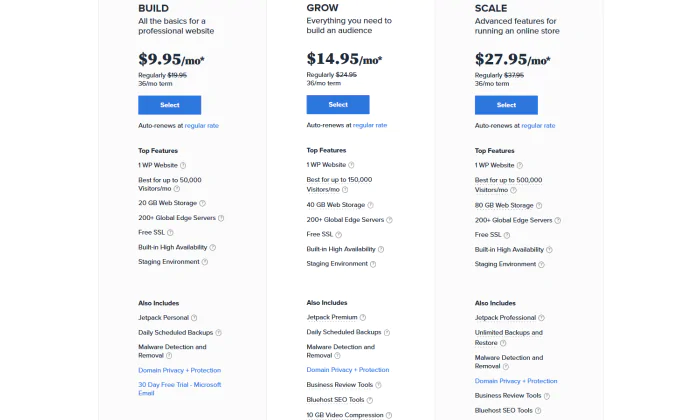
Bluehost managed WordPress plans - Build, Grow, and Scale tiers by traffic capacity
- 20 GB+ storage
- 200+ global servers
- Scheduled backups
- Staging environments
- Free SSL
- More storage
- 200+ global servers
- Scheduled backups
- Staging environments
- Marketing tools
- Maximum storage
- 200+ global servers
- Advanced backups
- Staging environments
- Full security suite
Bluehost Performance Test Results
Speed directly affects user experience and SEO rankings - a 1-second delay in page load can reduce conversions by 7% and cost up to 50% of traffic at 3 seconds.
To validate Bluehost's performance, we created a test site using WordPress with the default Twenty Twenty-Three theme, populated with dummy content including images, and ran four separate tests.
Speed Test - Pingdom
Using Pingdom with no caching plugins or speed optimisation tools installed on the test WordPress site, the page loaded in under two seconds.
This is a strong result for a raw WordPress installation on shared hosting - most sites with properly configured caching plugins would perform even faster in real-world conditions.

Pingdom speed test - Bluehost loaded the test WordPress site in under 2 seconds with no caching or optimisation plugins installed
Stress Test - 100 Concurrent Users (K6)
K6 (formerly LoadImpact) was used to gradually build up to 100 simultaneous virtual users to test how Bluehost handles peak traffic conditions.
The green line shows active virtual users and the blue line shows server load time. The server load remained stable throughout the entire test even at peak concurrent traffic - no performance degradation, no failures.
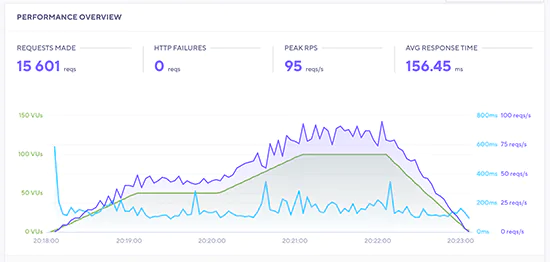
K6 stress test - Bluehost server load (blue line) remained stable as virtual user count (green line) climbed to 100 simultaneous connections
Uptime Monitoring
An uptime monitoring alert was set up for the test account throughout the testing period. No downtime events were recorded - the site remained continuously available during and after the stress test. This is consistent with Bluehost's 99.99% uptime guarantee.
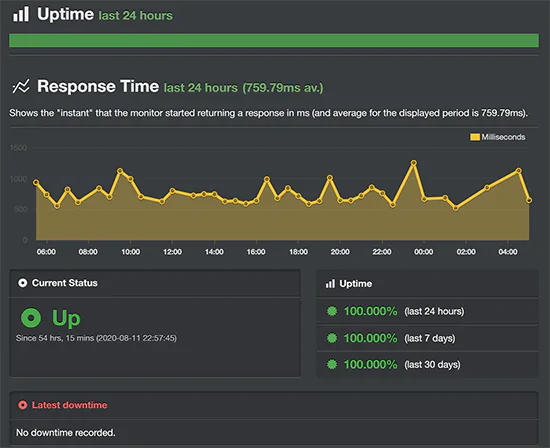
Uptime monitoring - no downtime events were recorded throughout the full testing period
Server Response Time - Global (Bitcatcha)
Bitcatcha tests server response time from multiple geographic locations simultaneously, isolating pure server response independent of page content weight. Bluehost's server responded in under one second from every location tested.
The US result was particularly fast - fractions of a second - reflecting the Utah data center's proximity to domestic visitors. International results were also under one second, though higher than US figures as expected given geographic distance from the single US data center.
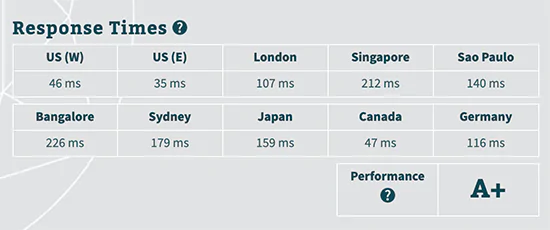
Bitcatcha global response test - Bluehost responded in under 1 second from every geographic location tested
Bluehost earned an A+ performance grade across all four tests. Sub-2-second load time without caching, stable response under 100-user concurrent load, zero downtime, and sub-1-second global server response confirm that Bluehost's shared hosting infrastructure delivers reliably on its core performance promise.
Bluehost Pros and Cons
What Bluehost Does Well
- Pricing: Hosting plans within reach of most users, especially beginners - from $2.95/month on a 36-month plan
- Reliability: Powers 2+ million websites with consistent uptime - no downtime recorded in our full testing period
- No hidden charges: Transparent signup with no hidden fees added during account creation
- Free domain: First-year domain included on all plans - reduces initial setup cost
- Free CDN + SSL: Cloudflare CDN and SSL certificate included on every plan - one-click enable
- 30-day money-back guarantee: Full refund within 30 days on all plans
- Official WordPress recommended host: WordPress.org endorsement since 2006 - WordPress engineers on team
- Best-in-class WordPress onboarding: Auto-installs WordPress during signup; My Sites dashboard is the most beginner-accessible in the category
- PayPal accepted: Credit card not required - PayPal available at checkout
Limitations Worth Knowing
- Higher domain renewal price: The free first-year domain renews at above-average rates. Factor renewal cost into your long-term budget - or transfer to a cheaper registrar like Namecheap after the first year.
- Aggressive add-on upselling during signup: SiteLock and other add-ons are pre-selected during the signup flow. Uncheck them manually at checkout to avoid unintentional charges - they are not required for the hosting plan to function.
- Single US data center for shared hosting: Shared hosting runs through Bluehost's Utah data center. Sites targeting primarily Asian, African, or South American audiences may find hosting providers with closer data center options deliver lower latency for those regions.
Bluehost Alternatives
A2 Hosting
A2 Hosting's Turbo plans (LiteSpeed, up to 20x faster than Apache) with an Anytime Money-Back Guarantee are the most direct speed-focused alternative to Bluehost. In benchmark comparisons, A2 Turbo consistently outperforms Bluehost on raw page speed. Trade-off: no free domain. See our A2 Hosting review.
Try A2 HostingHostinger
At $1.99/month with LiteSpeed servers, free SSL, and free domain, Hostinger is the strongest budget alternative to Bluehost. Pricing is lower; performance benchmarks on LiteSpeed are competitive. The main trade-off versus Bluehost is the slightly less polished WordPress-specific onboarding experience. See our Hostinger review.
Try HostingerPressable
Owned by Automattic (the company behind WordPress), Pressable provides enterprise managed WordPress hosting with Jetpack Security, global CDN, one-click staging, and WordPress-specialist support - a significant managed upgrade from Bluehost's shared plans. See our Pressable hosting review.
Try PressableHostGator
Bluehost and HostGator are the most direct competitors in the shared WordPress hosting market. HostGator counters Bluehost with a 45-day money-back guarantee (vs 30 days) and often slightly lower entry pricing. Bluehost wins on WordPress-specific onboarding, SSD storage, and overall user experience. See our HostGator review.
Try HostGatorWP Engine
WP Engine is the premium managed WordPress host - A+ performance, EverCache technology, 36+ free StudioPress themes, and 24/7 WordPress expert support. For sites that have outgrown Bluehost's shared or managed WP plans and need enterprise-grade infrastructure. 20% off for Nwaeze David readers. See our WP Engine review.
Try WP EngineFinal Verdict - Is Bluehost the Right Choice for You?
Bluehost earns its position as one of the most recommended WordPress hosting providers for a straightforward reason: it delivers on the fundamentals that matter most for new and growing sites - affordable pricing, a free domain, free SSL and CDN, one-click WordPress installation, and 24/7 expert support - with an onboarding experience that is genuinely the most beginner-accessible in its category.
The A+ performance grade, sub-2-second load time without caching, stable stress test response under 100 concurrent users, and zero downtime during testing confirm that the platform backs up the marketing claims with real infrastructure quality.
The Choice Plus plan at $5.45/month represents exceptional value - adding free domain privacy and automated backups at the same price as the Plus tier.
The limitations - domain renewal pricing and upsell pressure during signup - are real but manageable. Check the renewal rate before committing to a long plan term, and uncheck the add-ons during checkout to avoid charges for services you did not intend to buy.
If you are starting your first or second website, blog, or small business site and want a proven, beginner-friendly WordPress hosting provider with a genuine track record - Bluehost is a reliable starting point and our recommended choice for that use case.
Start Your Website with Bluehost Today
Free domain name, free SSL, free Cloudflare CDN, 1-click WordPress installation, and 30-day money-back guarantee. Exclusive discount applied automatically.
FAQs About This Bluehost Review
Yes - Bluehost is one of the better WooCommerce hosting providers among budget shared hosts. The starter Basic plan is sufficient to launch a WooCommerce store with a reasonable initial product catalogue and low-to-moderate traffic. Bluehost's platform is fully compatible with WooCommerce and the one-click installation process includes WooCommerce as an option during setup. As your store grows in traffic volume and transaction volume, you will need to upgrade - first to the Choice Plus or Pro shared tier, then to a managed WordPress or VPS plan. By that point, your store revenue should comfortably justify the upgrade cost. For established or high-traffic WooCommerce stores starting from scratch, Nexcess is the more purpose-built alternative.
Yes - Bluehost is widely considered the most beginner-friendly WordPress hosting company in the market. When you sign up, WordPress is automatically installed and configured without any manual steps required. The My Sites dashboard provides a clean, simplified interface for managing your WordPress installation without requiring knowledge of cPanel or server administration. An extensive library of detailed guides, video tutorials, and how-to articles covers almost every task a new site owner will encounter. 24/7 live chat and phone support are available for issues that require human assistance. The combination of automatic WordPress setup, intuitive dashboard, comprehensive documentation, and always-available support is what makes Bluehost the most recommended starting point for first-time website owners.
Bluehost's shared hosting plans are suitable for starter websites and small businesses with moderate traffic. In our stress test, the shared hosting plan handled 100 simultaneous virtual users (equivalent to a meaningful traffic surge) without any performance degradation or slowdown - a strong result for shared hosting. However, shared hosting plans have finite server resource allocations that become constraints at higher sustained traffic levels. If you are expecting consistently high traffic - tens of thousands of daily visitors or more - you should plan to upgrade to Bluehost's managed WordPress hosting (which scales to 500,000 monthly visitors) or VPS hosting before reaching those levels. Bluehost's upgrade path makes this transition relatively straightforward within the same account.
Bluehost is one of only three hosts officially recommended by WordPress.org - a position it has held since 2006. This endorsement reflects the degree to which Bluehost's hosting infrastructure is specifically optimised for WordPress performance, not generic PHP hosting. Bluehost employs WordPress engineers on its team, meaning the company has internal WordPress expertise at a development level rather than just at a user interface level. Its platform auto-installs WordPress during signup, the My Sites dashboard is purpose-built for WordPress management, and the technical configuration of servers is tuned specifically for WordPress workloads. For sites built on any platform other than WordPress, these advantages do not apply - but for WordPress sites specifically, Bluehost's long relationship with the WordPress community is a meaningful differentiator.
No - Bluehost accepts both credit cards and PayPal. During the checkout process, you can select PayPal as your payment method rather than entering credit card details. This is particularly useful for users who prefer not to store credit card information with hosting providers or who manage business expenses through PayPal. The full range of Bluehost plans, discounts, and promotional offers are available regardless of which payment method you choose - selecting PayPal does not affect your access to any plans or pricing tiers.
For WordPress hosting specifically, yes - Bluehost is the stronger choice over GoDaddy. Bluehost's support quality, My Sites WordPress dashboard, and overall WordPress onboarding experience are significantly more polished than GoDaddy's equivalent. Bluehost also offers better pricing for small businesses on shared hosting, and the official WordPress.org recommendation reflects the platform-level alignment that GoDaddy lacks. GoDaddy's strengths are in domain registration (where it is one of the largest registrars) and business email - areas where it competes more directly with registrars like Namecheap rather than with hosting-focused providers like Bluehost. If your primary need is WordPress hosting, Bluehost is the better choice. If your primary need is domain registration with hosting as a secondary consideration, GoDaddy's domain management tools may be more relevant.
Versus SiteGround: Bluehost offers more value for money - plans start at $2.95/month with a free domain, while SiteGround plans start at $4.99/month without a free domain. SiteGround counters with better speed and security features on its platform, and its data center locations include Europe and Asia (compared to Bluehost's single US data center for shared hosting). For US audiences on a budget, Bluehost is the better starting point. For international audiences or users who prioritise platform performance over cost, SiteGround is worth considering. Versus HostGator: the two are the most directly comparable shared WordPress hosting providers in the market. They are similar on CPU resources, unmetered bandwidth, storage, database limits, pricing, and site migration tools. Bluehost has a slight advantage in WordPress-specific user experience and SSD storage. HostGator counters with a 45-day money-back guarantee (vs Bluehost's 30 days). See our full HostGator review for the complete comparison.
Bluehost operates its own in-house primary data center in Utah, USA - a 50,000 square foot facility. This is the data center that serves shared hosting customers. The managed WordPress hosting plans provide access to a network of 200+ global servers through the Content Delivery Network integration, which means static assets (images, CSS, JavaScript) are distributed to visitors from geographically nearby edge nodes regardless of the origin server location. However, the origin server for standard shared hosting plans is located in Utah. If your primary audience is outside the United States - particularly in Asia, Africa, or South America - the server distance will result in higher latency compared to hosting providers with data centers closer to those regions.
For a brand new website, blog, or online store, start with the Choice Plus plan at $5.45/month. It includes everything in the Basic plan (1 website, 50 GB storage, free domain, free SSL, free CDN) plus unlimited websites, free domain privacy, and a full year of automated backups - at the same price as the Plus tier. The reason to choose Choice Plus over Basic is the addition of domain privacy (which protects your personal contact information from public WHOIS lookups) and automated backups (which are essential for any site you care about). The reason to choose Choice Plus over Plus is simply that they cost the same but Choice Plus includes more. Only consider the Pro plan if you specifically need additional CPU resources and a dedicated IP address - typically relevant for high-traffic sites or compliance requirements. For WordPress sites expecting more than 50,000 monthly visitors, the managed WordPress plans offer a more appropriate infrastructure tier.