📋 Table of Contents
What Is WP Engine?
WP Engine is the market leader in premium managed WordPress hosting. Founded in 2010 by serial entrepreneur Jason Cohen, who identified the gap in the market for specialised, performance-optimised WordPress hosting as WordPress's adoption accelerated, WP Engine has grown into the most recognised managed WordPress brand in the industry, trusted by organisations including Yelp, Asana, National Geographic, PBS, and MyFitnessPal.
Headquartered in Austin, Texas, with offices in San Antonio, London, Limerick, Brisbane, and Kraków, WP Engine has won multiple Best Place to Work in Austin awards and is a consistent contributor to the WordPress core and open-source community.
It runs on Google Cloud and Amazon Web Services infrastructure, giving customers the choice of data centers across North America, Europe, and Asia/Pacific.
What WP Engine delivers is a completely managed WordPress environment, it handles updates, security monitoring, daily backups, performance caching (via its proprietary EverCache® technology), staging environments, and threat detection so that you can focus entirely on your content and business rather than the technical operation of your site.
For a broader comparison, see our guide to the 21+ best WordPress hosting plans.
Nwaeze David readers get an automatic 20% discount applied at checkout — no coupon code needed.
WP Engine at a Glance
Who WP Engine Is Best For
🏢 Small Businesses and Affiliate Sites
The Startup plan ($25/month annual) is designed for sites expecting up to 25,000 monthly visitors that need uptime guarantees and managed security without maintaining a technical team.
📈 Growing Blogs and Content Sites
The Professional and Growth plans (3–10 sites, 75K–100K monthly visits) give growing sites room to scale without infrastructure concerns — managed updates and backups handle the technical overhead as traffic grows.
🔧 WordPress Developers and Agencies
WP Engine's local development environment (WP-CLI, Xdebug, MailHog), Git deployment, staging environments, and 36+ free StudioPress premium themes make it the professional WordPress development stack of choice.
🛒 eCommerce WooCommerce Stores
Dedicated WooCommerce hosting solutions with high traffic capacity, EverCache optimisation, and enterprise-grade security suit eCommerce stores where performance and checkout reliability directly affect revenue.
🏛️ Enterprises and High-Traffic Publishers
The Scale and Custom plans support millions of monthly visitors with 24/7 phone support, proprietary support for incidents, and the infrastructure to handle traffic at enterprise scale without performance degradation.
WP Engine is genuinely expensive compared to shared hosting. If you are launching a first website or blog with little to no traffic yet, the Startup plan at $25/month may be overkill — you can get comparable results for less at Bluehost or Hostinger. WP Engine is best considered when your site has genuine traffic, generates revenue, or has reached a point where downtime or security incidents would have real business consequences.
WP Engine Plans and Pricing
Prices below are for annual billing — monthly billing is higher (noted per plan). Annual billing saves you two months' cost. Verify current pricing at wpengine.com. Nwaeze David readers get an automatic 20% off the first 3 months applied at checkout. A 60-day money-back guarantee applies to annual plans.

WP Engine's three core plan categories — Managed WordPress, eCommerce (WooCommerce), and Advanced Solutions
- 1 website
- 25,000 visits/month
- 50 GB bandwidth
- 10 GB storage
- 24/7 live chat support
- Free SSL + CDN
- Save $60/year vs monthly
- 3 websites
- 75,000 visits/month
- 125 GB bandwidth
- 15 GB storage
- 24/7 live chat support
- Free SSL + CDN
- Save $120/year vs monthly
- 10 websites
- 100,000 visits/month
- 200 GB bandwidth
- 25 GB storage
- 24/7 live chat + phone
- Free SSL + CDN
- WordPress multisite (paid add-on)
- 30 websites
- 400,000 visits/month
- 500 GB bandwidth
- 50 GB storage
- 24/7 live chat + phone
- Free SSL + CDN
- WordPress multisite (paid add-on)
- 30+ websites
- Millions of visits/month
- 400 GB+ bandwidth
- 100 GB – 1 TB storage
- Proprietary enterprise support
- WordPress multisite included
- Personalised onboarding
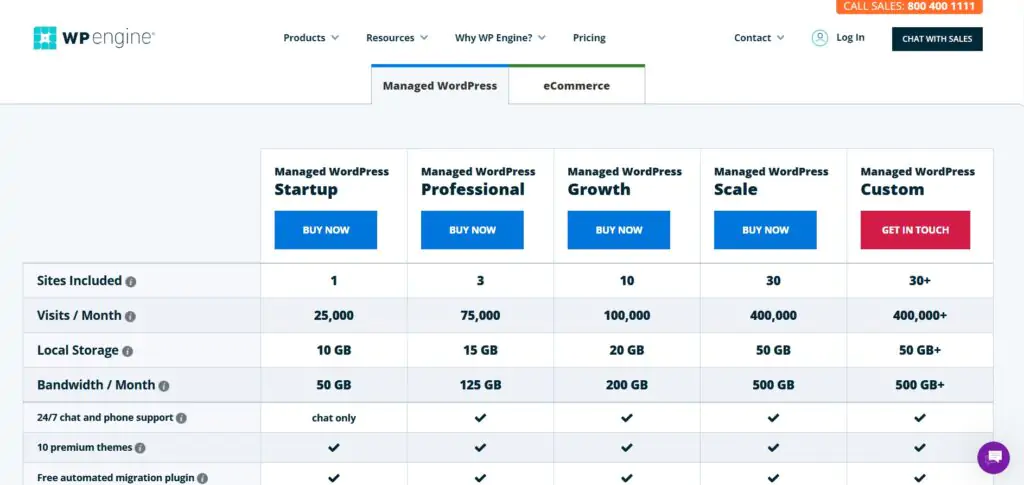
WP Engine pricing comparison — annual billing saves two months' cost across all tiers
For a single profitable business site, the Startup plan ($25/month) is the right entry point. For growing blogs or agencies with 2–3 active client sites, the Professional plan ($49/month) offers the best cost-per-site ratio on WP Engine. Growth is the minimum tier that includes 24/7 phone support — relevant if you need fast human support for complex issues.
WP Engine Features
🔒 Advanced Security — Automatic Core Updates + Threat Detection
WP Engine's security stack is one of the most comprehensive in managed WordPress hosting. The WordPress core is automatically updated to the latest version, but only after WP Engine rigorously tests major updates before deploying to customers. You have the option to defer certain updates if needed.
The proprietary intrusion detection and prevention system actively blocks DDoS attacks, brute force login attempts, malware, and JavaScript/SQL injection attacks in real time.
Regular third-party security audits and code reviews supplement the automated defences. The guarantee that matters most: if your site gets hacked while on WP Engine, they fix it for free.
⚡ EverCache® — Proprietary Caching Technology
EverCache is WP Engine's built-in, proprietary caching system, one of the key contributors to its A+ performance benchmark results. Unlike plugin-based caching, EverCache operates at the server level, automatically caching static content and serving cached pages without PHP execution overhead on each request.
Beyond standard page caching, EverCache evaluates all incoming traffic to determine which requests to serve from cache and which to block, functioning as both a performance layer and a security filter.
Caching rules are customisable to accommodate sites with complex content strategies or dynamic elements that should not be cached.
🧪 Three Environments - Development, Staging, Production
All WP Engine plans include access to three environments (Development, Staging, and Production) at no additional cost. This gives you a complete workflow for building and testing changes safely before they go live:
- Development — local development environment with full toolset access (Xdebug, WP-CLI, MailHog, MySQL, PHP version switching)
- Staging — a cloud-hosted replica of your live site for testing updates, new features, or design changes without maintenance mode
- Production — your live site, protected from any changes until you deliberately push them from staging
💾 Automated Daily Backups — 40+ Restore Points
WP Engine automatically backs up your site daily, with up to 40 backup restore points available (contact support for access to up to 60 most recent points).
You can also trigger manual on-demand backups at any time. Restoring to any backup point is a single-click operation from the WP Engine dashboard — no developer required, no FTP, no database exports.
🌐 Global CDN + Free SSL on Every Plan
All WP Engine plans include access to a global Content Delivery Network (CDN) with a single click — distributing your site's static assets (images, CSS, JavaScript) to server locations worldwide so visitors load your site from geographically nearby infrastructure regardless of where your origin server is. Free SSL certificates are included on all plans, auto-installed and auto-renewed without manual management.
🎨 36+ Free StudioPress Premium Themes + Genesis Framework
WP Engine acquired StudioPress; one of the most respected premium WordPress theme companies. As a result, all WP Engine customers receive access to all 36+ premium StudioPress themes and the Genesis Framework at no additional cost. Retail value: over $2,000.
These themes are known for clean code, fast performance, and SEO optimisation, and include the Genesis Framework, the most widely respected parent theme in the WordPress ecosystem for developer-grade sites.
🏆 24/7 WordPress Expert Support (97% Satisfaction Rate)
WP Engine's support team is composed entirely of trained WordPress experts, not general hosting support staff who cover dozens of platforms. 24/7 live chat support is available to all plan tiers.
Phone support (24/7) is included from the Growth plan upward. Enterprise customers receive dedicated ticket support and a one-on-one onboarding experience.
WP Engine reports over 97% customer satisfaction across thousands of daily support interactions, a benchmark that reflects both the expertise of the team and the quality of the platform they are supporting. A comprehensive knowledge base of articles, how-to guides, and tutorials is also available for self-service troubleshooting.
🔧 Local Development Environment
WP Engine provides a full-featured local development environment for developers building WordPress sites — a workflow that most managed hosts do not include. You get access to Xdebug for PHP debugging, WP-CLI for command-line WordPress management, MailHog for local email testing, MySQL database access, and Hot-Swap PHP version switching between 5.6 and current PHP versions. One-click WordPress installation lets you start building a local WordPress site instantly.
🚨 Proprietary Threat Detection and Blocking
WP Engine logs all attempts to write to the disk, giving it a complete picture of server activity that allows rapid identification of malicious versus legitimate code execution.
Additional protective measures include a proprietary firewall that automatically detects and blocks malicious traffic patterns, automatic protection against author ID enumeration attacks, and a managed disallowed plugins list that prevents known security-risk plugins from being installed.
📊 Managed Plugins List and Platform Oversight
WP Engine maintains an actively curated list of disallowed plugins, WordPress plugins that are known to cause security vulnerabilities, conflict with WP Engine's own features, or generate excessive server load.
This managed approach means that certain categories of plugins (some caching plugins, some backup plugins, some related post plugins) cannot be installed on WP Engine-managed sites.
This is both a security advantage and an operational limitation, addressed in detail in the Pros and Cons section below.
Performance Test Results
To verify WP Engine's performance claims, a WordPress test site was built using the Twenty Seventeen default theme filled with dummy data including media and images, replicating the behaviour of a typical average WordPress site. Three tests were run.
Speed Test (Pingdom)
Using Pingdom, the test site loaded in less than half a second without any performance optimisation plugins installed — the result of EverCache and WP Engine's server-level configuration doing the optimisation work at the infrastructure level rather than relying on the WordPress layer.
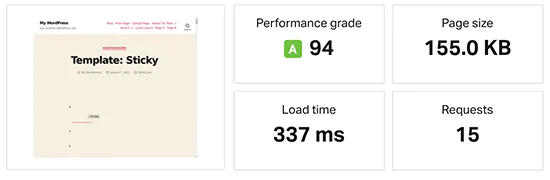
Pingdom speed test — WP Engine delivered a sub-500ms load time on a default WordPress site with no performance plugins installed
Stress Test (K6 / LoadImpact)
K6 (formerly LoadImpact) was used to gradually build up to 100 concurrent users to test how the server handles multiple simultaneous connections at peak load.
The blue line (response time) remained steady throughout the test as the green line (user count) climbed, minor spikes only, with no failures recorded and no downtime during the entire stress test.
WP Engine maintained its response rate under 100-user concurrent load without degradation.
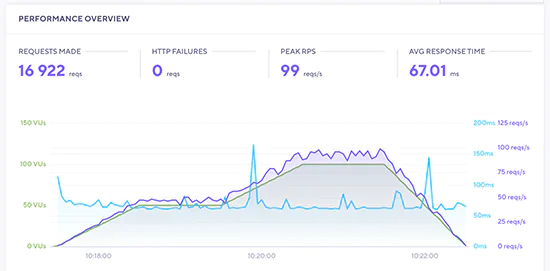
K6 stress test — WP Engine response time (blue) remained stable as concurrent user count (green) climbed to 100, with zero failures recorded
Server Response Time (Bitcatcha — Global)
Bitcatcha tests server response time from multiple geographic locations simultaneously. WP Engine's server response remained under 500ms for every location tested, particularly strong in the United States where it was exceptionally fast.
This result reflects WP Engine's use of Google Cloud and AWS infrastructure with multiple data center regions for low-latency responses across continents.
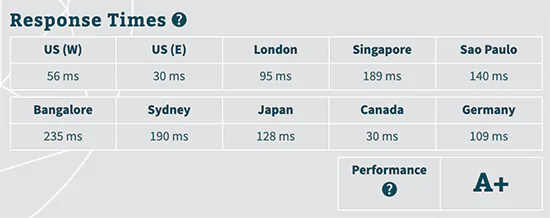
Bitcatcha global response test — WP Engine delivered sub-500ms response from every geographic location tested, with exceptional results from the United States
WP Engine's 337ms average load and 123.8ms average response time are among the best results across all managed WordPress hosts tested. These results were achieved on the standard hosting configuration without additional plugins — EverCache and the underlying Google Cloud/AWS infrastructure handle the optimisation at the server level.
WP Engine Pros and Cons
✓ What WP Engine Does Well
- Security — advanced security features that most hosts do not offer: proprietary intrusion detection, real-time threat blocking, DDoS/brute force protection, and free hack remediation
- Performance — A+ performance grade; 337ms average load, 123.8ms average response; EverCache delivers server-level caching without plugins
- Reliability — proprietary front-end layer handles traffic spikes without slowdowns; steady response maintained under 100-user concurrent load in testing
- WordPress Expert Support — entire support team trained in WordPress specifically; 97% customer satisfaction; 24/7 live chat on all plans
- 36+ Premium StudioPress Themes — $2,000+ in Genesis Framework themes included free with every plan
- Three Environments — development, staging, and production included at no extra cost
- Developer Toolset — local development with WP-CLI, Xdebug, Git deployment, PHP hot-swap, MailHog
- Positive customer track record — consistently strong reviews for reliability and support quality across a large customer base
- 60-day money-back guarantee — on annual plans (double the standard 30-day guarantee)
✗ Limitations Worth Knowing
- Disallowed plugins — WP Engine does not allow certain WordPress plugins (some caching, backup, related post, and other plugins) that conflict with or duplicate its features, or cause high server load. This can require workflow changes for developers accustomed to specific plugin setups
- No domain registration — WP Engine does not offer domain registration; domains must be purchased separately from a registrar and pointed to WP Engine
- Higher cost — substantially more expensive than shared hosting for equivalent traffic; the premium is for security, performance, and peace of mind rather than raw resources
- No email hosting — email hosting is not included; you need a separate email provider (Google Workspace, Microsoft 365) for custom domain email addresses
WP Engine Alternatives
Bluehost
One of three hosts officially recommended by WordPress.org, Bluehost is the most accessible entry point for first-time site owners — one-click WordPress install, Yoast SEO integration, and 24/7 support at a fraction of WP Engine's pricing. The right alternative for sites that do not yet need the managed WordPress premium tier.
Try Bluehost →Nexcess
Nexcess specialises in managed WordPress and WooCommerce with auto-scaling, free iThemes Security Pro, and visual comparison testing on updates — and at pricing that starts lower than WP Engine.
A strong direct alternative for eCommerce-focused sites that want premium managed hosting without WP Engine's entry price point. See our Nexcess review.
Try Nexcess →Pressable
Owned by Automattic (the company behind WordPress), Pressable provides enterprise WordPress hosting with the deepest possible native WordPress platform integration — Jetpack Security, global CDN, and WordPress-specialist support. Comparable pricing to WP Engine's entry tier with more WordPress-specific features at that price point. See our Pressable hosting review.
Try Pressable →Cloudways
Cloudways delivers cloud-level WordPress performance from $10/month on DigitalOcean infrastructure — significantly cheaper than WP Engine at the entry level. Less hands-off (requires some cloud hosting familiarity), but for technically confident users the performance-per-dollar is exceptional. See our Cloudways review.
Try Cloudways →Hostinger
At $1.99/month with LiteSpeed servers, free SSL, free domain, and 29 million users — Hostinger is the right starting point for new sites before they have enough traffic or revenue to justify WP Engine's pricing. Nwaeze David readers get an exclusive 80% off.
Try Hostinger →A2 Hosting
A2 Hosting's Turbo servers (LiteSpeed, up to 20x faster than Apache) with an anytime money-back guarantee are a strong alternative for sites prioritising raw page speed at a mid-range price point — particularly effective for moving an existing site from budget hosting to a faster environment. See our A2 Hosting review.
Try A2 Hosting →HostGator
HostGator offers 99.9% uptime, 24/7 support, and 62% off for Nwaeze David readers with a free domain and free SSL. A solid middle-ground option for small businesses that want supported WordPress hosting at a price significantly below WP Engine.
Try HostGator →Final Verdict — Is WP Engine Right for You?
After thorough testing, WP Engine earns its reputation as the best-in-class managed WordPress host. The A+ performance grade, 337ms average load time, 123.8ms average response time, and zero-failure 100-user stress test are not marketing claims; they are test results, and they are genuinely impressive.
What you are paying for with WP Engine is not raw server resources. You can get more storage and bandwidth from a shared host for less money.
What you are paying for is security, performance consistency, expert support, peace of mind, and the freedom to focus on your business rather than the technical operation of your website.
If these things have quantifiable value to you (and for most businesses running serious sites, they do) WP Engine justifies the premium.
The disallowed plugins policy is the most significant operational consideration for sites migrating from other hosts or with complex plugin configurations. Review the WP Engine prohibited plugins list before migrating to confirm your workflow is compatible.
WP Engine is the right choice for small businesses, growing blogs, professional developers, agencies, and enterprises that want the best WordPress hosting available.
It is not the right choice for brand-new sites that have not yet generated enough traffic or revenue to justify the cost, start with Bluehost or Hostinger, and upgrade to WP Engine when your growth demands it.
Exclusive discount for Nwaeze David readers — applied automatically at checkout, no code needed.
Build Your Online Business on the Best Platform
Join AIpreneur Academy for expert guides, tutorials, and strategies to grow a profitable online business — from choosing the right tools to scaling your income.
FAQs About This WP Engine Review
No — WP Engine is not a shared hosting company and does not offer services similar to shared hosting plans. WP Engine is a managed WordPress hosting company that provides WordPress-specific hosting solutions on Google Cloud and Amazon Web Services infrastructure. On shared hosting, multiple customers share a single server's CPU, RAM, and storage resources — meaning one account's traffic spike can affect others on the same server. WP Engine's managed WordPress platform provides isolated environments where your site's resources are protected from other customers' activity, and the company handles all technical server management, security monitoring, updates, and performance optimisation on your behalf.
Managed WordPress hosting is a hosting service specifically configured and optimised for WordPress, where the hosting provider handles the technical management of your site on your behalf. A managed host like WP Engine takes care of WordPress core updates (tested before deployment), security monitoring and threat blocking, daily automatic backups, server-level caching (WP Engine's EverCache), CDN configuration, staging environments, and performance optimisation — all without requiring action from you. This leaves you free to focus on creating content, growing your audience, and running your business rather than managing server infrastructure. Managed WordPress hosting is typically more expensive than shared hosting — the premium reflects the management layer, the WordPress-specific optimisation, and the expert support team's WordPress knowledge rather than raw server resources.
For sites that have outgrown shared hosting — in terms of traffic, revenue, or the business consequences of downtime — yes, WP Engine is worth the investment. The performance test results (A+ grade, 337ms load, 123.8ms response) confirm that WP Engine delivers on its claims. The security infrastructure (proprietary threat detection, automated core updates with testing, free hack remediation), the expert-only support team (97% satisfaction), and the included $2,000+ in StudioPress premium themes all represent real value that justifies the premium over basic shared hosting. The question to ask yourself is: what does an hour of your site being down cost your business, and how much is your time worth when spent managing technical WordPress issues? If those numbers are significant, WP Engine's pricing becomes easy to justify. For brand-new sites with little traffic or revenue, start with a budget host and upgrade when your growth demands it.
WP Engine uses Google Cloud Platform and Amazon Web Services (AWS) as its underlying infrastructure — two of the largest and most globally distributed cloud networks available. This gives WP Engine customers the ability to choose data center locations across North America, Europe, and Asia/Pacific when setting up their hosting. Choosing the data center region closest to your primary audience directly reduces server response latency for visitors in that region. The Bitcatcha global response test in this review confirmed sub-500ms response times from every geographic location tested, including locations in Asia and Europe — a result of the global infrastructure footprint WP Engine runs on.
In the managed WordPress hosting category, WP Engine competes most directly with Pressable (owned by Automattic), Nexcess, and Kinsta. WP Engine has a slight performance and support edge over most competitors due to its EverCache technology, the exclusive access to 36+ StudioPress premium themes and Genesis Framework (unique to WP Engine), and its expert-only support team. WP Engine pricing is higher than shared hosting providers like Bluehost, HostGator, Hostinger, and Pressable — but the comparison is not really appropriate; these are different categories of hosting at different price and feature levels. Within the managed WordPress category, WP Engine is the most feature-complete and most established option available, with the track record and customer base to back it up.
Yes — WP Engine supports WordPress multisite on the Growth and Scale plans as a paid add-on. WordPress multisite is not available on the Startup or Professional plans. For agency and enterprise customers on Custom plans, WordPress multisite is included as a standard feature. WordPress multisite allows you to run a network of multiple WordPress sites under a single WordPress installation — useful for agencies, publishers with multiple brands, or educational institutions running multiple sub-sites under one management interface. If WordPress multisite is a requirement for your use case, plan for at least the Growth tier when evaluating WP Engine's pricing.
Yes — you can cancel your WP Engine hosting service at any time from your account dashboard or user portal. WP Engine offers a full refund during the first 60 days of hosting for customers who have pre-paid annual plans — this is double the standard 30-day money-back guarantee offered by most managed WordPress hosts. For month-to-month customers, cancellation stops future billing but does not typically include a refund for the current month already paid. To initiate a cancellation, log into your WP Engine user portal and follow the account management options, or contact the support team directly. The 60-day window gives annual plan customers a meaningful evaluation period to confirm WP Engine meets their performance and support expectations before the guarantee expires.
The right WP Engine plan depends primarily on the number of sites you need to host and your monthly visitor count. For a single website with up to 25,000 monthly visitors, the Startup plan at $25/month (annual) is the entry point — suitable for small business sites, affiliate sites, and blogs generating real income. For growing sites or anyone managing 2–3 properties, the Professional plan at $49/month offers the best cost-per-site value on WP Engine. If you need 24/7 phone support in addition to live chat, Growth ($95/month) is the minimum tier that includes it. For agencies managing 30 sites, Scale ($241/month) is the appropriate tier. Enterprise sites with millions of monthly visitors should contact WP Engine's sales team for a Custom plan quote. Nwaeze David readers get an exclusive 20% off their first three months on any plan — applied automatically at checkout through the links on this page.