Table of Contents

Why Nigerians and Africans Need This Guide
Do you know that you can easily open a verified Stripe Account in Nigeria? Stripe is one of the most powerful payment processors available for internet businesses, whether you are running an eCommerce store, a SaaS product, a digital course platform, a subscription service, or a marketplace.
It handles everything from one-time payments to recurring billing with clean API integration and competitive transaction fees of just 2.9% + $0.30 per successful card charge.
The problem for Nigerians and most Africans is that Stripe does not directly support accounts from Nigeria, Ghana, Kenya, and many other African countries. If you try to sign up at stripe.com using a Nigerian address, the system will reject you at the country selection stage.
But here is the solution: you can open a fully verified, legitimate Stripe account by forming a US Limited Liability Company (LLC), getting a US Employer Identification Number (EIN), and using those legal US business credentials to register with Stripe, just as any US business would. This is completely legal, legitimate, and used by thousands of African entrepreneurs today.
This guide will walk you through the entire process (step by step, with screenshots) using Doola to form your LLC and EIN, and then taking you through the Stripe account setup from start to finish.
This article is educational guidance only and is not legal or tax advice. Consult a qualified legal or tax professional for advice specific to your situation before making any business or tax decisions.
What You Need to Open a Stripe Account
- US LLC Formation Documents — Articles of Organization and Operating Agreement for your US business entity
- EIN / Federal Tax ID — Employer Identification Number issued by the US IRS to your LLC
- US Physical Business Address — Provided by your LLC formation service (such as Doola)
- US Bank Account Details — Where Stripe will deposit your earnings (Wise, Raenest, or Payoneer all work)
Do not worry, all of these are straightforward to obtain when you use the right services.
The LLC formation and EIN are handled for you by Doola, and the US bank account is covered by Wise, Raenest, or Payoneer (free to set up). Once your LLC is approved and your EIN arrives, you will have everything needed for a fully verified Stripe account.
Because you are applying as a non-US citizen, your EIN may take up to 30 days to arrive from the IRS. Plan accordingly — do not wait until you urgently need Stripe before starting this process. Start the LLC formation now so your EIN arrives in time for your needs.
How to Get a Dollar Card for Payment (If You Don't Have One)
To pay for your LLC formation with Doola, you will need a dollar-denominated card. If you do not already have one, here are two straightforward options:
Part 1 of 2
Form Your US LLC and Get Your EIN with Doola
At Doola, you will form your LLC and receive your EIN/Tax ID. We recommend forming your LLC in Wyoming or Delaware, both are popular states for international founders due to their low fees, strong legal protections, and business-friendly laws.
The recommended Doola plans are Tax and Compliance or Business-in-a-Box - both include your EIN, State Filing Fee, and Operating Agreement, which are the three documents Stripe requires for full verification.
Your Operating Agreement is legal proof that you are the owner of your US business. Keep this document safely. Stripe may request it during verification or if any issue arises with your account later.
If you prefer to use a different LLC formation service, here are other trusted options:
- Bizee (formerly Incfile)
- BetterLegal
- ZenBusiness
- Firstbase
- TailorBrands
- Northwest Registered Agent
- MyCompanyWorks
- Business Anywhere
See our full comparison: Best LLC Formation Services in the USA (2026)
Now let us walk through the Doola signup process step by step.
Go to doola.com via this link and click the Get Started button on the homepage.

Step 1: Click Get Started on the Doola homepage to begin your US LLC formation
Fill in your details on the account creation page. Enter your correct name, email address, and create a password. Everything you do from this point will be managed from your Doola dashboard, so make sure your information is accurate.

Enter your details on the Doola registration page
On the next screen, select your country of residence. This helps Doola tailor their service to your specific situation and provide the most relevant documentation and compliance support for your home country.

Select the country where you currently reside
You will then be asked what you want to accomplish. Select Form and start a new US business and click Continue.

Select that you want to form and start a new US business
Choose the type of business entity you want to register. For most individual entrepreneurs and online businesses, an LLC (Limited Liability Company) is the right choice. C-Corps are better suited for startups seeking venture capital funding.

Select LLC for most online businesses and solo entrepreneurs
Select your entity type and proceed to the next step.
Type the business name you want to register as your US LLC. This is the name that will appear on all your official business documents, your EIN certificate, and your Stripe account. Choose carefully — this becomes your legal US business name.

Enter the business name you want registered as your US LLC
Choose the US state where you want to form your LLC. Wyoming is our top recommendation for international founders: it has low annual fees ($60), strong privacy protections (members are not listed publicly), and no state income tax. Delaware is a good alternative if you plan to seek US investment.

Select your state. Wyoming is recommended for most international founders.
Doola offers several plans. For the purpose of getting a verified Stripe account, you need a plan that includes all three of: State Filing Fee, EIN, and Operating Agreement. The Tax and Compliance or Business-in-a-Box plans both include these.

Choose a plan that includes EIN and Operating Agreement. Tax and Compliance or Business-in-a-Box are recommended.
Stripe requires your EIN to verify your business identity as a US entity. Without an EIN, Stripe cannot confirm your LLC is legitimate and your account will not be fully activated. Make sure the plan you choose includes EIN filing.
Review everything carefully before paying. Confirm your plan includes the State Filing Fee, EIN, and Operating Agreement. If all three are present, you have everything you need for Stripe verification.

Review your order and confirm it includes EIN, State Filing Fee, and Operating Agreement
Proceed to checkout and make your payment using a debit or credit card. Select Electronic Delivery ($0) for your documents — everything will be sent directly to your email.

Complete payment. Select Electronic Delivery to receive your documents by email at no extra charge.
That is it for Part 1. You have successfully submitted your US LLC application. Doola will handle the filing, and your documents (including your EIN certificate) will be delivered to your email. Remember that EIN delivery for non-US citizens can take up to 30 days from the IRS.
After your LLC is formed, the IRS will send you a Form SS-4 to complete for your EIN. Here is exactly how to fill it out as a non-US citizen:
- Enter your full name where requested
- Enter your US business address (the one Doola provided) where asked for address
- In the SSN field, write FOREIGN — this signals to the IRS that you are a non-US citizen with no Social Security Number or existing EIN
In the Members form, enter your full name and US business address. If you have business partners, include their names and US addresses too.
Part 2 of 2
Set Up Your Verified Stripe Account
Once your LLC documents and EIN have arrived by email, you are ready to set up your Stripe account. Work carefully through this section; Stripe's verification system is thorough, and your business details must exactly match what is on your LLC documents and EIN certificate.
Go to stripe.com and click the Create account button. When selecting your country, make sure you select United States, this must match the country where your LLC was formed. Do not select Nigeria or your home country here.

Step 1: At stripe.com, select United States as your country — matching your LLC registration state
Check your inbox for a confirmation email from Stripe and click the verification link. Once confirmed, you will land on your Stripe dashboard. Click on Activate payments to begin the business verification process.

Click Activate payments on your Stripe dashboard to begin the business verification flow
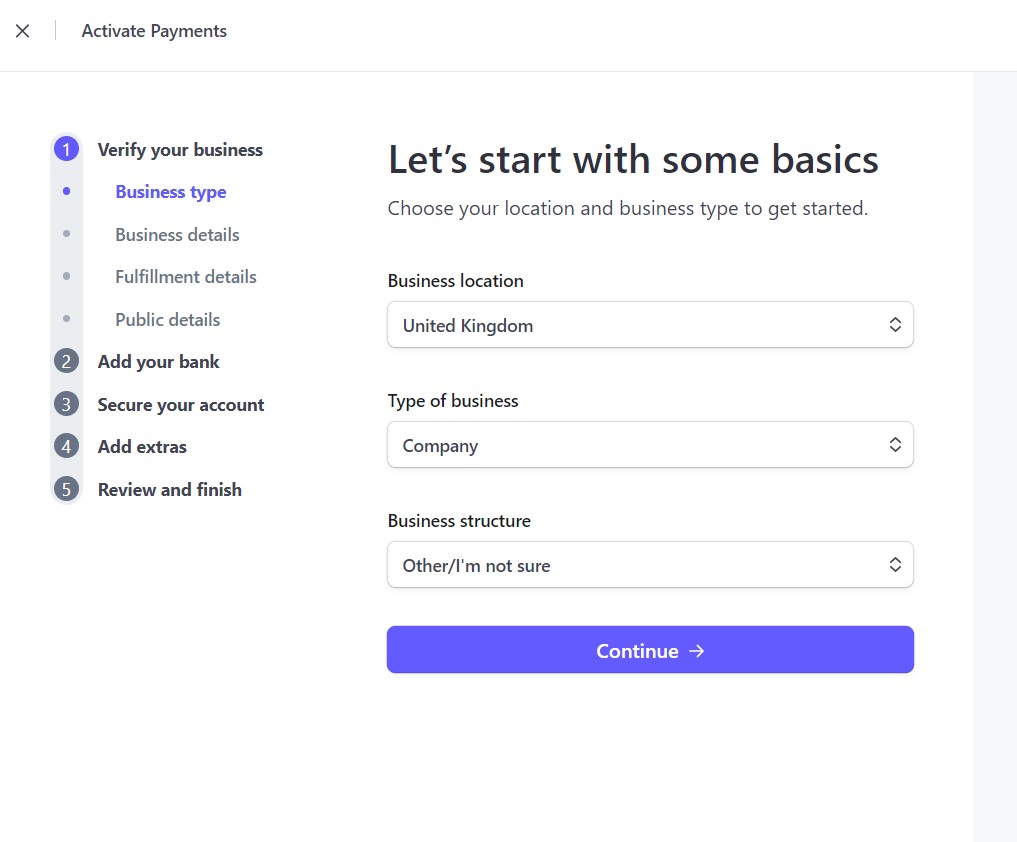
On the next screen, you will be asked about your business type. Select Company as the type of business, and for Business Structure, select the entity type that matches your LLC registration (e.g. Single-member LLC). Make sure the country shown is United States.

Select Company as the business type and the exact LLC structure that matches your Doola formation documents
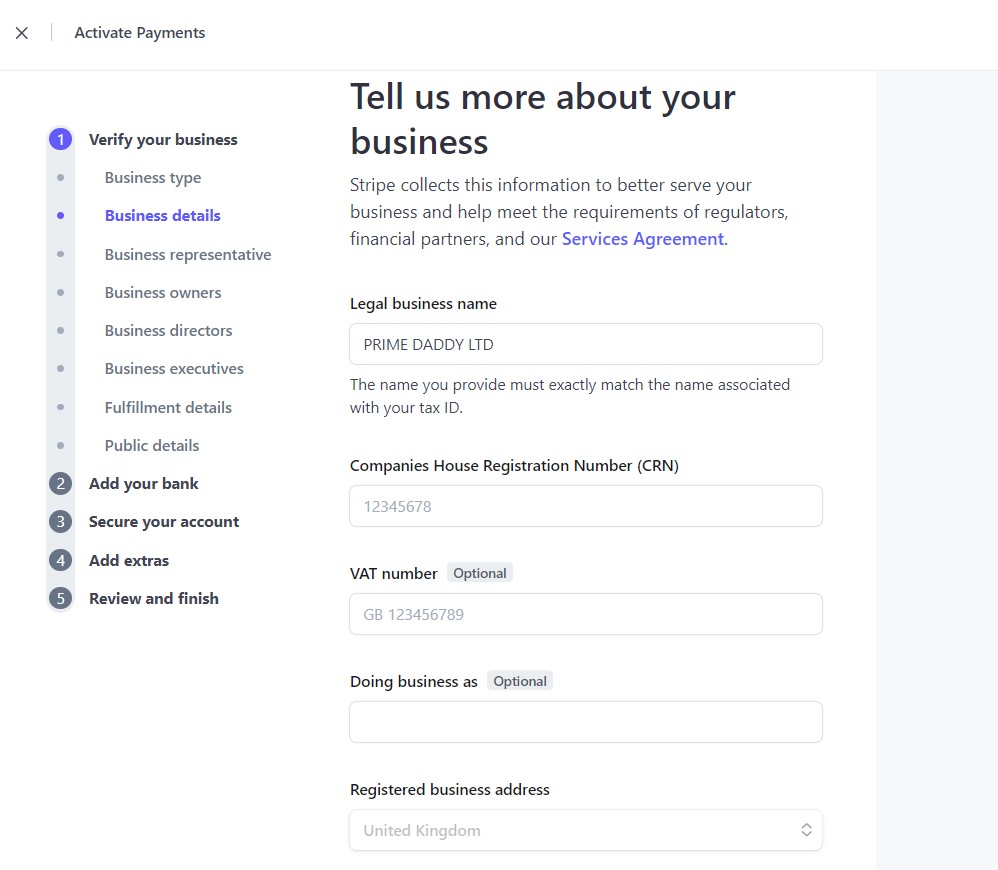
Fill in every business detail field exactly as it appears on your LLC documents and EIN certificate. This includes your LLC's legal business name, registered address (the US address from Doola), and your EIN in the Tax ID field. Any discrepancy between what you enter here and what the IRS has on file can trigger a verification hold or account restriction.
Enter your business name and address exactly as shown on your LLC documents
Enter your EIN in the Tax ID / EIN field. This must match what the IRS issued.
Stripe's verification system cross-checks your EIN against IRS records. Any difference in business name spelling, punctuation, or address format can cause a verification failure. Copy the details directly from your LLC formation documents — do not type from memory.
This step is where most international founders get confused. Pay close attention.
You will be shown a personal details form with a field for a US Social Security Number (SSN). You do not have a US SSN — and you do not need one. Here is what to do:
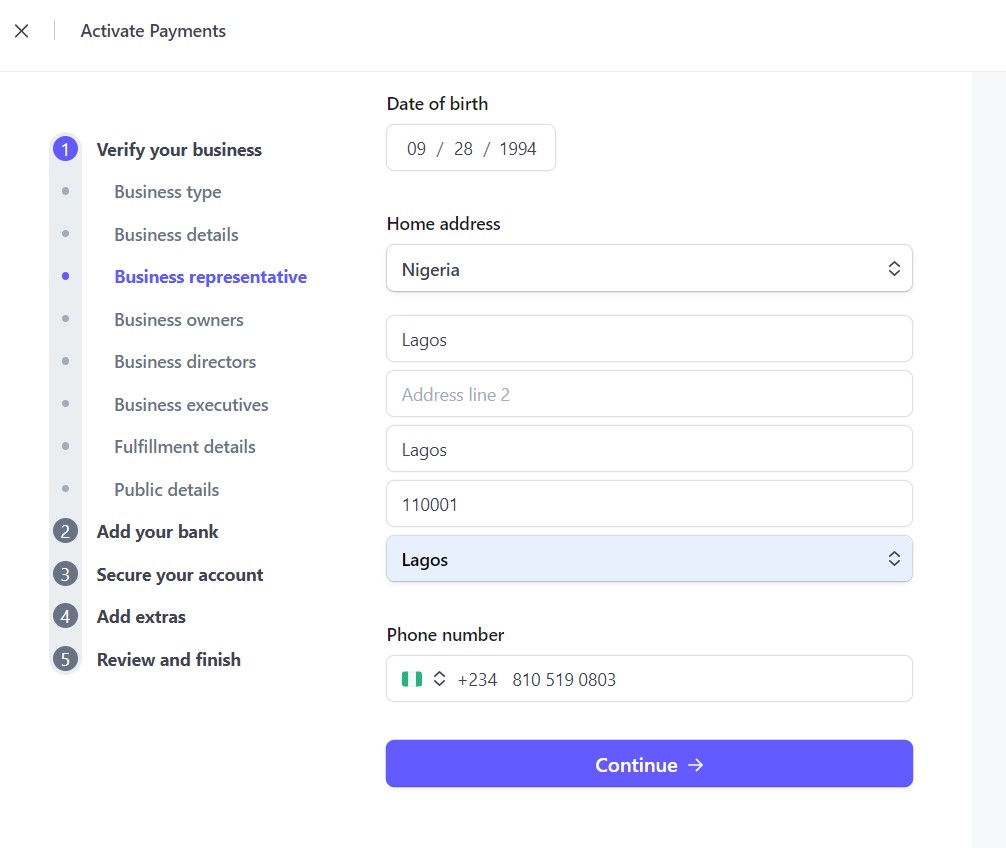
Look for the option to change the ID type near the SSN field
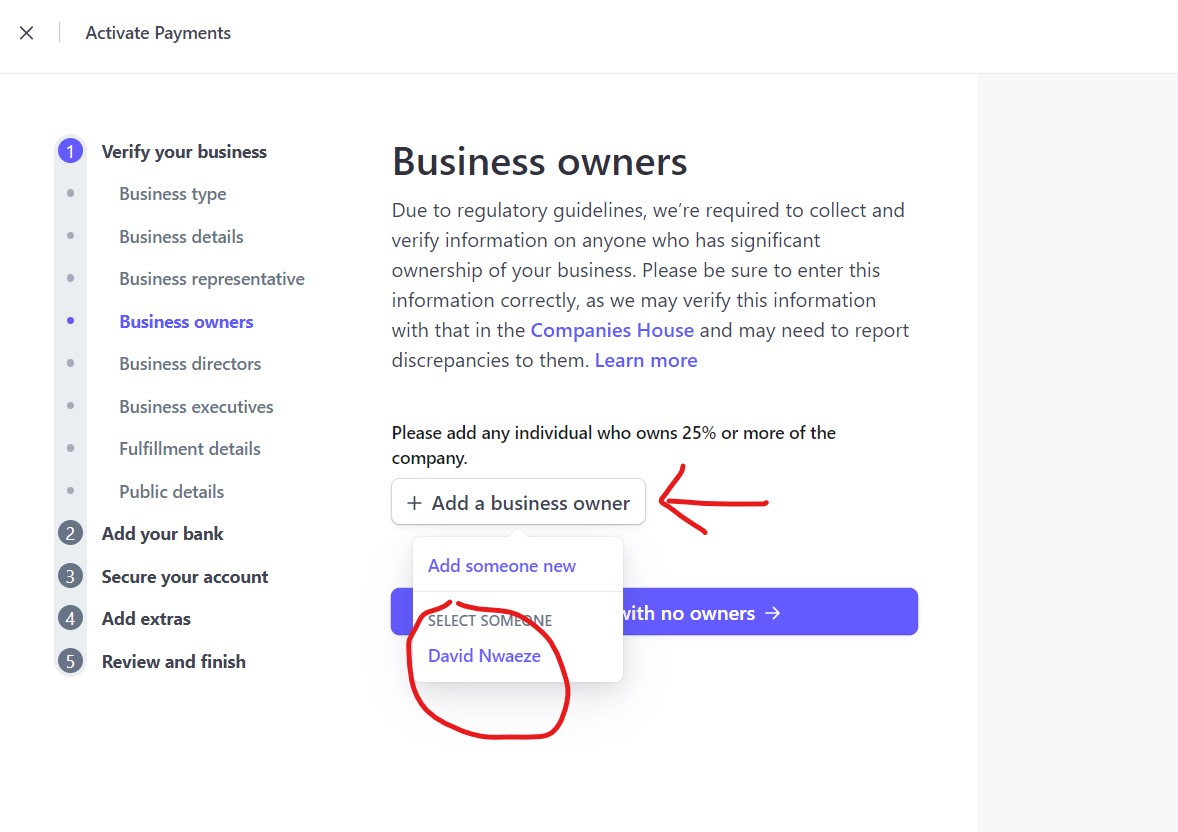
Fill in your personal details using your home country information
Next to or below the SSN field, you will see a link or dropdown that allows you to change the country for your ID. Click it and change the country from USA to your home country (e.g. Nigeria). Once you do this, the SSN field changes to accept your home country ID number instead.
As shown in the image below, the form now accepts your Nigerian National ID, International Passport number, or Driver's Licence number in place of a US SSN. Use the ID that matches what you have available.

After changing the country to Nigeria, the SSN field accepts your Nigerian ID number. Do the same for your home country.
For your personal address, use your actual home country address (your Nigerian address, for example) — not the US business address. Stripe may require you to verify your identity using your home country's government-issued ID, so your personal details should match your real identity documents. You can also use your home country phone number in the phone field.
You will also be asked about how your business fulfils its products or services to customers:
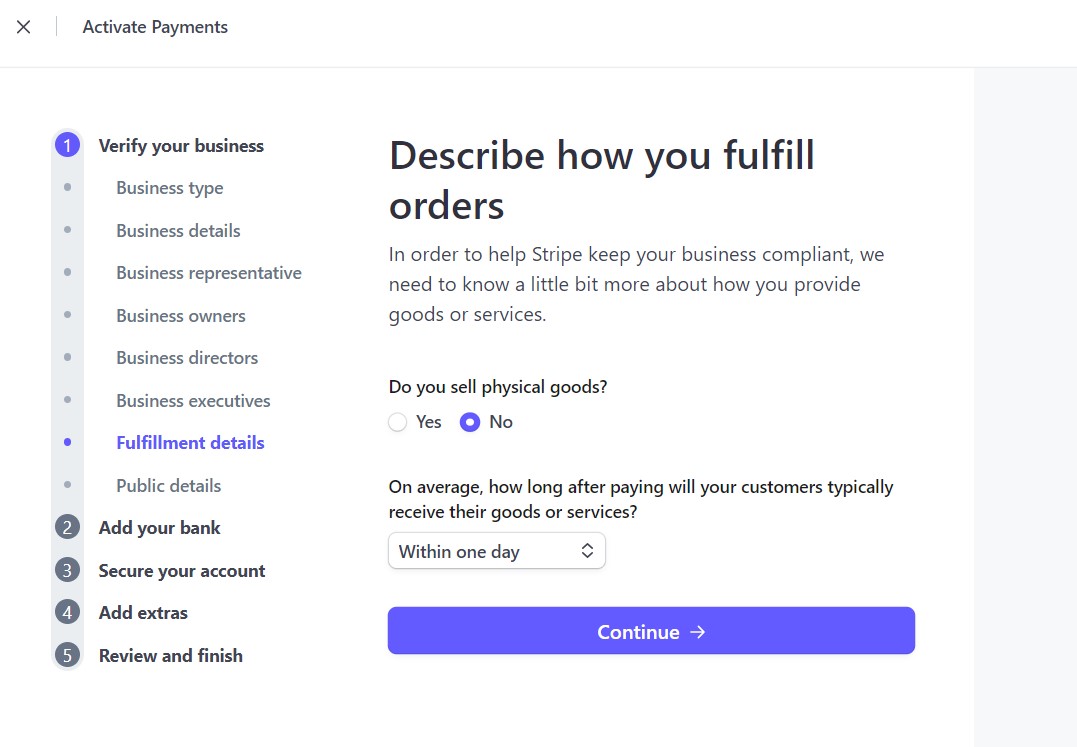
Describe accurately how your business delivers products or services to its customers
And how your business will appear to the public (the name and description your customers will see on payment receipts):

Enter exactly how you want your business name to appear on customer payment receipts and bank statements
Stripe needs a US bank account to deposit your earnings into. You need a US routing number and account number — and since you do not have a physical US bank account, you will use a virtual US bank account from one of these three services:
Option 3: Payoneer
Payoneer also provides US bank account details compatible with Stripe payouts. Set up at payoneer.com
Once you have your US bank account details from any of the three options above, enter them into the Stripe bank account field as shown below. Click the link to manually enter your account and routing numbers rather than selecting from the listed banks.

Click the link to enter your bank details manually, then enter your Wise, Raenest, or Payoneer US routing and account numbers
After entering your bank account details, review your entire application one final time and submit. Stripe will review your application and verify it against your EIN records with the IRS. As long as all your business details match your LLC documents, approval is typically straightforward.
Once Stripe verifies your business details, your account will be fully activated and you can start accepting payments from customers worldwide — on your Shopify store, WooCommerce site, SaaS platform, or any other business. Your earnings will be deposited into your Wise, Raenest, or Payoneer US account.
FAQs About Creating Stripe Account in Nigeria
Yes — Stripe allows you to select your home country in the personal details section and verify your identity using your home country's government-issued ID instead of a US Social Security Number (SSN). During the personal details step, look for the option to change the country next to or below the SSN field. Once you change it to Nigeria (or your home country), the field accepts your National ID card number, International Passport number, or Driver's Licence. This is the intended path for non-US citizens setting up Stripe through a US LLC.
After Doola files your LLC, the IRS will send you a Form SS-4 to complete your EIN application. Here is exactly how to fill it out as a non-US citizen: Enter your full name where the form asks for the responsible party's name. Enter the US business address provided by Doola where it asks for address. In the SSN or ITIN field, write the word FOREIGN in capital letters — this signals to the IRS that you are a non-US citizen with no SSN. For the Members form, enter your full name and your US business address (from Doola). If you have co-founders or business partners, list their names and addresses too. Your EIN may take up to 30 days to arrive because of the non-US processing pathway at the IRS.
Yes — you can add additional Stripe products and services after your account is verified. Stripe offers many capabilities beyond basic card payments, including Stripe Billing (subscriptions), Stripe Connect (marketplaces), Stripe Radar (fraud prevention), and more. To add or change services, log in to your Stripe dashboard, go to the Products section, or contact Stripe support via email or chat. You can also update your business information, bank account details, and payout schedule from within your verified dashboard at any time.
After you submit your application with your LLC documents and EIN, Stripe typically begins reviewing your account within a few hours to 1 business day. Full verification and payment activation can take anywhere from a few days to up to 15–45 days, depending on how quickly the IRS processes your EIN, how completely you filled out the application, and whether Stripe requires any additional documentation. To avoid delays, make sure all your business details match your LLC documents exactly, upload clear copies of any requested documents promptly, and use a consistent email address across your LLC registration, EIN application, and Stripe account.
All three work reliably for receiving Stripe payouts, and the best choice depends on your priorities. Wise is the most widely used globally and offers excellent exchange rates when converting your dollar earnings to Naira or other local currencies — it is the most recommended starting point. Raenest is specifically built for African founders and may offer better local conversion rates and a more Africa-focused customer experience. Payoneer is well-established and integrates with many additional platforms (Upwork, Amazon, Fiverr, etc.) beyond Stripe. You can set up all three and use the one that gives the best payout rate for any given transfer. All three are free to open and provide real US routing and account numbers that Stripe accepts.
Yes — this method is completely legal. You are forming a legitimate US business entity (an LLC) through proper state filing channels, obtaining a genuine EIN from the US Internal Revenue Service, and then registering that US business with Stripe as any US business owner would. There is nothing deceptive or irregular about this approach. Many thousands of African, Asian, and Latin American entrepreneurs use this exact structure to access US payment infrastructure. Doola, Firstbase, and other LLC formation services exist specifically to help international founders establish legitimate US businesses. What is important is that you maintain the LLC properly — file your annual reports, keep the registered agent active, and handle any applicable tax obligations. Consult a qualified tax advisor for guidance on your specific tax situation in both the US and your home country.
Quick Summary — The Entire Process
- Get a dollar card if you do not have one — use Grey.co (virtual) or a bank dollar prepaid card
- Form your US LLC and get your EIN at Doola — choose the Tax and Compliance or Business-in-a-Box plan in Wyoming or Delaware
- Fill out the IRS EIN form when it arrives — write FOREIGN in the SSN field if applicable
- Wait for your EIN to arrive (up to 30 days for non-US citizens)
- Open a US virtual bank account with Wise, Raenest, or Payoneer
- Register at stripe.com, select United States as your country, and complete the business verification using your LLC details and EIN
- In the personal details section, change the country to your home country and enter your local ID instead of an SSN
- Enter your Wise/Raenest/Payoneer US bank account details for payouts
- Submit and wait for Stripe to verify — typically 15–45 days
- Start accepting payments worldwide through your verified Stripe account
Ready to Start Your US Business and Accept Stripe Payments?
Form your LLC and EIN with Doola — the #1 LLC formation service for international founders. See my courses on YouTube to learn how to build and monetise your online business from Africa.
Go further
Resources that go with this guide




Written by
Nwaeze David
Nigerian digital entrepreneur, YouTuber and author of more than 20 books on business, money and online income. He writes plain-language guides for entrepreneurs around the world.